HOME | DD
 second-circle — Helena

#daz3d #iray #model #redhead #shader #skin
Published: 2015-05-22 14:45:19 +0000 UTC; Views: 18742; Favourites: 258; Downloads: 0
Redirect to original
Description
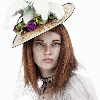
So my first shot with a custom photo skin based off a very porcelained skinned model I shot a while back. Am quite pleased with it - liking the details that are coming across and the normal maps are making the pits and pores pop quite nicely. Will finish off the torso and limbs and see if I can get a good full body of her done.Daz, iray, PS.
Used this shader again :
Related content


Comments: 46

I salute second-circle....your work just stands out and grabs the eye. I come back to your store whenever online.
👍: 0 ⏩: 0


Holy smoking GPU... ahum...
Wow! This image really speaks! Uber awesome job!
👍: 0 ⏩: 0

Very beautiful and photorealistic rendering. The colors complement each other, and I appreciate the texture in the skin. Beautiful work!
👍: 0 ⏩: 1

Thank you very much. Really appreciated
👍: 0 ⏩: 0

Amazing and inspirational, only downloaded daz a few weeks ago - seeing this sort of result certainly makes we want to put the hours in
👍: 0 ⏩: 1
Thanks - I found most of the bought textures a bit flat so made my own from photo references for this one. Time consuming, but I liked the result.
👍: 0 ⏩: 0

How do you place a photo reference skin on a daz3d model? And also is that a custom morph.
👍: 0 ⏩: 1
There are a couple of ways - photoshop cloning is one - place the photo layer below your paint layer - clone the parts you want and then blend them by painting them in. Lately though I've been using Blacksmith 3D which you can paint from an image directly onto the 3d mesh. its really good - useful tool. You can also use Facegen which will do it all automatically - however it then requires more tweaking to get it to look good in Daz. It works for original genesis figures.
Hope that helps a bit
👍: 0 ⏩: 0

Great portrait. Can I ask where you got your eye maps from, and teh set up used in the render for them? I'm new to Daz (3D in general) so have a lot to learn
👍: 0 ⏩: 1
I feel your pain - I'm new to this too. 
Hope this helps.
👍: 0 ⏩: 1
It's very impressive. I've been using your settings guide for skin textures, but with out of the box maps. What a difference it makes having a good quality skin (mine always look a bit flat). I'll have to try making some. Thanks for the advice
👍: 0 ⏩: 1
Good textures really do make all the difference along with normal/SSS maps etc. (Danae's on Renderosity I like a lot) Along with lighting. Lighting is at least as important - some good HDRi on openfootage.net. No worries
👍: 0 ⏩: 1
Perfect, thanks for the advice, I'll be sure to check them out
👍: 0 ⏩: 0
Thanks - am still working on the skin texture, but it almost finished
👍: 0 ⏩: 1

I find them so beautiful class
I would also like to be able :-D
you can get something like this? if so, where?
👍: 0 ⏩: 1
Aww - thank you
www.renderosity.com/mod/bcs/th…
👍: 0 ⏩: 1
yes I know and have the all
which are so great
👍: 0 ⏩: 0

Thanks very much RC
👍: 0 ⏩: 0




Thanks - much appreciated
👍: 0 ⏩: 0
This is wonderful! Your job with the skin is really great!
👍: 0 ⏩: 1
Thank you - much appreciated
👍: 0 ⏩: 0


Breathtaking stuff! Love her slightly skewed nose, and as you say, that skin is really detailed, fine work.
👍: 0 ⏩: 1
thanks
👍: 0 ⏩: 0


Thanks - its getting there. A bit more editing up and it'll be good
👍: 0 ⏩: 0

Beautiful portrait. You're really good at working with Iray in creating skin texture.
👍: 0 ⏩: 1
Thank you - am just getting to grips with it. I like the flaws and textures of real skin, so am planning on making quite a few custom skins.
👍: 0 ⏩: 0


Thank you - you should! Its a very good system
👍: 0 ⏩: 0