HOME | DD
 sixsixfive — ACID
by-sa
sixsixfive — ACID
by-sa
Published: 2012-01-22 13:27:16 +0000 UTC; Views: 89624; Favourites: 94; Downloads: 25748
Redirect to original
Description
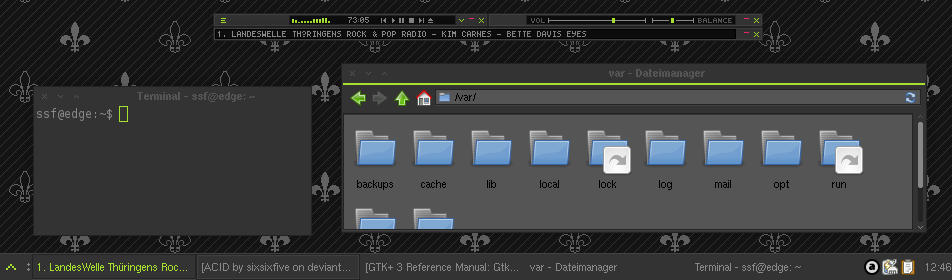
A dark, minimalistic & fast theme made for XfceIncludes themes for:
- GTK2
- GTK3 (3.6, 3.8.4, 3.10.2)
- Xfwm
- Xfce Notify
- A very simple Wallpaper pattern
Changelog
18 Feb 2014
- probably gtk 3.10 compatible
- gtk3 arrows still ugly cause not themeable (yes, gtk3 supports animations and all other useless stuff but not arrow theming :/ )
Related content






Comments: 172

Here's a patched changecolor.sh that doesn't have the bug that mangles transparency.
gist.github.com/ellisgeek/a825…
It now depends on GraphicsMagick and does not depend on gif2png or ImageMagick.
👍: 0 ⏩: 0

gtk3 theme turns selected icons black. anyone else have this problem?
👍: 0 ⏩: 1

the gtk3 theme is fully outdated and probably incompatible with newer gtk releases
👍: 0 ⏩: 0

My work : an ACID wallpaper : sta.sh/021bwqj66qx8
👍: 0 ⏩: 0

Hey sixsixfive! Thanks for all the great work, I like this theme so much I ported it over to QtCurve. I started with your Base theme and worked my way back. I'm not a theme maker at all but I think its pretty close.
(gtk3 is a nightmare so I'm jumping ship over to Qt Based apps)
it works great in qtcurve's gtk2 engine so far.
let me know what you think!
QTCurve Theme - www.fileswap.com/dl/FO4YwB5Aqb…
KDE Colors Theme - www.fileswap.com/dl/DRcGdbLKWu…
.gtkrc-2.0 File - www.fileswap.com/dl/j2VD9iOSKD…
👍: 0 ⏩: 1
nice, but too much green for my taste - i still hope for some qss support for kde 5
👍: 0 ⏩: 0

Oh crap, this theme is incredible. So incredibly beautiful.
One thing - I have this graphical glitch at the bottom of my windows. Do you think that's fixable? imgur.com/L05WfCB
And I love the SLiM theme.
👍: 0 ⏩: 1
ty very much
>Do you think that's fixable?
Well it's not a bug of the theme its a bug in X11 on some Distributons
www.deviantart.com/users/outgo…
you could try to modify the xfwm theme (eg: streching the borders to more than 1px)
👍: 0 ⏩: 0

currently I'm trying to port simpliX (which is similar to ACID) to 3.10, but they removed a lot of features which makes it impossible to create a good port - Maybe I can figure out how to port it, but since there is no real documentation and the possibility that it will break again in 3.12 it has a very low priority for me

👍: 0 ⏩: 0

I love this theme, it looks great. Thanks!
I'm running Debian Wheezy 64-bit. On your screenshots I see a green bar below the titlebar on every window but I don't see that. Do you have any idea how I can get that too?
Thanks again!
👍: 0 ⏩: 1
It depends on your Desktop environment currently the the following Widgets are themed: All Windows with aMenubar, Most Xfce Dialogs(settings etc.) and Dialog/Message windows
so it could be one of the following:
* you miss one of the needed theme engines(su -c "apt-get install gtk2-engines gtk2-engines-pixbuf" ,should fix this)
* you use another Desktop Environment(eg. GNOME, MATE or LXDE) - well it's an Xfce theme

👍: 0 ⏩: 1
Cool! Installing gtk2-engines-pixbuf fixed it 
Thanks!
👍: 0 ⏩: 0

Just installed this and it looks great except for the fact that the windows don't have a bottom border any idea how to fix that?
👍: 0 ⏩: 1
manual edit because your distro packages are buggy bugs.freedesktop.org/show_bug.…
👍: 0 ⏩: 0

Well... maybe it needs more work actually.
I went and changed to another theme for a moment, tried to get ACID back, nothing is working. Seems it reverts to something else as soon as anything else is selected. I didn't do anything unusual, so if it's broke on my system, it's only gonna work with the initial setup you've outlined above- to have to re-do that every one might want to use the theme is more than any normal consumer of an OS is going to be willing to do- it needs to work once it's installed and selected from the settings/theme menu.
But looks great right off the batt- one of my fave's and I've seen TONS- 10/10 once you get it consumer friendly!
👍: 0 ⏩: 0
By the way, I recommend you drop this over to Clem at LinuxMint for the next release in their xfce version- I think it would be a great theme for them to have included and set up as part of the xfce defaults when they put out the next release. Really nicely done, client side!!!
👍: 0 ⏩: 0
wow. The change color script needs "ImageMagick" and "Gif2png" (2.5.8+) to be installed, just FYI.
👍: 0 ⏩: 0

Also, what do I need to do to get the icons to appear next to the window buttons on my panel bar?
👍: 0 ⏩: 1
open gtk-2.24.14/theme/gtkwidget.theme with a text editor and comment line 27: XfceTasklist::minimized-icon-lucency=0
see here for more details: docs.xfce.org/xfce/xfce4-panel…
👍: 0 ⏩: 0
I just applied this and I Love it, except for one small problem...when I used the changecolor script, I'm guessing the image colorization process got rid of the transparent backgrounds on a lot of the images...for example, all of the arrow images (ie arrow-down-active.gif) have white backgrounds instead f transparent.
WhenI first ran the script it said I didn't have gif2png or something, so I did a sudo apt-get install gif2png (or png2gif, can't remember) and ran the script again and it worked...but like I said...the transparent backgrounds are gone...what should I do for that?
👍: 0 ⏩: 2
I know that this is an old comment but I updated the changecolor script so it actually works properly. If you still care the script is over here: gist.github.com/ellisgeek/a825…
👍: 0 ⏩: 0
just redownload and try again, if it still not work post the color i will change it for you
👍: 0 ⏩: 0

Love this theme! Been using it for forever because it's the best looking theme I could find
BTW what size should the bitmap fonts be? I can't seem to get them right...
👍: 0 ⏩: 1
thx, I use Helvetica@7 but it really depends on your screen size & DPI settings
👍: 0 ⏩: 0

This is great! I love how you also left an option for the users to choose their colors. 
One question though, is there a way to exclusively change the line color?
Or alternatively, is there a way to exclusively change the font color?
👍: 0 ⏩: 1
sry for my late reply but I was a bit busy
to change the line color edit the following files:
images/menubarshadow.gif
images/toolbarfix.gif
images/dialogbg.gif
images/xfcedialogheader.gif
gtk-2.0/theme/gtkmenubar.theme:
Line 7: bg[PRELIGHT]="#a5e12d"
gtk-3.0/theme/gtkmenubar.css:
change the colors in the following lines
Line 2: box-shadow:inset 0px -2px 0px 0px #a5e12d;
Line 12: border:solid #a5e12d;
Line 20 & 24: background-color:#a5e12d;
👍: 0 ⏩: 1


For those having 'Missing titlebar issues', one guess: mc unpacks the package improperly, try to unpack it like it's shown in the description above ( 7z x acid_by_sixsixfive-*.7z )
👍: 0 ⏩: 0

A friend of mine has this question regarding the use of this theme: "After a reboot, my window icons have disappeared from my panel. I'm running xubuntu 12.10 with xfce 4.12. I really love the theme, but I need to see the window buttons! Any thoughts?"
👍: 0 ⏩: 1
yeah, they are disabled by default [link]
open your ACID/gtk-2.0/theme/gtkwidget.theme with a text editor and comment line 27(XfceTasklist::minimized-icon-lucency=0), save and restart your panel
👍: 0 ⏩: 1

Thank you very much! Looks lovely on my Arch desktop, all I need to do now is just find some monospace fonts and I'll have the most ricer desktop on the block! Nah, but in all seriousness, it's a great theme. I particularly like the small title bar and the line below it. It has an interesting visual affect and it's done in good taste. Lime green isn't my first choice of colour, but I can understand your reasoning, and hey, I can probably edit it to something a little nicer. Overall, 8/10. Outstanding work.
👍: 0 ⏩: 1
thx, You can easily change the color with the included script

👍: 0 ⏩: 0

Which distro is that in your screenshot?
Do you know if I can use this theme in Fedora 18 Xfce x86/32-Bit? Or if it'll work?
👍: 0 ⏩: 1
debian sid and yes you can just install the required engines
👍: 0 ⏩: 1
I'm lost on this step
Moved the archive to the themes folder via the Terminal command in the first step.
but I can't figure this one out.
cd ~/.themes && 7z x acid_by_sixsixfive-*.7z
👍: 0 ⏩: 1
Whats happend? you just enter your themes folder and unpack the archive with p7zip
👍: 0 ⏩: 0

but i have a little problem when the window is reduce i see a blank icon. i see the icon only when the app is visible. how can i fix that problem ?
👍: 0 ⏩: 1
just comment XfceTasklist::minimized-icon-lucency=0 or change it to 255(no prelight on hover)-->[link]
👍: 0 ⏩: 1
Thank you. I love it
I just change XfceTasklist::minimized-icon-lucency to 1in gtk-2.0/theme/gtkwidget/gtkwidget.theme
to reactivate the icon in the xfce-panel because i use it like win7 with only icon.
👍: 0 ⏩: 0

Hi ~sixsixfive, how can i fix the colors of the thunar menubar? I think that it uses murrine instead of pixmap like synaptics and others...
Thanks
👍: 0 ⏩: 1
I don't really understand what you wanna do but this should do it.
style "thunar"
{
fg[NORMAL]="#555"
fg[PRELIGHT]="#277599"
fg[SELECTED]="#e04613"
fg[ACTIVE]="#555"
fg[INSENSITIVE]="#888"
bg[NORMAL]="#ff00ff"
bg[PRELIGHT]="#fafafa"
bg[SELECTED]="#fafafa"
bg[ACTIVE]="#fafafa"
bg[INSENSITIVE]="#fafafa"
base[NORMAL]="#fff"
base[PRELIGHT]="#fff"
base[ACTIVE]="#292929"
base[SELECTED]="#292929"
base[INSENSITIVE]="#fafafa"
text[NORMAL]="#555"
text[PRELIGHT]="#555"
text[ACTIVE]="#fff"
text[SELECTED]="#fff"
text[INSENSITIVE]="#888"
}
widget_class "*ThunarWindow*GtkToolbar"style "thunar"
👍: 0 ⏩: 1
Thunar only apply the theme is you run it as root...i want that thunar show the theme in normal mode too...
Thanks i try it tomorrow...
👍: 0 ⏩: 1
Not work... the code above only change the colors in root mode and thunar's theme is ok in root mode... I refer to this: [link]
Other applications like gimp too feel like thunar...
Thanks
👍: 0 ⏩: 1
ah sorry you said menubar the above code changes the toolbar XD
just replace
"*ThunarWindow*GtkToolbar" with "*ThunarWindow*GtkMenuBar" you may need to change the menuitem too if and if you want only to change the font color you can add a GtkLabel as class eg "*ThunarWindow*GtkToolbar*GtkLabel"
for more information have a look here:
[link]
[link]
👍: 0 ⏩: 1
Thanks but not work... thunar, gimp and others... only show the theme is you run them in superuser mode... i will continue investigating...
👍: 0 ⏩: 1
| Next =>