HOME | DD
 sixsixfive — ACID
by-sa
sixsixfive — ACID
by-sa
Published: 2012-01-22 13:27:16 +0000 UTC; Views: 89631; Favourites: 94; Downloads: 25748
Redirect to original
Description
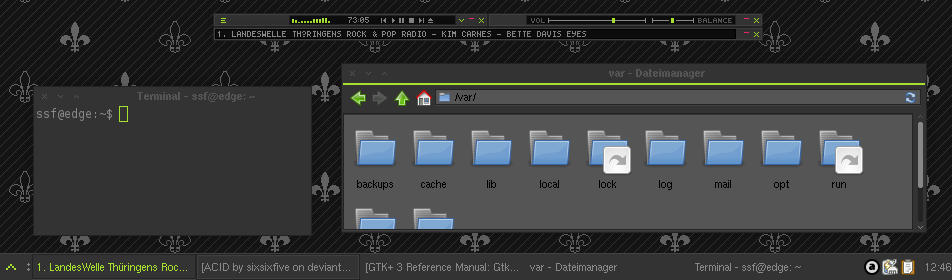
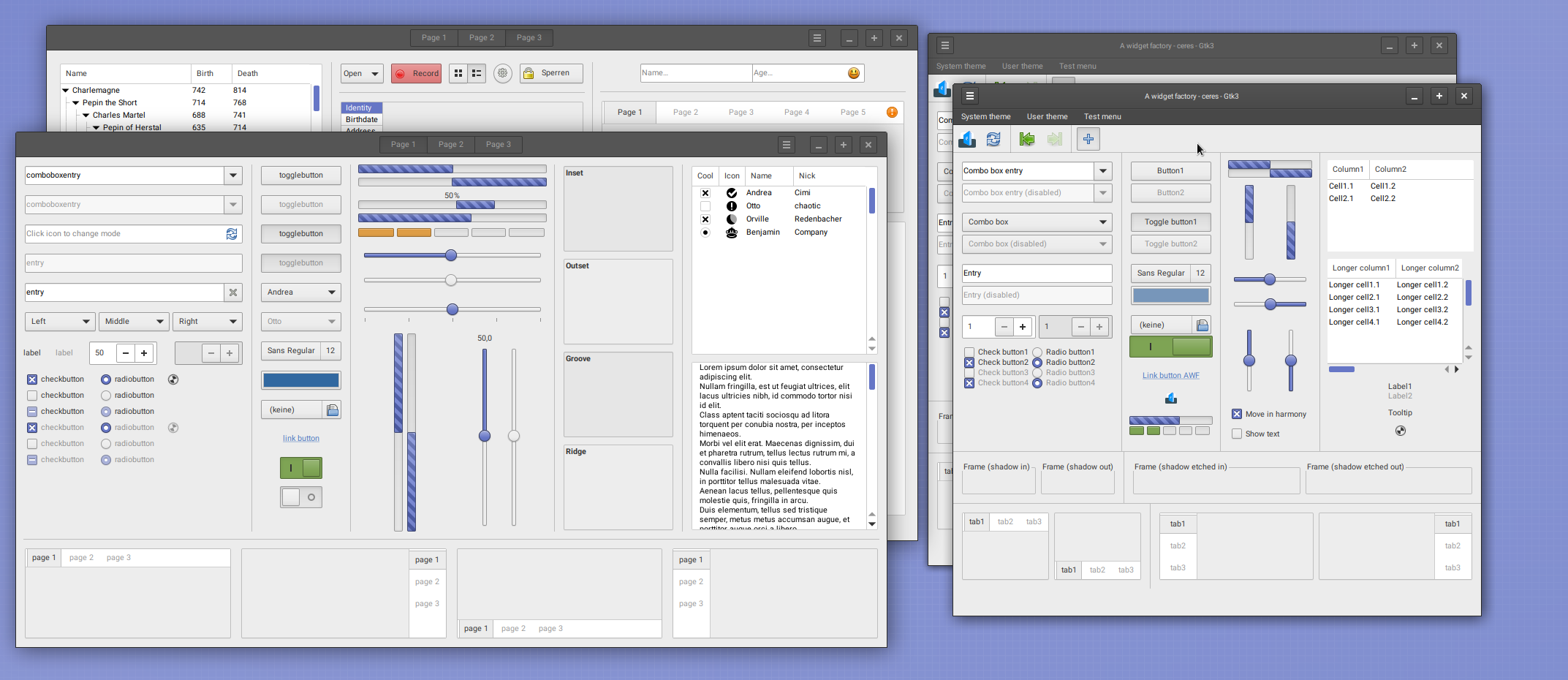
A dark, minimalistic & fast theme made for XfceIncludes themes for:
- GTK2
- GTK3 (3.6, 3.8.4, 3.10.2)
- Xfwm
- Xfce Notify
- A very simple Wallpaper pattern
Changelog
18 Feb 2014
- probably gtk 3.10 compatible
- gtk3 arrows still ugly cause not themeable (yes, gtk3 supports animations and all other useless stuff but not arrow theming :/ )
Related content






Comments: 172

ok I tried the xubuntu live cd and yes, got the same error and I found the solution: please update your apng2gif package and try again
You can get it from here
[link]
or try the debian package
[link]
👍: 0 ⏩: 2

Managed to update everything but imagemagick (quite picky with dependencies) and it sorta works. Still has transparency problems, but that's it. I'll change the gif files manually to have a working backup and see if there's anything else I can do. Thanks for the help!
👍: 0 ⏩: 0
Close but no cigar. That got rid of the "black bar" issue (seems like xubuntu's repos are a bit late on schedule!), however I still have the same transparencies issue, and some arrows stay green instead of changing colour. As of now, I'll try updating Imagemagick and gif2png, to see if that does anything. I'll let you know if I manage to fix it.
👍: 0 ⏩: 0

keyboard shortcuts of application's popup menu don't work.
👍: 0 ⏩: 1
sorry, i solved it.
just change gtk-enable-mnemonics to 1.
👍: 0 ⏩: 1
you can also enable auto mnemonics [link]
👍: 0 ⏩: 0

Man, I wish both of these worked on Windows... Haha.
👍: 0 ⏩: 0

Hi, I'm not really experienced in theming on Linux (Using Xubuntu, to be exact.), so excuse my ignorance.
How exactly do I change the text colors?
👍: 0 ⏩: 1
open a terminal, navigate to the theme directory(usually ~/.themes/ACID) and execute the script eg:
cd ~/.themes/ACID
sh changecolor.sh
👍: 0 ⏩: 0

My GNOME-Shell theme's almost done, here's a preview: [link]
Do you care what the license is? I'd like to use cc-by-nc-sa.
I'll make sure to credit you.
👍: 0 ⏩: 1
nice, I personally would prefer a free license, but it's your theme so use whatever you want.
👍: 0 ⏩: 1
cc-by-nc-sa is you can modify it and share it (non-commercially)), but you must credit the original and share it under the same license
👍: 0 ⏩: 1
No it's not just see [link] anyway, use whatever you want.
👍: 0 ⏩: 1
[link]
by = attribution
nc = non-commercial
sa = share alike
sounds pretty free to me, I'll use that if it's ok with you.
👍: 0 ⏩: 0

Hi, I just love your theme, there is only one thing that I'll like to change, it's a bit to dark inside the windows and some words are hard to see. Can you point me to the right direction so I can change the colors ? ... THNX
👍: 0 ⏩: 1
for gtk2 have a look in:
theme/gtkwidget/gtkwidget.theme
theme/thunar/thunar.theme
base[STATE] = #COLOR <
for gtk3:
theme/gtkviews/gtktreeview.css
theme/gtkentry/gtkentry.css
theme/gtkbutton/gtkspinbutton.css
👍: 0 ⏩: 0
I'm going to make a GNOME-Shell theme of this, ok?
👍: 0 ⏩: 1
It looks like I'll have to modify it to make it work better, but mostly the same look

👍: 0 ⏩: 0
I love this theme, it's great! I have noticed though, that when renaming files in Nautilus (GTK3), you can't see any indication that it's in renaming mode.
👍: 0 ⏩: 1
thx, I think it's fixed, but there are still a lot other GTK3 bugs
cheers,
665
👍: 0 ⏩: 1
Yep, it works, thanks
I also noticed that the highlight colour in Gedit is the same as the regular colour, you can't tell when it's highlighted. The find/replace up/down buttons don't look right, either.
👍: 0 ⏩: 1
i'll see what i can do.
👍: 0 ⏩: 2
ok, highlight is fixed ,but I couldn't find that replace thing [link]

👍: 0 ⏩: 0

1. thx for your fast respond
2. THE gnome 2 fork
3. Nevermind, I installed xubuntu for your great theme.
4. Where did you get this wallpaper?(not the one with the mice)
👍: 0 ⏩: 1
>4. Where did you get this wallpaper?(not the one with the mice)
It's a pattern included in the extra folder
👍: 0 ⏩: 1

where can i get that awesome mouse wallpaper?
👍: 0 ⏩: 1
thank you for the rapid reply
👍: 0 ⏩: 0


how did you disable the icons for the window buttons (tasklist) in xfce4-panel?
i'd like to use it in another theme and for the heck of it i can't find it anymore...
👍: 0 ⏩: 1

i checked the pages and tried adding this:
gtk-icon-sizes = "panel-tasklist-menu=0,0"
to both ~/.gtkrc-2.0
and the themes own gtkrc.
i added this:
style "xfce-tasklist-style"
{
# The maximum length of a button before the label ellipsizes.
# When this value is set to -1 the button will expand to the
# entire available space.
XfceTasklist::max-button-length = 160
# Ellipsizing used in the task list and overflow menu labels.
XfceTasklist::ellipsize-mode = PANGO_ELLIPSIZE_END
# Lucency of minimized icons. Valid values are between 0 (completely
# hide the icon) and 100 (don't lighten the icon).
XfceTasklist::minimized-icon-lucency = 10
XfceTasklist::icon-size = 0
# Maximum number of characters in the menu label before it will
# be ellipsized.
XfceTasklist::menu-max-width-chars = 24
}
class "XfceTasklist" style "xfce-tasklist-style"
style "xfce-panel-image-style"
{
# Fix the panel images to a default gtk icon size, is only works for
# images below 32 pixels. You can for example use this when you have
# fuzzy launcher icons.
XfcePanelImage::force-gtk-icon-sizes = true
}
class "XfcePanelImage" style "xfce-panel-image-style"
to ~/.gtkrc-2.0.
nothing.
also i find nothing of the sort in your acid theme.
can't you jut tell me how you did it?
👍: 0 ⏩: 1
gtk-2.0/theme/gtkwidget/gtkwidget.theme
...
GtkWidget::draw-border = {0,0,0,0}
XfceTasklist::minimized-icon-lucency = 0
GtkWidget::link_color = "#006eff"
...
👍: 0 ⏩: 1
ah, thanx!
now i even have it globally for all themes!
👍: 0 ⏩: 0
thanks a lot for this!
i made a mod: [link]
for pixelfont lovers i'd like to point out this fix: [link]
the point is: ttf-pixelfonts usually look great in one size, but applications scale them and then they look really bad.
there's other fonts that don't get scaled or that have separate bitmaps for every scaling, old xfonts, but they are disabled by default. when you enable them you should have more fonts to choose from and when you play around with them you notice that some stay the same when you change the size, or change sizes in steps like 10, 12, 15... so those look nice and crisp even if an application attempts to scale them.
there's many xfonts in the repositories.
(you can also have a look at xfontsel - should be installed - there's even more fonts some of which again don't show up in a standard gtk font selection dialog... if someone knows why and how to get at them let me know 
PS: the preview for my theme is sclaed so you can't appreciate the crispness of the font 
PPS: i wrote in english so that everybody understands. could've written in german...
👍: 0 ⏩: 1
nice colors
@pixelfonts Well, some applications won't run with pixel fonts and on a web browser, Oh my!
PS: If you want to remove the horizontal stripe, just uncomment xfceheaders and gtkdialogs (/gtk-2.0/theme/gtkwidget/index.theme).
MfG

👍: 0 ⏩: 1
thanks for the compliment & your tips!
@pixelfnts
i really have no problems with choosing a *true* pixelfont for my desktop environment. All applications run, no problem. Also my firefox looks much cooler now.
- i remember these problems you're talking about from using ttf-pixelfonts under windows.
follow iamfuss' instructions, then try to use sth like Fixed as a system font, no problem. also under firefox.
one thing though, many ttf-fonts have the *same name* as older bitfonts, and they kind of "cover" the bitfonts. you will have to remove some.
i started a whole thread on this here: [link]
just trying to encourage people.
👍: 0 ⏩: 1
+ some screenshots to proove my point: [link]
👍: 0 ⏩: 0


Using it now
First custom theme for XFCE, thanks
👍: 0 ⏩: 0

Excellent theme! I'm actually looking to change a few things to suit my needs (specifically the green colour and text colour). Are there any resources you can recommend for figuring out which files coincide with the changes I'd like to make?
👍: 0 ⏩: 1
To change the green in all images I can recommend imagemagick(see the command above "for name in...)
you can change multiple configuration/text files(eg: textcolors) with sed, awk, cat and other commandline tools
see also:
[link]
[link]
some gtk2 stuff:
[link]
[link]
👍: 0 ⏩: 1
Woohoo awesome! Thanks for the quick reply!
👍: 0 ⏩: 0

Though I really like this theme, I've got two small gripes.
1. Would it be possible to change the color from green to something else without editing a large amount of files?
2. The focused tab is pretty unreadable: [link]
👍: 0 ⏩: 1
to 1 hm, you could write a little script to change the colors(something like: for name in `find -wholename "*.gif"`;do convert "$name" -fill "#whatever" -opaque "#a5e12d" "$name";done;)
and 2nd: Firefox isn't a GTK-app.
👍: 0 ⏩: 0
<= Prev | | Next =>