HOME | DD
 sixsixfive — ACID
by-sa
sixsixfive — ACID
by-sa
Published: 2012-01-22 13:27:16 +0000 UTC; Views: 89633; Favourites: 94; Downloads: 25748
Redirect to original
Description
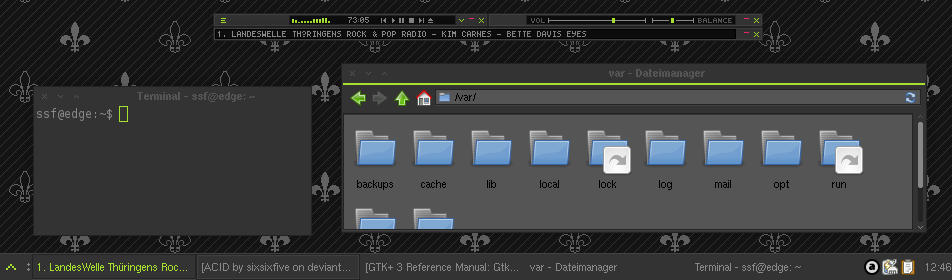
A dark, minimalistic & fast theme made for XfceIncludes themes for:
- GTK2
- GTK3 (3.6, 3.8.4, 3.10.2)
- Xfwm
- Xfce Notify
- A very simple Wallpaper pattern
Changelog
18 Feb 2014
- probably gtk 3.10 compatible
- gtk3 arrows still ugly cause not themeable (yes, gtk3 supports animations and all other useless stuff but not arrow theming :/ )
Related content






Comments: 172

This is so awesome, I only use the GTK theme though, because I use Awesome WM as my window manager
👍: 0 ⏩: 0

I would like to submit a request for Firefox persona.
Kthnx
👍: 0 ⏩: 0

created package for arch linux [link]
install:
yaourt -S acid-gtk-theme
thanks for your theme!
👍: 0 ⏩: 0

wow! But my firefox looks kinda strange with it...
👍: 0 ⏩: 1
also the xfwm theme doesn't work for me. xfwm displays the bottom and side borders, but somehow not the title bar.
👍: 0 ⏩: 1

What's not displayed? the whole titlebar? Can you take a screenshot please?
👍: 0 ⏩: 1
[link]
the whole titlebar's missing.
👍: 0 ⏩: 1
Hm, intresting
please check if xfwm4 is running and if composite is enabled make sure your frame opacity isn't set to 0 (xfconf-query -c xfwm4 -p '/general/frame_opacity' -s '100')
btw: Why do you have a resize grip on this window?
[link]
👍: 0 ⏩: 1
Sehr gut! Wie ich sehe, sprichst du deutsch 
xfwm läuft, frame opacity ist auf 100. Compositor war aus, läuft jetzt aber. Hat nichts geändert.
Der resize grip war schon immer da - ohne mein zutun. Keine Ahnung, woher der kommt.
Ich glaube, da ist irgendwo irgendein Fehler in der windowbar - den Frame unter und neben den Fenstern zeigt xfwm ja.
👍: 0 ⏩: 1
Also ich hab des jetzt mal auf 3 Systemen ausprobiert(Alle Debian Testing mit Xfce 4.8), lief auf allen dreien wunderbar.
Ich tippe eher auf einen Entpackfehler (Ich gehe jetzt mal davon aus, da mein resizegrip nur eine kleine grüne Ecke wäre)
Stell doch bitte sicher ob beim entpacken alles glatt ging bzw. ob die Berechtigungen und Symlinks stimmen(zb. xfwm4/title-2/3/4/5-active.xpm müsste ein Symlink auf xfwm4/title-1-active.xpm sein)
[link]
👍: 0 ⏩: 1
sieh an. Darauf hätte ich selbst kommen sollen... Ich hab einmal neu entpackt und alles läuft super. Der resize grip ist allerdings noch wie beim alten theme... wodurch wird der festgelegt? xfwm? Da finde ich allerdings keine Datei, die den ersetzen sollte...
👍: 0 ⏩: 1
Eigentlich über das GTK2-Thema, definiert ist das ganze in gtk-2.0/theme/gtkwidget/gtkstatusbar.theme und die eigentliche Grafik ist gtk-2.0/theme/gtkwidget/image/resizegrip.gif
Für das GTK2-theme brauchst Du allerdings die Pixbuf/pixmap-GTK2-engine(nennt sich als debian Paket "gtk2-engines-pixbuf") und für die transparenten inaktiven Schriften benötigst Du noch die Mist-GTK2-engine(nennt sich bei debian"gtk2-engines")
👍: 0 ⏩: 1
beide engines installiert, datei ist da, auch die gtkstatusbar.theme sieht in ordnung aus - der resize grip ist der selbe... aber naja, mich störts nicht.
👍: 0 ⏩: 1

mich hat der resize-grip auch gestört, nicht nur bei diesem thema.
so kriegt man's weg:
diese zeilen:
style "default-style"
{
GtkWindow::resize-grip-height = 0
GtkWindow::resize-grip-width = 0
}
class "GtkWidget" style "default-style"
in die datei ~/.gtkrc-2.0 pasten. oder datei kreieren falls sie nicht da ist.
👍: 0 ⏩: 1

just unzip the theme to ~/.themes
eg: in a terminal
mv $PATHTOARCHIVE/acid_by_sixsixfive-*.7z ~/.themes
cd ~/.themes && 7z x acid_by_sixsixfive-*.7z
xfconf-query -c xfce4-notifyd -p '/theme' -s 'ACID'
xfconf-query -c xfwm4 -p '/general/theme' -s 'ACID'
xfconf-query -c xsettings -p '/Net/ThemeName' -s 'ACID'
xfconf-query -c xsettings -p '/Gtk/ButtonImages' -s 'false'
xfconf-query -c xsettings -p '/Gtk/MenuImages' -s 'false
👍: 0 ⏩: 1

Great work.
Can you tell us what font you are using and the icon set you recommend?
Thank you.
👍: 0 ⏩: 1
Also, I recommend:
Semplice or Munica [link]
hm, and as icon set something with sharp borders like Tango btw. I recommend to disable all menu and button icons
👍: 0 ⏩: 0

Really nice! Dark and minimalistic, best merge!
👍: 0 ⏩: 0
<= Prev |