HOME | DD
 sixsixfive — ACID
by-sa
sixsixfive — ACID
by-sa
Published: 2012-01-22 13:27:16 +0000 UTC; Views: 89634; Favourites: 94; Downloads: 25748
Redirect to original
Description
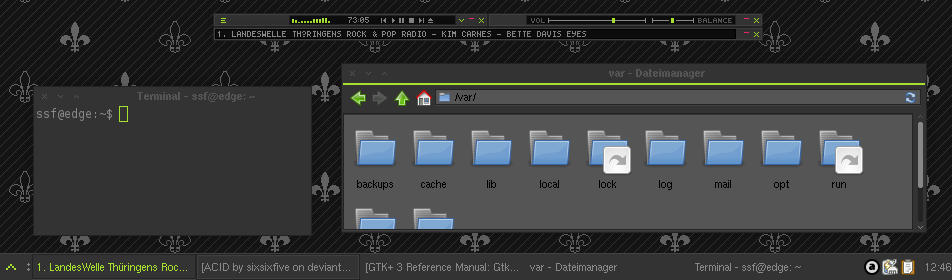
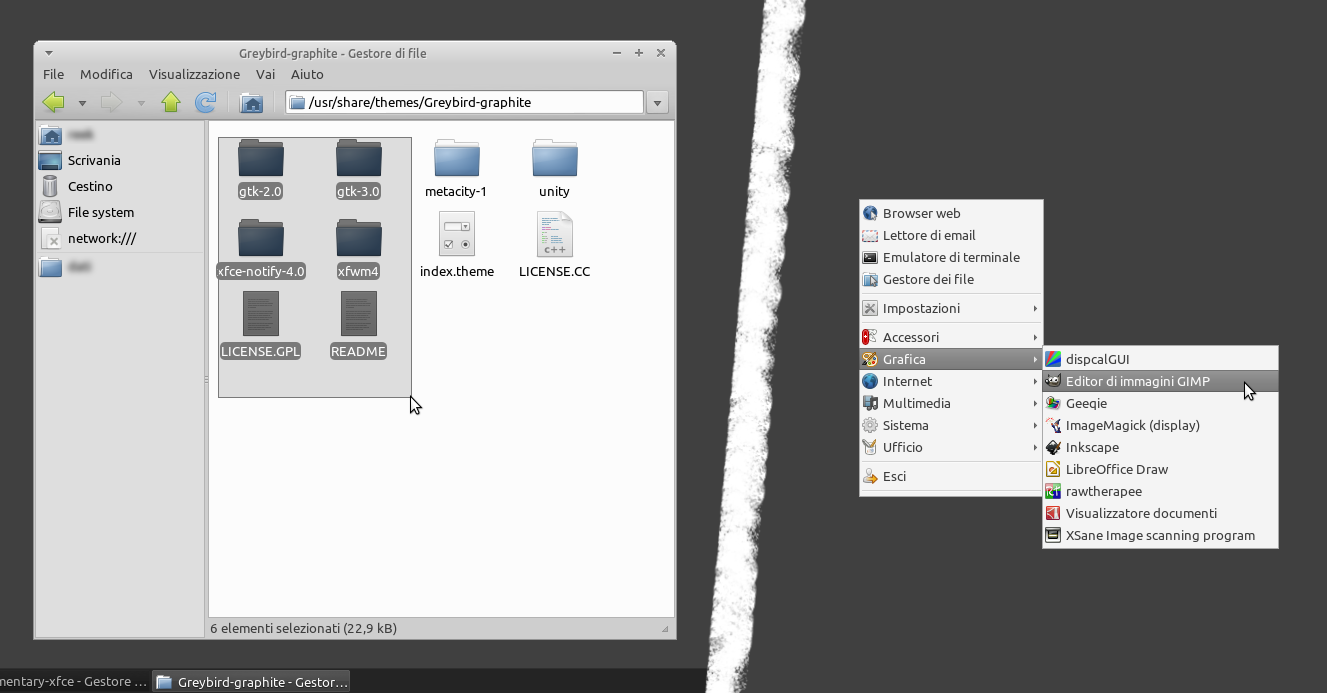
A dark, minimalistic & fast theme made for XfceIncludes themes for:
- GTK2
- GTK3 (3.6, 3.8.4, 3.10.2)
- Xfwm
- Xfce Notify
- A very simple Wallpaper pattern
Changelog
18 Feb 2014
- probably gtk 3.10 compatible
- gtk3 arrows still ugly cause not themeable (yes, gtk3 supports animations and all other useless stuff but not arrow theming :/ )
Related content






Comments: 172

I solved it uninstalling all the engines of themes except used by the theme...
Regards...
👍: 0 ⏩: 0
If you use Firefox o Thunderbird, to fix the text color of selected menu items you can modify your userChrome.css ("~/.mozilla/firefox/userprofile/chrome/" where "userprofile" is XsomeNumbers.default folder) like this:
menubar > menu { color: #a5e12d !important; } menubar > menu[_moz-menuactive="true"][open="false"] { color: #a5e12d !important; } menubar > menu[_moz-menuactive="true"][open="true"] { color: #333 !important; }
👍: 0 ⏩: 1

or you could try my iceweasel theme
:thumb313592241:
👍: 0 ⏩: 2
I was just trying to help ...

👍: 0 ⏩: 0
stupid deviantart code, [link]
👍: 0 ⏩: 0
Other bug:
diff -ruws ACID/gtk-3.4/theme/gtkrange/gtkrange.css LastACID/gtk-3.4/theme/gtkrange/gtkrange.css
--- ACID/gtk-3.4/theme/gtkrange/gtkrange.css 2012-04-22 11:17:57.000000000 +0200
+++ LastACID/gtk-3.4/theme/gtkrange/gtkrange.css 2012-10-13 17:36:40.000000000 +0200
@@ -24,7 +24,7 @@
GtkRange.slider{
background-color:#888;
-border-image:url("image/slider-normal.gif") 1px;
+border-image:url(data:image/gif;base64,R0lGODlhBQAFAKECADMzM4iIiP///////yH5BAEKAAIALAAAAAAFAAUAQAIHRA6Gx+1RAAA7) 1px;
border-width:1px;
border-style:solid;}
Great theme!!!
Thanks
👍: 0 ⏩: 2
Too, when you change the color of the theme all radiochecked images of all gtkmenu folders are illegibles...
👍: 0 ⏩: 1
Not, thanks to you for your work...
👍: 0 ⏩: 0
yeah, iirc i was tying to use base64 images once, but it shouldn't make any difference if you point to a real image or to a base64 encoded one. Anyway, it's already fixed in the 3.6 release
👍: 0 ⏩: 1
Sorry sixsixfive but the Colorscript does not work correctly... now the alpha from the image is converted to black...
Thanks
👍: 0 ⏩: 1
damn, what version of imagemagick did you use? because it seems to work here [link] .
my gif2png is 2.5.8 and imagemagick is 6.7.9.3
👍: 0 ⏩: 1
"imagemagick 8:6.7.7.10-2ubuntu4" and "gif2png 2.5.8-1"...
Thanks
👍: 0 ⏩: 2
Still no progress here, could you please tell me which version of ubuntu do you use?
👍: 0 ⏩: 1
Ubuntu 12.10 quantal...
Regards
👍: 0 ⏩: 0
I solved installing recommended packages for imagemagick...
👍: 0 ⏩: 0

Manjaro Linux will probably like your theme! manjaro.org [link]
👍: 0 ⏩: 0

Fixed a Problem in your box-shadow:
Here is the difference
Should be like this..
{....box-shadow:inset 0 -1 0 0 transparent;}
Your Code was
{...box-shadow:inset 0px -1px 0px 0px transparent;}
which throws a Gtk-CRITICAL error... seems like
"Horizontal and Vertical Offsets are required"
Doesn't recognize your offsets and ignores them as far as I can tell..
this is present in
gtkcheckbutton.css
gtkswitch.css
gtkspinbutton.css
gtkentry.css
nautilus.css
..probably other places....
For gtk-3.4.4 not sure about other version...
No complaints about your gtk2 code so far
PS: Thanks for the amazing theme!
👍: 0 ⏩: 1
Yeah, because it's made for gtk 3.6.2 and above but the old (not so fancy) gtk 3.4.2 version is still included. You just need to set the symlink(cd ~/home/.themes/ACID && ln -sf gtk-3.4 gtk-3.0)
👍: 0 ⏩: 1
cd ~/.themes/ACID && ln -sf gtk-3.4 gtk-3.0 ,of course.
👍: 0 ⏩: 0

@Sixsixfive, is there any reason that the bottom border vanishes when using ACID for the window manage theme? It used to work fine, but now I just see an invisible line. Well... I can't see it, it's invisible... but I assume you'll understand 
👍: 0 ⏩: 1
Oh, and this is for XFCE on Quantal Quetzal. I don't know if it was happening before the xubuntu update as I took a few days off using it.
👍: 0 ⏩: 1
look's like ubuntu's package is broken. I'll upload an hard coded theme...
👍: 0 ⏩: 1
Thank you again, I can stop being distracted by my desktop now
👍: 0 ⏩: 0

This completely fucked up my LibreOffice, now I see all of the originally white backgrounds in gray, and everything has weird sizes.
THANKS. Yeah it's probably not your fault, but you see that I am not happy.
....how do I un-fuck it back? (I can log to GNOME but well, I don't want to be doing that)
👍: 0 ⏩: 2
>This completely fucked up my LibreOffice...
Well, it's a GTK theme and Open/LibreOffice aren't GTK-apps
>....how do I un-fuck it back? (I can log to GNOME but well, I don't want to be doing that)
What? sorry but I don't get it
👍: 0 ⏩: 1
Strange.
Well I ment it in this way - if I log out of XFCE and log in to GNOME, the LibreOffice is OK. So I can do THAT to have the backgrounds white. But that's a little stupid.
What I ment to ask - how do I remove the theme and go back to the "factory settings" (just to be sure it's not the theme)?
👍: 0 ⏩: 1
just remove the theme from the themes folder or change it to another eg: Clearlooks or Adwaita
👍: 0 ⏩: 0
Not sure if you can help, but in the xfce Terminal app, its really hard to tell which tab is active because the font color stays gray on the active tab (instead of turning green like other tabs do) any idea how to fix this??
I also have firefox with the GTK+ theme (a theme that utilizes my active gtk!) it works great except has the same activetab issue. I tried editing gtknotebook files to no avail.. any tips?? Thanks!
👍: 0 ⏩: 1
>(instead of turning green like other tabs do) any idea how to fix this??
nothing I can do here it's a limitation of GTK2
for that firefox stuff try the stylish theme [link]
👍: 0 ⏩: 0

Hey, great theme. I recently reinstalled my system and since then, for some reason, the bottom border seems to be missing. do you have a suggestion about what could be wrong? [link] <- have a look at the terminal windows bottom border.
👍: 0 ⏩: 1
probably an extraction issue, did you use a 3rd party tool like xarchiver, squeeze etc.?
here are my md5sums
punx@schleppi:~/.themes/ACID/xfwm4$ md5sum bottom*.xpm
09bdce99ea125523fa46f567ab022282 bottom-active.xpm
4ba3a47903ff299eecc84c61275421d3 bottom-inactive.xpm
528e2e2c9e9aa4a5b88251af67b62d5d bottom-left-active.xpm
7a4c8f288d10c3ef677c9afe9d4b70db bottom-left-inactive.xpm
18e98d9ad0ef886a6bc0602149d5eab1 bottom-right-active.xpm
5f73b2a271afdcbaad64ae8fe7cff630 bottom-right-inactive.xpm
btw. nice setup!
👍: 0 ⏩: 1
Thanks for the reply
Seh grade, dass deine Screenshots auf Deutsch sind!
Ich krieg die gleichen md5sums, aber ich habs grade mal mit einem alten screenshot verglichen und ich glaube es liegt nicht an den bottoms sondern die linken und rechten Segmente sind laenger als sie sein sollten.
12:00:53 lorizean ~/.themes/acidred/xfwm4 $ md5sum right*.xpm left*.xpm
ec46e363b6723ffa96b330d07e2edd8b right-active.xpm
8a83d4bb3810394b7f484721c8a41928 right-inactive.xpm
56c37a83c83cb6d303ff01d170534312 left-active.xpm
6e629e0593112bcfe1b4a1e6c2711c39 left-inactive.xpm
Eigentlich hab ichs auch ganz normal mit 7zip entpackt.

👍: 0 ⏩: 1
Nein, recht und links sind auch vorhanden. Es stimmt irgendwas mit der unteren Deco nicht, selbst wenn es zu lang wäre, für Xfwm sind das alles nur tiles [link] .
LAde es einfach nochmals herunter und überschreibe Dein Xfwm4-Verzeichnis. (Das Farbskript brauchst Du nicht da sich Xfwm die Farbe vom GTK-theme holt.)
PS. Du kannst aber auch mal versuchen deine bottom-active.xpm mit einem texteditor zu öffnen.
hier meine:
/* XPM */
static char * bottom_active_xpm[] = {
"1 2 3 1",
" c None",
". c #0000FF s active_hilight_2",
"+ c #00FFFF s active_shadow_2",
".",
"+"};
👍: 0 ⏩: 1
Hm, ich hatte genau das gleiche. Kurioserweise funktioniert es, wenn ich es auf folgendes aendere:
/* XPM */
static char * bottom_active_xpm[] = {
"2 2 3 1",
" c None",
". c #0000FF s active_shadow_2",
"+ c #00FFFF s active_hilight_2",
"++",
".."};
Das muss aber was mit meinem System zu tun haben, auf meinem notebook funktioniert das naemlich out-of-the-box.
Danke fuer die Hilfe
👍: 0 ⏩: 0

Great theme I had to modify the gif2png in your color script since I used gif2apng found here. [link]
Thanks for the work done on this theme it is my favorite.
👍: 0 ⏩: 0

Loving the theme. Actually working on a little personal project to create "Suite" around this theme, your SLiM theme (slightly modified), theRealPadster's metacity theme (slightly modified), and a Cinnamon theme which I've written personally. I've also added a few colors, and will probably add more eventually.
It's hosted on github if this interests you at all:
[link]
I know that the GTK3 status is still "Beta," but I've noticed something in regards to Nautilus/Nemo. The "lasso" selection has no transparency. I've searched around and can't seem to find any information regarding where to set that.
Example:
[link]
👍: 0 ⏩: 1
>The "lasso" selection has no transparency. I've searched around and can't seem to find any information regarding where to set that.
I will see what I can do.
👍: 0 ⏩: 1
lasso is now fixed and will work with the next update
👍: 0 ⏩: 0

Having a few problems getting this to work in Backtrack 5 r3. When I extract with p7zip, I get loads of errors (318) saying 'Unsupported Method'. It makes a file anyway, when I put it into the themes folder, I only get a blank 'Controls' theme called ACID. If I need to install some kind of theme engine to run this theme, what is that engine called, and what is the name of the repository for it?
--Sorry if this is a nooby question. I've never themed linux before, so this is all new to me. Thanks in advance.
👍: 0 ⏩: 1
So it looks like I was being a noob all along. I used 7z instead, and everything worked fine, However, I dont get a window border, is that normal?
👍: 0 ⏩: 1
Did you set it in xfwm4-settings?
👍: 0 ⏩: 0

Hi i've just been playing around with this.
Looks great, couple of things though:
When trying to run the change color script, it runs, but has a few errors from png, specificaly undefined color maps, image reading error, broken image.
The end result is that the menu bars fonts have chaned color, but the actual line, menubarshadow is still the default green.
I then opened the ACID/gtk2/theme/gtkmenu/image/menubarshadow.gif with gimp and attempted to change the color myself, but It wouldn't allow me to color in anything other than gray scale.
In the end, i created a new gif file with the same dimensions and painted it myself. Before saving over the original file.
This worked, but there are several other files ill need to change manually, and I thought you'd probably want to know if something was wrong with your files.
👍: 0 ⏩: 1
>...specificaly undefined color maps...
infos not errors
>...menubarshadow is still the default green...
please check your dependencies color script requires at least
ImageMagick >= 6.7.7
apng2gif >= 1.5
gif2png >=2.5.8
👍: 0 ⏩: 0

Dude, this theme is lovely. However, I seem to be having some problems with it, most of them regarding the script you use to change colour. Ever since I changed the colour to #33B5E5, certain parts of the screen that should be in grey now appear in black ([link] ). I tried grep-ing the css files for the string "#000000" to no avail. That's one. The other: certain buttons and sliders appear to lack transparency! ([link] )
I'm running Xubuntu 12.04, and I managed to replicate the error in a different machine, also running the same distro. Anything I could do to fix that tiny little error? Any particular string or option I should be looking out for? Thanks in advance!
👍: 0 ⏩: 1
hm that's strange, how did you run the script? double click?
please redownload and follow steps and try
1.) open a terminal
2.) cd ~/.themes/ACID
3.) execute with "./changecolor.sh"
👍: 0 ⏩: 1
Yep, Redownloaded the skin, followed your steps and still nothing happened. I always run scripts by terminal - bash changecolor.sh (maybe that's what fucks it up?). I sorta seemed to fix the transparencies issues by overwriting some of the files changed by your script with their unchanged versions. At least I got my transparencies back.
👍: 0 ⏩: 1
| Next =>