HOME | DD
 Splinks — Making Simple Animations

Published: 2008-06-19 03:51:53 +0000 UTC; Views: 12855; Favourites: 239; Downloads: 306
Redirect to original
Description
THIS IS ALL I USEBoth programs are free and the camera is just a simple $50-$70 (depending where you live) Wal-Mart camera. Now some may ask how I use this equipment to make an animation...Well Guess What I'm here to give you my personal and simplest steps on how to make a simple video animation. Hope this helps you all.
STEPS
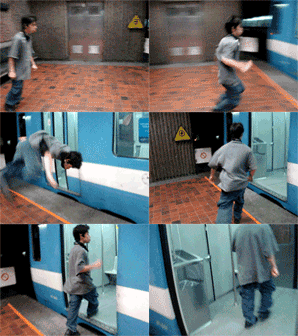
1. get some video of a pose or action then save it on the computer...(AVI files work well)
2. open it on quicktime player which is free at this site or any other on google
[link]
3. just copy LAYERS of the video while its paused in quicktime and paste it into gimp.....(gimp you must press the "new layer" button on the layers dialog box after each paste)
4. gimp can be found at the following links.....
Windows: [link]
Mac: [link]
5. then just keep pasteing image by image in gimp then save it as a GIF format which all you do is just add ".gif" at the end of the name of the document then you'll have the option of saving it as an animation or "save as merged"...select animation.....and ta da u made a simple animation
P.S. if u wish to add effect like erasing urself or shooting lighting waves then please do effects before u save it as a "gif".....or either you'll just have a picture that moves which is fine just no super effects...if u dont finish a project then dont worry gimp also has a file type u are able to save to called XCF....so basicly when u saved ur project just add ".xcf" at the end of the name......and u can get back to ur project with no lost data
SUGGESTION: An actual video camera is alot better to use then a digital unless you can set your camera to NOT have auto light setting
---------------------------------------------------------------------------------
andryu89's: [link]
Related content







Comments: 117

wow really? lol
that's kinda sad xD
👍: 0 ⏩: 1

ya it is...but most of the time they just want me to do it for them
👍: 0 ⏩: 1
la gasp!
well you are really good at it xD
👍: 0 ⏩: 1

Sha-weet! Cheat sheet!
lol!
Nice of you to put this.

👍: 0 ⏩: 2

thankz for da animation tips and syq wow that little pet me thing it totally cool!!!!!!
👍: 0 ⏩: 1
anytime....wait till you start working on 150 layer animations
👍: 0 ⏩: 0

Yeah i use the gimp too frame by frame takes forever sometimes especially with 100+ frames
👍: 0 ⏩: 1
well there is an extension called GAP, but it loads more then needed then you have to end up changing the speed of each frame and have to delete over 300 layers
👍: 0 ⏩: 0

so you literally take frame by frame into glimp? that sounds really hard
👍: 0 ⏩: 1
basicly...but you dont have to download every layer just the ones you want...same as clay animation...then just going back to each layer and edit one by one
👍: 0 ⏩: 1
I think I will stick with my 3d animation stuff
👍: 0 ⏩: 1
ok mate...cant wait to see your new stuff
👍: 0 ⏩: 1
<= Prev |