HOME | DD
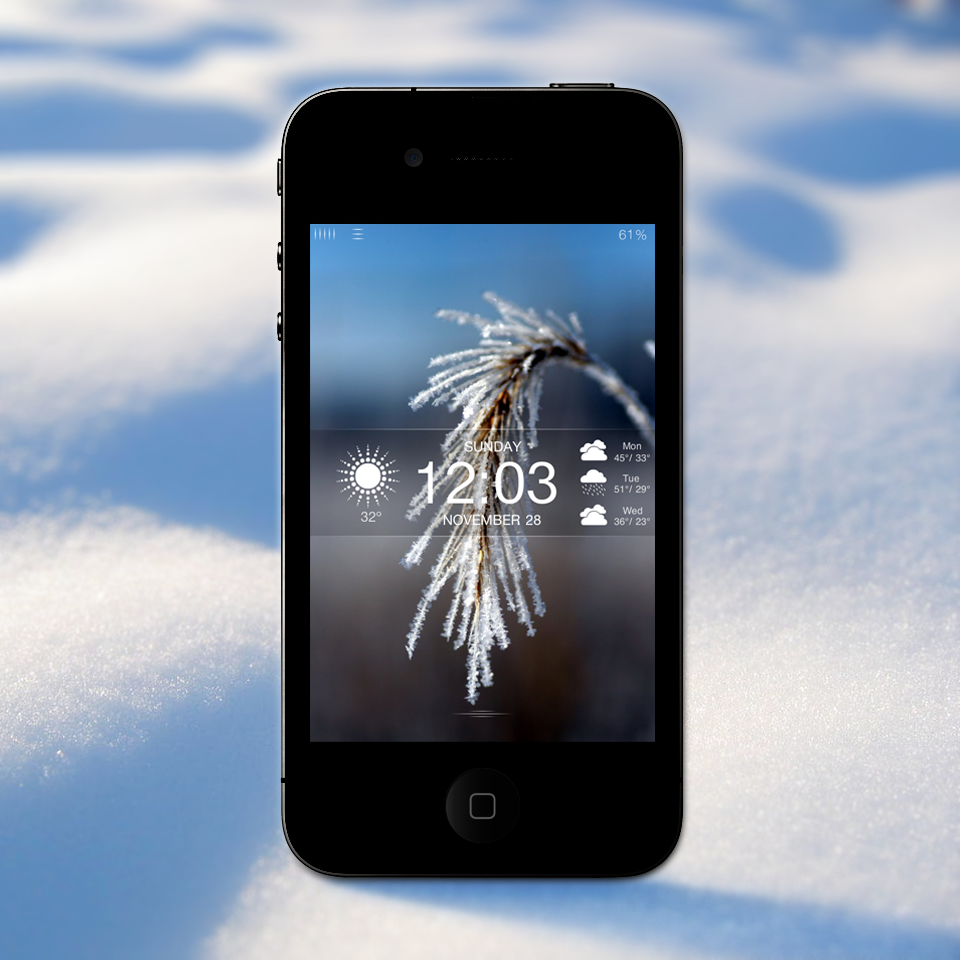
 technouse — Frost LS
by-nc-sa
technouse — Frost LS
by-nc-sa
Published: 2010-11-27 07:09:06 +0000 UTC; Views: 51989; Favourites: 192; Downloads: 13401
Redirect to original
Description
AVAILABLE NOW -->UPDATE: There is now a modified version of the theme located in the extras folder--it pushes everything up near the top of the screen.
UPDATE: You can now set your lockscreen background picture from your camera roll. This is now the default setting for the theme. Also, I've tweaked the slider a bit--the old one is located in the same folder as the new one.
UPDATE: Fixed the issue with the time being centered when switching from single digit hours to double digit hours!
To change your weather location:
Open LockBackground.html and scroll down to the line that begins with 'var locale=' and change your location there.
Also used in this theme:
-Lockscreen clock hide
-Tap to Unlock (optional)
-Status Bar Battery Hide (optional)
You can find Tap to Unlock and Status Bar Battery Hide in the Extras folder, along with a couple alternate versions of the semitransparent overlay.
Thanks to mone and the photographer
Related content







Comments: 94

I htink this theme isnt working preperly on iOS 6. Is there any fix soon? Really Awesome theme!!! Greetings!
👍: 0 ⏩: 0

Great LS! Using it right now but i have one problem.. The pictures for the weather doesn't show, what's wrong then?
👍: 0 ⏩: 0

didn't work ios 5.1.1 the blue question Mark still appear for the weather and also for the picture
the slide is fine but i see a black image with the bleu question Mark i really tried everything that you advice but neither of that work for me
help cuz i really love this theme
(Btw good job Technouse (y) )
👍: 0 ⏩: 0

I found two ways to solve the blue question mark error for the weather icons:
1. Move the folder IconsSets from Frost LS/Private/IconSets to the folder Frost LS/.
2. Open the HTML and search for IconSets/ and change it to Private/IconSets/
I only tried the second option and it worked fine. But I assume option 1 should do the same thing.
👍: 0 ⏩: 1

neither of those worked for me, the "?" still came up in the middle and on the left side, but there were cloud pictures on the right. sigh lol. for the time being i'll have to use a different theme.
👍: 0 ⏩: 0

I am getting blue question marks for the weather icons...is there a file path error somewhere?
👍: 0 ⏩: 0
I am getting blue question marks for the weather icons...is there a file path error somewhere?
👍: 0 ⏩: 0
I am getting blue question marks for the weather icons...is there a file path error somewhere?
👍: 0 ⏩: 0
very nice looking theme, but can't get it to work on ios 5.1.1. weather icons just show as boxes with "?". i don't know how to fix it, i want to use this theme. :[[[[
👍: 0 ⏩: 1

me too.. any ideas? i've looked at your other themes/posts/comments and they all told me to put the icons of the weather images in the top most folder (xxx.theme).. stil didnt work.
fixed the locale settings like you suggested and im out of ideas now.
👍: 0 ⏩: 0

how to make this theme work on ip4 ver 5.0.1 ~ winterboard ?
👍: 0 ⏩: 0


I'm having a problem here.. The clock stays at the top and won't come down to where it's supposed to be.. Please help!
👍: 0 ⏩: 0


yes ios 5 jailbreak is available
👍: 0 ⏩: 0

How can I move it 100px down? Do I have to update only one tag in the html or a lot of places?
👍: 0 ⏩: 0


Thanx for this Lockscreen and the inspiration...
I take your Frost LS + parts of Glasklart Theme for my Homescreen.
Here you can see a screenshot...
[link]
👍: 0 ⏩: 0

Help? My slider is still showing?[link]
any way to fix this?
👍: 0 ⏩: 1

But i have a little problem with top: [link]
(Battery % and wifi image)
iPod Touch 2G


👍: 0 ⏩: 0

awesome! my first theme installed. thanks and kudos!
👍: 0 ⏩: 0

Anyone know when whenever I open up the LockBackground.html all I see is a picture of the lock screen? What do I need to open it with in order to change the weather. I've tried Safari, IE, Word, Text Edit. Nothing seems to work.
👍: 0 ⏩: 1
Notepad2 (here: [link] )
👍: 0 ⏩: 0


Sorry when I have to ask this. Can anybody please tell me how to install this to my iPhone. I'm new to these kinds of things. Thank you.
👍: 0 ⏩: 1

var/stash/themes
ssh to the folder in ur iphone and place this folder innit
open winterboard, and choose the lockscreen.
👍: 0 ⏩: 0

I hope you can update the slide to unlock transparency for the iphone 4.3.1 update...
👍: 0 ⏩: 0

In html, search for:
var isCelsius
Change this to "true".
Replace and Respring.
👍: 0 ⏩: 0

Outstanding Lockscreen,
You have been featured on 
👍: 0 ⏩: 0

Hi there
I really like the weather on the screen but it loads every time I activate the lock screen and I have to wait around 10 seconds to see it. Could u cache the data somewhere so we dont have to wait when we need to see the weather.
Kind regards
👍: 0 ⏩: 1

Did you ever find a fix for this? I was wondering the same thing. This is perfect except for the reloading every time you activate the lock screen.
👍: 0 ⏩: 0
Hi there
Just one thing, I really like the weather on the screen but it loads every times I activate the lock screen and it takes some time to load, so could u make it cache the data somewhere so we dont need to wait to see the weather
Kind regards
👍: 0 ⏩: 0

I don't suppose you're still offering support for this theme, but if so, I'm never able to set my own background through the camera roll or settings on my phone. Also, I'm wondering if there's a way to disable the custom signal/wifi/battery icons so that I can mod the colors easier.
👍: 0 ⏩: 0


hi, i love your themes, truly beautiful. However I have two questions, how do I change to celius? and how do I change it to Shanghai, China? I've tried the var locale, but maybe i'm doing something wrong?
👍: 0 ⏩: 0

doesn't work on 4.2.1, but looks freaking awesome! great job man!
👍: 0 ⏩: 0

could someone point me to where the code starts and stops in the .html file for the 3 day forecast on the right please?
👍: 0 ⏩: 0


Looks great!
Faved n featured on MacRemix.com
Hope it brings you some extra visitors! Cheers!
👍: 0 ⏩: 0


the slider does not work on 3GS
the battery percentage is too big but after adding '~iphone' to the end of each icon name it works
adding '~iphone' to the end of the reception bar icons does not work however
👍: 0 ⏩: 1


comment out this line in lockbackground.html:
currentHours = ( currentHours > 12 ) ? currentHours - 12 : currentHours;
and this one as well:
currentHours = ( currentHours == 0 ) ? 12 : currentHours;
👍: 0 ⏩: 0
| Next =>