HOME | DD
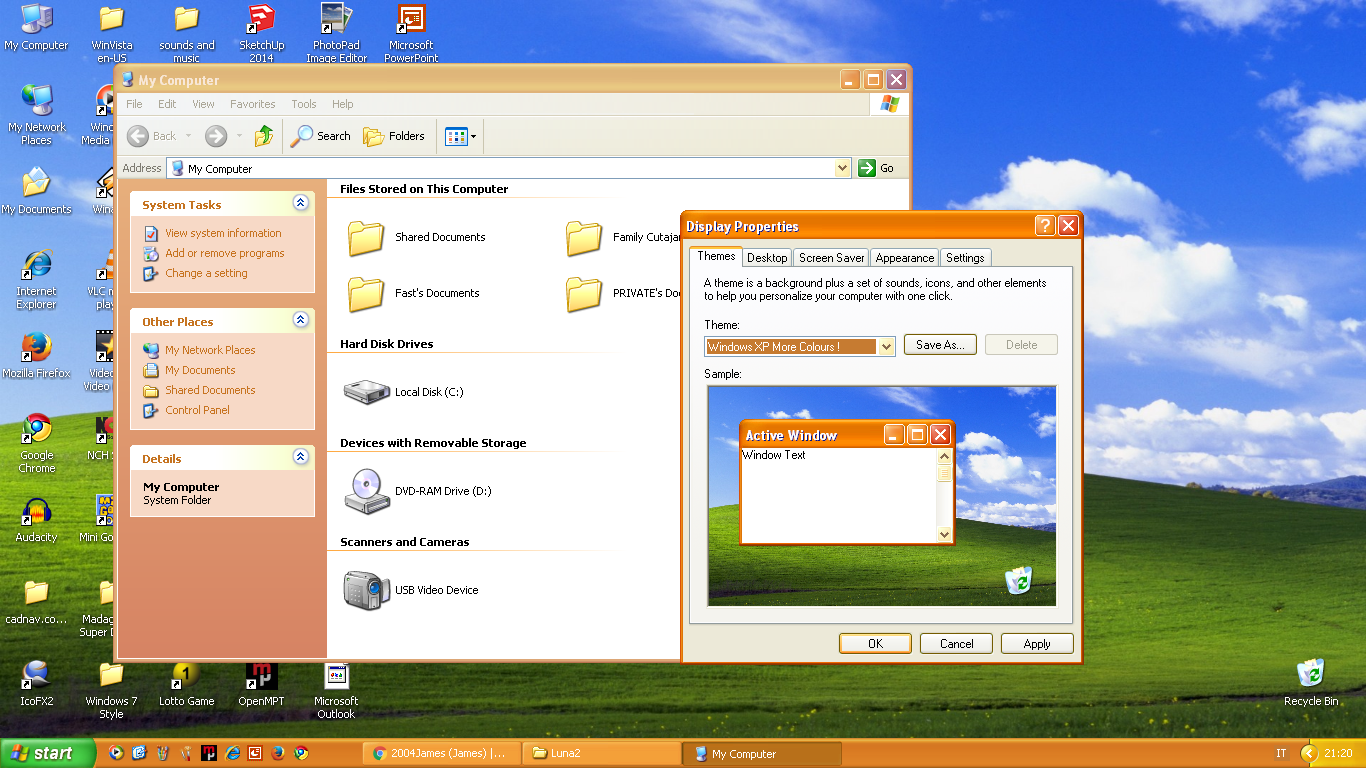
 2004James — Windows XP More Colours!
#theme #windows #windowsxp #appearance #customization #visualstyle
Published: 2019-05-18 19:48:38 +0000 UTC; Views: 9714; Favourites: 22; Downloads: 775
Redirect to original
Description
Windows XP More Colours Style!As we all know Windows XP only has 3 colour schemes (Blue, Olive Green, Silver), so I decided to make a new style myself. Actually what I really did is edit the luna.msstyles file with resource hacker.
To apply the style you first need to download uxstyle for Windows XP from the link here: uxstyle.en.softonic.com
Then all you need to do is extract the "Luna2" folder to "C:\WINDOWS\Resources\Themes", then you should be able to apply the style by right clicking on the desktop, selecting "Properties" and go to the "Appearance" tab where you should find the style named "Windows XP More Colours!"
Hope you enjoy it!
If you have any problems please leave a comment below, I will try and answer as soon as possible!
If you can, please, send me feedback!
UPDATE: Unfortunately I cannot update this theme right now for certain reasons. The Windows XP laptop I have is kinda dodgy and is on it's last legs (it is 11 years old, so it might work another year, or break tomorrow). I don't have much time, right now, I have a full time job involving computers, so I try and avoid computers in my free time (for my own health). Finally, the biggest reason is that when I try modifying the Luna Olive and Luna Silver theme, I get weird bugs in the taskbar. I have no idea what is the cause of the problem and how to fix it. A commenter on this page has the same bug, so it's either there's a bug in the windows XP styling or more probable, I messed up, but I don't know how .
Related content






Comments: 19

👍: 0 ⏩: 0

👍: 0 ⏩: 1

👍: 0 ⏩: 1
👍: 0 ⏩: 1
👍: 0 ⏩: 1
👍: 1 ⏩: 0

👍: 0 ⏩: 1
👍: 1 ⏩: 1
👍: 0 ⏩: 0

👍: 0 ⏩: 1

👍: 1 ⏩: 0

👍: 0 ⏩: 0

👍: 0 ⏩: 1
👍: 0 ⏩: 0

Not feedback but I gotta say even though I've moved on from Windows XP this really brings life back into the nostalgic operating system!
👍: 1 ⏩: 1
I thought that many people like you, have moved to a newer version of Windows, however surprisingly after 19 years there are still many people using Windows XP.
👍: 0 ⏩: 0