HOME | DD
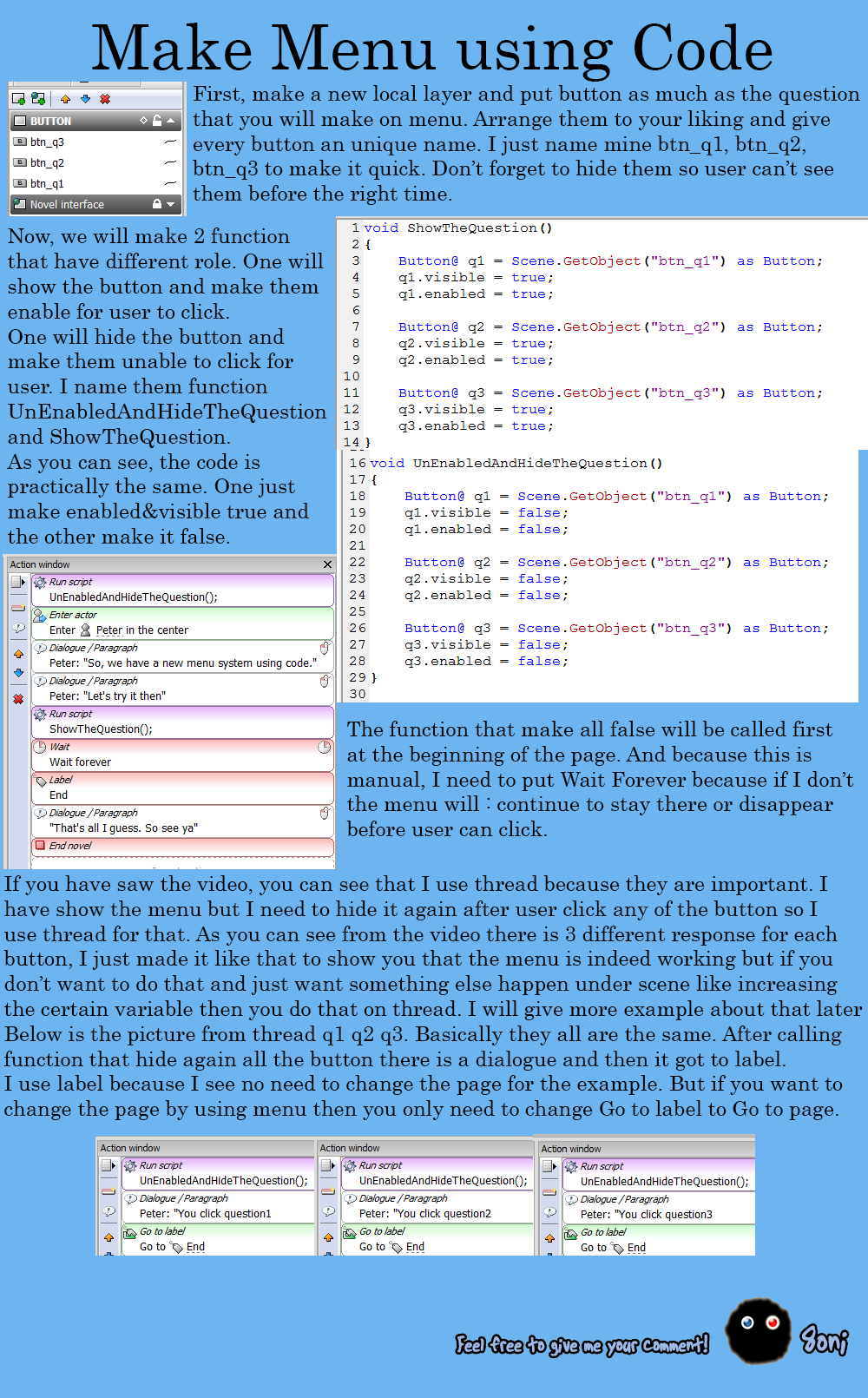
 8oni — Menu Using Code
#code #novelty #custommenu #noveltytutorial
Published: 2015-04-12 07:15:05 +0000 UTC; Views: 1435; Favourites: 6; Downloads: 14
Redirect to original
Description
This is for 2ClassyBricksThis is an alternative from using built-in menu because there is a bug that made it show up above screen.
As usual, zip contain project example and the image tutorial.
Related content







Comments: 9

I read the picture above, but I don't know exactly what labels are for. How can I use them in my novel?
👍: 0 ⏩: 1


Thank you for having taken the time to do all of this! I really, really appreciate it! I'm going to go try everything out right now!
Edit: I was able to get it to work! Considering the game I'm working on now has a lot of choices for the player to pick, doing things this way instead of constantly "Transform->Move object" will be a huge time saver! I'll be sure to credit you for the code. Thank you again for the tutorial!
👍: 0 ⏩: 1

You are welcome. I have fun doing this. You don't have to credit but if you want to then just wrote 8oni
👍: 0 ⏩: 0
