HOME | DD
 bogo-d — Developer Folder
Published: 2008-02-26 09:47:21 +0000 UTC; Views: 72466; Favourites: 186; Downloads: 28430
Redirect to original
Description
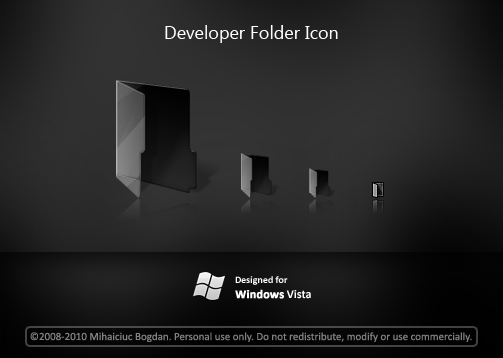
Windows Vista-like developer folder.Package contains :
- Windows Vista-compatible icon
- 256x256 PNG icon
- Back/Front PNGs for adding custom content to folder
- Mask for bluring items behind the folder
Update
- Fixed the bright white line at the bottom of the icon
- The top white edge is smoother
--------
©2008-2010 Mihaiciuc Bogdan.
Related content










Comments: 53

👍: 0 ⏩: 0

please share complete pack my brother. are the best icons MsOS for anywhere system.
👍: 0 ⏩: 0


hi, its very nice... but when i change the icon, i cant use it on more than only 1 foldeR.. why?
👍: 0 ⏩: 0


Do you know if I'd still be able to see folder previews by using this icon in windows vista?
👍: 0 ⏩: 1

No.
You would need to make back and front icon files from the PNG files and then either replace those icons in Windows' imageres.dll or use an icon-changing program that supports changing those two icons.
I can make the back/front icons for you and if you want modify your imageres.
I'm not sure which icon program supports changing these icons but I'm pretty sure you can find one with Google.
👍: 0 ⏩: 1
Thank you for the help.
I converted the two front and back .pngs (they were already in the compressed folder) into icons, and will be using the program IconPackager to make them work. ;D
👍: 0 ⏩: 1

I like that you made a separate 16x16 icon to make it more visible at small sizes.
Good work!
👍: 0 ⏩: 1
Thanks, I don't like small, blurry icons
👍: 0 ⏩: 0


there's nothing to install.
if you want to replace a particular folder with this icon right-click on it, go to properties ► customize ► change icon...
if you want to replace all of your folders you must change the appropriate icons in [X] ► Windows ► System32 ► imageres.dll, where [X] is the letter of the partition windows vista is installed on.
👍: 0 ⏩: 1

ok thanks i got it...but can u select multiple folders to change it?
👍: 0 ⏩: 1
yes.
you can do it in the same way. just select multiple folders and right click on any of the selected folders.
the downside is that you will no longer be able to view folder contents as with normal folders in windows vista.
👍: 0 ⏩: 0


May I ask How to use it in vista, but keep it shows the content inside the folder?
👍: 0 ⏩: 1
not really sure, but i think that you need to convert the front and back pngs to icos and then replace them within imageres (or shell32, not exactly sure which of those has these icons).
👍: 0 ⏩: 0

so how do i set it to be used as the default folder icon in xp?
luv this icon
👍: 0 ⏩: 2
i tried changin it in file types but it wont let me choose icon is greyed out.
shell32.dll i dont know how to edit that. so i will try those programs you said.
ty sir.
👍: 0 ⏩: 1
you're welcome.
both of these programs are payware
i saw a lot of other freeware icon programs. however i can't remeber where i saw them or how they're called else i'd give you a link
👍: 0 ⏩: 1
This page may have some useful links: [link]
Hope that helps!
👍: 0 ⏩: 0
either use an incon-customizing app such as IconPackager or IconWorkshop or (i haven't tested this) open an explorer window and go to Tools > Folder Options > File Types and change the icon for Folder and File Folder.
another option would be to change to icon within shell32.dll
👍: 0 ⏩: 0


| Next =>