HOME | DD
 brbk —
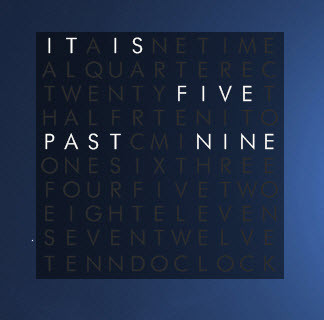
WordClock2
by-nc-sa
brbk —
WordClock2
by-nc-sa
Published: 2010-07-16 23:11:37 +0000 UTC; Views: 159287; Favourites: 589; Downloads: 23794
Redirect to original
Description
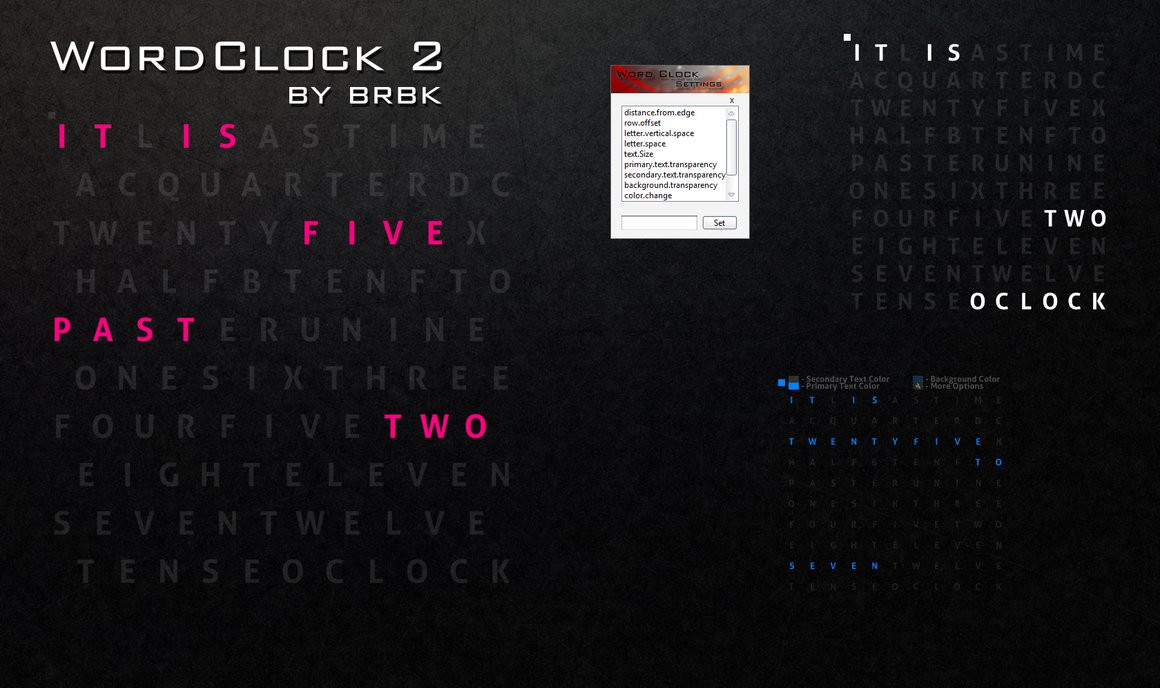
QQ Discontinued :CHmm... I just put together this skin, its sort of an upgrade to my older [link] Clock). You need [link] (Rainmeter 1.2) >_<
To change the text color click on the small square on the top left, from there u would be able to open Raincofig.
Also please install [link] RainRGB 4.0
Most of the skin is customizable through Rainconfig.
WordClock2 ALT is only compatible with Rainmeter 1.3
Credits:
Color Chooser Please Install by [link] (jsmorley).
I got some ideas from some of [link] (poiru) skins
Rainmeter skin config by [link] (fediaFedia)
omg thanks for the daily deviation >_< thanks alot.
Related content









Comments: 115


I really like this, but i cannot get the colour changer thing to work - even after i download that extra colorpicker addon

👍: 0 ⏩: 1
Actually, nevermind, i did a sys reboot and it fixed it up nice. Thanks!
👍: 0 ⏩: 0


Oh and I plan to use WordClock2 Alt for this.
Please respond =\
👍: 0 ⏩: 0
Hi, is it possible to scale this full-screen to a 1280x 1024 monitor screen?
If so can you tell me how to do it exactly?
Also what font have you used on the clock on your preview (left)
👍: 0 ⏩: 1

not sure about the font. and yea u can change around the font sizes and stuff to make it huge
👍: 0 ⏩: 0


can you make the same as this but a calander
so it says
it is the twenty seventh of the third two thousand and twelve
please
👍: 0 ⏩: 1


I don't know if you can change those things, but I just wanted to point it out just in case.
👍: 0 ⏩: 0
I love the skin, but there are some minor issues/annoyances
On some times I feel like it's missing a word.
Examples:
"It is quarter past twelve" instead of
"It is a quarter past twelve"
for times near 12:10 it says
"It is ten twelve" It seems like it should be
"It is ten past twelve"
Those are just the ones that I noticed. Only minor things, and I love the whole skin.
👍: 0 ⏩: 0

go into more options and change the font size
👍: 0 ⏩: 0

How the hell do i change color? I press the white/black boxes but nothing happens
👍: 0 ⏩: 1
install this RainRGB4.rmskin [link]
👍: 0 ⏩: 1
Oh thanks!
Sorry if i seemed too angry 
👍: 0 ⏩: 1
lol no prob, good to know that it solved the problem. i need to update that
👍: 0 ⏩: 2
-_- I never figured out how to do it so i changed the code instead
👍: 0 ⏩: 0
Even though it may fix the problem i haven't figured out how to use it yet xD
The instructions is a bit vague for someone who isn't exactly used to using code and stuff
👍: 0 ⏩: 0

uhhh just curious... i'm reading the description but i don't really know how to change the color..
👍: 0 ⏩: 0
one of the most coolest clocks i've seen for rain meter
👍: 0 ⏩: 0

Just wanted to let you know that in Rainmeter 2.1 r953, Two lines of code are creating logging problems over and over each second..
[MUpdate]
Measure=Calc
Formula=Counter % 2
IfAboveAction=!execute [!RainmeterHideMeter Sec][!RainmeterRedraw]
IfAboveValue=0
IfEqualAction=!execute [!RainmeterShowMeter Sec][!RainmeterRedraw]
IfEqualValue=0
disabled=#disable.square#
This section of code I changed to
[MUpdate]
Measure=Calc
disabled=#disable.square#
and the issues quit being logged.. Just wondering if this is a proper fix for the Config or if it needed to be fixed..
👍: 0 ⏩: 1
thanks for the heads up will look into it
👍: 0 ⏩: 1


how can I change the language? is there any way to do that ?
👍: 0 ⏩: 1
sorry there is no way to change the language currently as i only know english
👍: 0 ⏩: 1


im happy to know some1 thinks that
👍: 0 ⏩: 0


Very cool. Not even close to what I was looking for, but I think I'll have this instead.

👍: 0 ⏩: 0


This is awesome, reminds me of an actual version of this that could go in your house, very nice!
👍: 0 ⏩: 0

Dude there are some bugs that I fixed, and you may like to do as well, the the WorldClockALT.ini(which I think is the better version).
1)"PAST" doesn't show when the time is relative to "SEVEN". Not even in Secondary color.
2)"SEVEN" stays in Secondary color when it should be primary.
ps: I registered here just to tell you this, I make rainmeter skins too, but generally keep them to beautify my pc only
👍: 0 ⏩: 1
thanks for pointing that out i had 2 meters with the same name in the config. i reuploaded. 
👍: 0 ⏩: 0
bug! in the WorldClockALT. the 'seven' doesn't light up
👍: 0 ⏩: 0
| Next =>