HOME | DD
 Decadia — Mini FUR and HAIR Tutorial
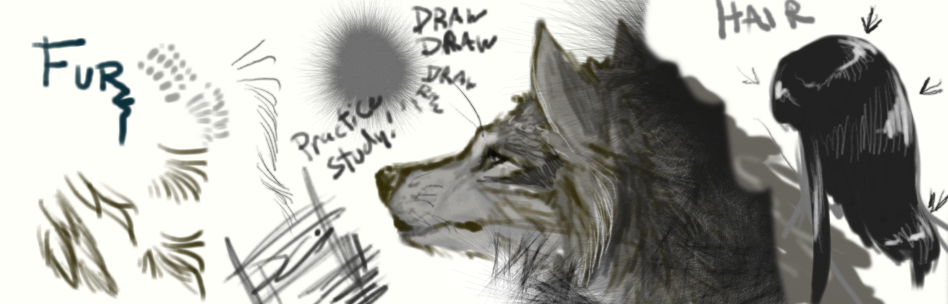
#anatomy #anime #draw #drawing #eye #eyes #fur #furry #hair #hot #hwo #photoshop #toturial #tutor #tutorial #tuturial #view #wolf #eyeeyes #hotto #sideview #wolfanime #drawdrawing #drawingwolf #furfurry #todraw #hairfur #hottodraw #helpphotoshop
Published: 2012-07-22 06:12:34 +0000 UTC; Views: 8465; Favourites: 138; Downloads: 0
Redirect to original
Description
Made with deviantART muroI felt its simple, short and understandable enough. xD
Its pretty much how I draw hair strokes most of the time.
There are other brushes that can help you get the results quicker
and if so, I recommend to use them too. Right now, single hair
strokes can help you learn the feel of how hair is.
----Pretty much I lay out how much length there will be.
----Then I can color it a solid color (not black or white).
((The reason for grey is because I can bring in and out contrast))
----For demonstration purposes I used neutral colors on Muro but
I can start this way in photoshop too.
((Using other colors is very similar with the exception that
you use Intesity of the color instead of tinting and other colors reflecting on it if any))
----Then I lay out where the lighter strokes and darker ones will be
with a medium sized brush.
The reason for medium is to get a quicker result.
----After that I refine with smaller strokes.
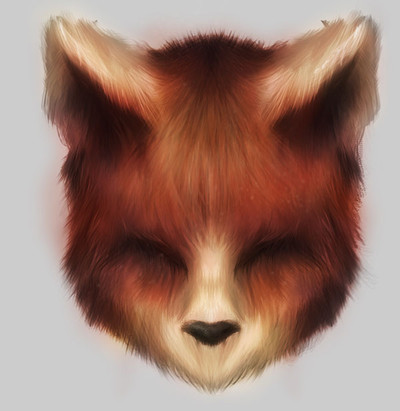
And then, I can make this face
Further tips:
Before drawing this I want you
to LEARN ANATOMY of whatever creature you draw and this can only do so much to help you. THERE IS MORE TO HAIR AND FUR. You would have to know how much in length, how much they reflect, how thick or thin, how straight or curly, how strong the hairs are, and even the direction of the hairs!
USE REFERENCE. Drawing from life and using refferences(pictures-photos) will help you grow as an artist!
KEEP DRAWING. I cannot stress this enough. Mileage in drawing will get you through major breakthroughs and evolutions of your artwork. No matter how much you watch other works or how others draw, you won't go anywhere without drawing it!
If you use this tutorial, comment! I would be happy to know how much it helped you!

Good luck

Related content



Comments: 16


This tutorial is great, I'm gonna use it for the next thing with fur that I draw
👍: 0 ⏩: 1

Yay! Thanks! May you learn alot from it! :3
👍: 0 ⏩: 0

so cool! absolutly adore, what cool tectures you can do with muro!
👍: 0 ⏩: 0


This is absolutely fantastic~!!! Im experimenting with digital drawing and the like, and i was able to draw the outline of my picture well enough but when it came to doing the block colour and then trying to replicate the hairstrokes i struggled a bit. But this has really helped 

👍: 0 ⏩: 1
Ah good good!
In the digital world, many artists use "layers" more efficiently. Since I
read that you are getting Photoshop, layers deffinietly come in handy.
Yes, drawing the outline is one thing, and drawing the hair to make it pop out is another. xD If you are struggling, thats good! It means you can accelerate your way up there with mileage.
Glad it helped!
👍: 0 ⏩: 0

This is so extremely helpful 
👍: 0 ⏩: 1
xD It might have been the flashplayer/shockwave/thing getting like that. D:
It lags especially when its in rabbit mode.
I'm glad it helped! I didn't cover the other stuff that you can do in photoshop but atleast its a good start. xD With your awesomeness I'm pretty
sure you will pick up your skillz quickly and do way better than this demo. xD
👍: 0 ⏩: 1
Probably, i've been having issues with it lately XD
daw, thanks~ XD I know it helped, I just need to fix the issue and rewatch it half a million times more so its hammered into my mind lol XD
👍: 0 ⏩: 1

