HOME | DD
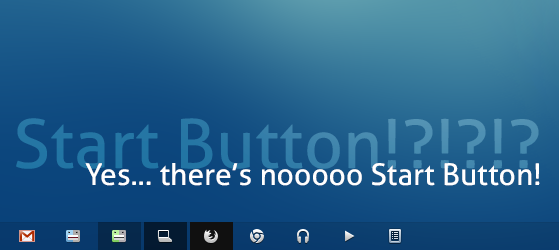
 dpcdpc11 — Remove Windows 7 Start Button Guide
Published: 2012-09-08 23:53:01 +0000 UTC; Views: 20934; Favourites: 36; Downloads: 1121
Redirect to original
Description
HOWTO REMOVE THE WINDOWS 7 START BUTTON GUIDE:The goal of this guide is to remove the Windows 7 Start Button and replace it with a Buttom Left Hot Corner to show the Start Menu.
1. Replace the Start Orb with the blank_start_orb.bmp in the package using Windows 7 Start Orb Changer by Kishan Bagaria.
Free Download available here: [link]
2. Remove the Start Button using the Start Killer application.
Free Download available here: [link]
3. Download and install the Hot Corners 2 application.
Free Download available here: [link]
4. Configure Hot Corners 2 to show the Start Menu when moving the mouse in the Bottom Left Corner:
Right Click the Hot Corners 2 system tray icon > Configure > Hot Corners >Bottom Left > select "Run.." and browse to select the "start.vbs" file from the package.
Now all you need to do is hover your mouse in the bottom left corner and the Start Menu will pop up.
You can also make the Start Menu pop up using the Windows Key on your keyboard.
That's it and... Enjoy!
Note: Windows 7 Visual Style used in the preview: Simplify Slim by dpcdpc11
Related content




Comments: 26


well it's right there on the right... the big Download button!
👍: 0 ⏩: 0


please read the main description... you have a link to the theme right there in the end!
👍: 0 ⏩: 0

Or you could put a heart in there to show your love
[link]

👍: 0 ⏩: 0

I cant seem to find the "start.vbs" on the package ive DL'ed from the link given. Need some help
👍: 0 ⏩: 1
that's because you have some paranoid antivirus that scanned the archive and deleted the start.vbs file.
👍: 0 ⏩: 0

Now I need your help in making the start hotspot of Win 8 to show the Win 7 start menu. Will that be possible with third-party start menus preferably Start8? If not, can you guide me how I can do it? Thanks.
👍: 0 ⏩: 1
I have no idea my friend... I currently use Win7. Ask on some Win8 forums.
👍: 0 ⏩: 0

LOL its funny....people that bitch about Windows 8 not having a start button....and then there is this...and I see people that actually like the idea to remove it on 7. Wow...I can't explain how crazy this logic is.
👍: 0 ⏩: 1
bitching about the lack of the start button is pretty silly... removing the start button may not be the best idea but I like the idea of just throwing your cursor down the left corner and make the start menu pop up.
I, on the other hand, hate the start screen and the metro crap forced on a working desktop setup ... the marriage between metro and desktop it's an ugly freaky mutant that messes up the workflow of many power users. was it really that hard to give the user upon installation to choose the purpose of their machine or something? and I bet there are other much more clever solutions out there.
I really don't see the benefits of upgrading to win8... I can't see how could window8 perform any better on my current machine?
👍: 0 ⏩: 0

You may fix your mouse but you'll never take of the Start bu... oh, wait

👍: 0 ⏩: 1
yeah, I'm pretty good at fixing stuff... now all I have left to fix is me!
👍: 0 ⏩: 0

Why would you want to do that? Especially in Seven... I also don't understand absence of start button in 8... but I don't plan on using that OS.
👍: 0 ⏩: 1
for my own 3 reasons:
- saving space on the taskbar
- design purpose
- skipping a click to access the Start Menu... making things easy.
I don't plan to use win8 either btw and this has nothing to do with win 8.
👍: 0 ⏩: 1
So how do you make the start appear?
👍: 0 ⏩: 1
uninstall StartKiller and restore the startOrb using [link]
Restart Windows!
👍: 0 ⏩: 0


Simplify Slim is one of the best themes I've used this year. I can't find anything to complain about, and that's rare for me, lol. I love the hidden start menu too, super awesome.
👍: 0 ⏩: 1

Welcome... hope you managed to use the guide!
👍: 0 ⏩: 0