HOME | DD
 DraconianRain — Clip Studio Animation Mini Tutorial Hierarchy
Published: 2016-03-24 22:09:29 +0000 UTC; Views: 4850; Favourites: 35; Downloads: 0
Redirect to original
Description
body div#devskin0 hr { }
I've been promising something more indepth so here it is though there's so much more to talk about I'm going to keep this particular tutorial short and as to the point as I can for a bigger "fuller" tutorial.
HeirarchyHeirarchy is the most important feature in ANY digital art program. It effects everything from layer clipping to hiding and unhiding portions of art with layers above and below. Taking this into consideration, the Animation folders especially, are extremely fussy when it comes to heirarchy. Thus the importance of planning.
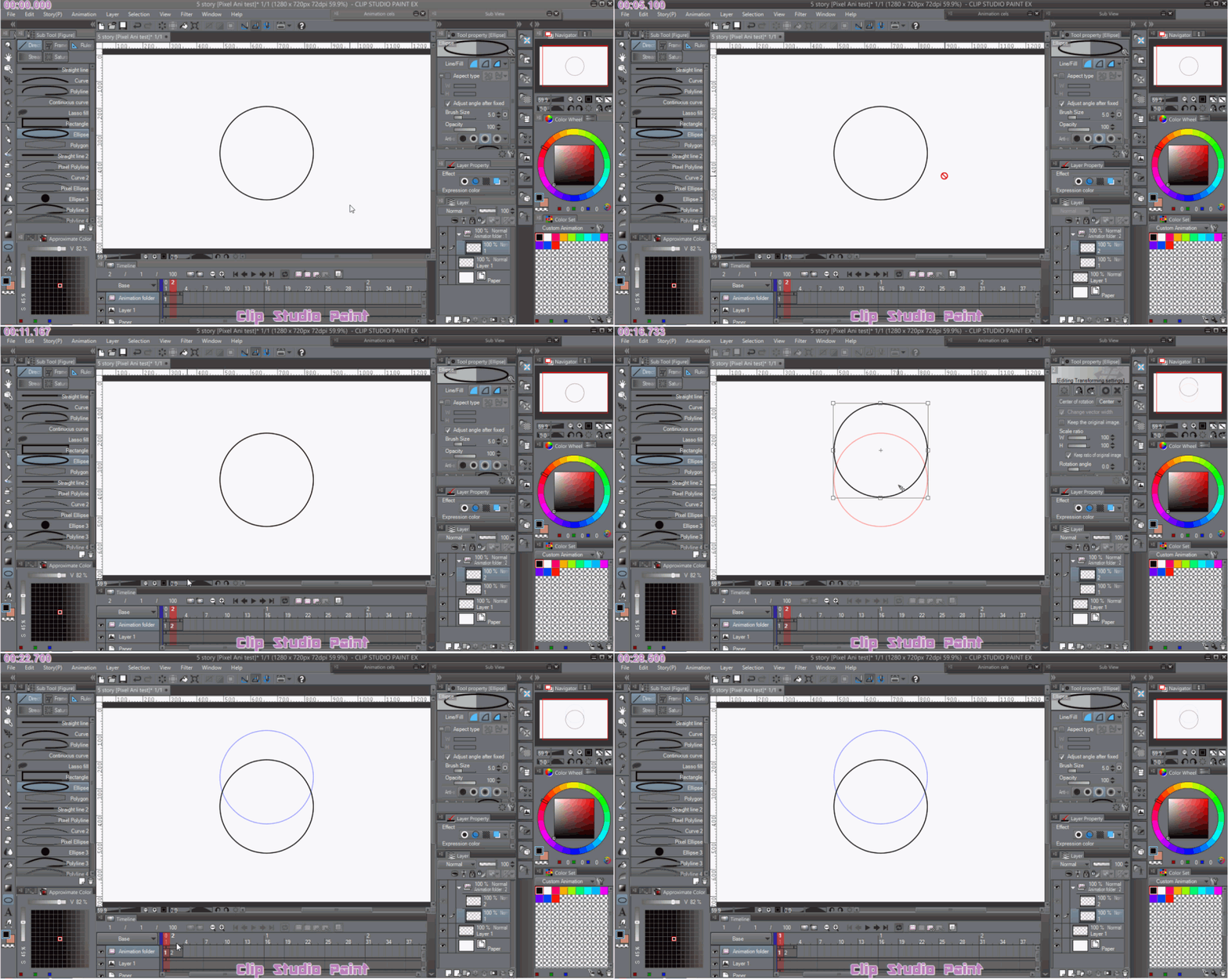
Specifying FramesIf you do not specify your frame in the timeline, you can NOT edit your animation. Please view this deviation to see what I am talking about.
This is going to happen or become important when you duplicate your layers or grouping folders inside your animation and you think everything is lost. I showed this exact issue in the above tutorial.
Hierarchy and Specifying Frames: What's the best way?
The best habit to get into is to have two animation folders or 3. If you are using three, have the bottom folder for storyboarding. Have the middle one for sketching your draft frames to the timing you desire and your top folder for your inking and colouring. If you're using two then have the sketch below and inks on top.
You should also consider creating a separate folder on the very base of your hierarchy for your background, animated or not.
In the youtube video at the top of this page, it acts as if the first two planning and drafting folders were already done. It was specifically aimed at inking and colouring.
A great feature in clip is once you set up your grouping folder, the next one you add, adds the same amount and type of layers and if you add more layers, it adds a an extra layer in the next new grouping folder so keep an eye on that.
So for example like in my video I had a raster layer for colouring, a vector layer for my lineart for easy re-adjustments, incase anything should happen so I wouldn't have to redraw it (I suggest you get into the habit of vector layers for inking hand drawn animation, you will definitely make a lot of frustrating mistakes) and I also had a vector layer for my animated shadows and highlights markup. Again same reason. It's easier to edit a point than it is to constantly redraw a section.
If you don't like to animate your shadows this way I do recommend trying out the use of clipping layers above your colour layer for animating shadows but it can get really confusing with the onion skin if you don't have some kind of boundaries to colour within and then you can get very confused.
Setting up my animation grouping folder layers this way allowed me to ink and colour quickly. I made sure my bucket tool was set to multilayer referencing and once one side was coloured, I hid the shadow layer. I generally like to add the shadow layer in a folder of it's own for a bulk hide but I have found out the hard way that I often make mistakes so I've found it easier to hide and edit one frame at a time and edit them one at a time but how you handle it, is entirely up to you. Once one side is coloured it's a good idea to hide the reference lines so when you colour the other side, it colours flawlessly without gaps.
Having your folders and layers in a sensible hierarchy will allow you to animate easily and cleanly but there will be times where you need to duplicate your animation cel layers/grouping folder and specify it. Just make sure you go to your timeline, right click and enable the layer on the timeline.
The most important thing to note is if you don't use grouping folders inside the animation folder you will not be able to use them like this. If there's no grouping folder clip considers the animation as a single frame. If you use grouping folders with multiple layers, everything in that folder is considered 1 animation cel. That's something a lot of beginners seem to be struggling with.
In short the best way is the neatest way and pre planning. I highly recommend writing out what you're going to animate and if you're a beginner you should still write out what you are trying to achieve, make a storyboard, even if it's just key poses for a 2 second clip and pay close attention to your layer hierarchy.
If you do all of this in the beginning, you'll have a lot less trouble and frustration later. And if you can remember to specify your animation layers you'll be fine.
Also a quick note, anything outside the animation folder will not animate and is not recognised by clip as anything to do with animation. It will just treat it as a regular painting. So animation in animation folders, non animation outside the animation folder.
Related content




Comments: 18

is EX worth it? i have pro but to upgrade it for 4x as much as i got it for... doesn't seem right, what do you think?
👍: 0 ⏩: 1

Yes absolutely worth it if we are talking about creating animation or PDF manga/comics. There's a variety of addons and tools exclusive to EX that Pro simply doesn't have and as far as cost goes it frequently goes on sale at 60% off so I recommend following their twitter if EX is something worth following. The other reason why I say it is worth it is because they offer free upgrages which most programs don't these days.
If you are looking for an alternative to animate with you could try Krita or OpenToonz (freeware) but they are buggy. Also EX is extremely stable just like pro but it's also a little harder on your system with all the extra's it has. Personally I use it for my animations and I like that I don't need flash or after effects. I hate needing multiple programs for one project and upgrading to EX was the best choice I made.
👍: 0 ⏩: 1
ahh yeah, i think it would be a nifty animating tool, but i already get problems as is with a lot of my art programs ps and flash and i think ex being "heavy" would kind of defeat that purpose? but i understand entirely what you mean, i hate program hopping -___- but if i once i have a more stable system, i will definitely look into it. thank you.
👍: 0 ⏩: 1
Sorry for the late reply.
It's really amazing to animate with. Simple yet complex enough to not need after effects for certain lighting techniques and blurring. That part was important for me. AE is too bulky for my PC to handle and I only ever used it for a gradient overlay kind of like Persona anime style but not quite. Compared to Flash EX isn't as heavy but you notice it more when you start using the 3D mannequins or models or really large pages or multiple page files. The beauty of each version of clip is how much ram you let it use really effects it's performance and even EX can run pretty smooth. It just depends one what you are trying to use it for.
Honestly as far as animation goes, other than GraphicsGale and AzDrawing2 it doesn't lag and that's extremely important to me. Though exporting it has frozen but that's nothing new to me because I badly need a new PC.
👍: 0 ⏩: 1
yeah maybe it wont be so bad for me cause my csp has never crashed on me before :0 how much did you get ex when it was on sale and did you upgrade or buy it on its own?
👍: 0 ⏩: 1
That's true and true for me as well. Mine will only crash somtimes exporting gifs and using 3D but my files and image sizes are enormous since I do everything large in case I decide to start printing again.
Well first I had mine bundled with my tablet but it was only valid for 1yr. Then I bought Pro on sale for $15 and I upgraded when it was on sale for $85 dollars but upgrading is cheaper now than when it first was made available. Back when I was going to upgrade it was around $200 to upgrade so I got lucky when it was on sale. I really recommend following their twitter or Facebook page because it goes on sale at 60% off frequently. I've been using it for years now.
👍: 0 ⏩: 0

I don't want to seem like an idiot here, but, I cant increase the length of my timeline beyond about three seconds. Am I doing something wrong? I asked this in a related forum and was sent a link leading to a page on how to set up a scanner.
👍: 0 ⏩: 1
It's ok, it's not a stupid question at all. The creators aren't very clear about this. I assume you are using Clip Studio Pro? Pro can't animate longer than about 3 seconds. Clip Studio Paint XD can go as high as 180,000 frames. If you do have EX please note me and we can use something like Join.me to figure it out together.
Also I'm really sorry to hear that. Some people are really rude or don't read your question at all when it comes to animation. Some still insist on using pencil and paper and a scanner as if we all have access to a multitude of traditional supplies. If you have more questions I'm willing to help. I just might be slow to respond some days.
👍: 0 ⏩: 1
thanks, I sort of suspected this might be the case. EX seems to be a teeny bit pricy right now, maybe there will be some kind of discount upgrade option I can use later.
As for the rudeness. turns out the guy was a spammer who wanted to promote his own tutorials. two or three other people sugested reinstalling, one claimed it was copyright protection and that I was a pirate, so far noones said the same thing as you. i'm tempted to just not use that forum anymore.
👍: 0 ⏩: 1
I am so sorry to hear that. It's limitation is listed but it's somewhat hidden and unclear and people auto assume everyone is a pirate these days.
And definitely wait. Follow their twitter. The upgrade frequently goes on sale for 60% off. That's how I got mine.
If you have questions you can always ask me. There's little I don't know about clip. I think There's two things I don't know how to use in the whole program.
👍: 0 ⏩: 1
My main problem right now is a matter of practice and turning the pressure sensitivity right down on my tablet. clip studio seems to have a bit of a twitchy sensitivity thing going on at higher levels, but at the lower settings, lives come out smooth and not blobby at all.
👍: 0 ⏩: 1
Sounds like you need to adjust the memory allowance and overall sensitivity in the preferences settings. I had that happen before with a Huion tablet. When's the last time you updated your tablet drivers? That sometimes helps.
👍: 0 ⏩: 1
yeah, its a huion. I updated it a few weeks ago, they had to patch the bizarre thing my tablet was doing to vlc media player.
👍: 0 ⏩: 1
I see. I remember having similar happen to me. I recommend going into clips preferences in the edit or file menu and changing how much ram memory it's using and the default pressure settings. It uses a curve type thing. If you change these two together, it should help improve your user experience. Also changing the stabilizer settings. Honestly I use to use LazyNezumi. I used it when it was free and bought it when it went on sale. It's truely the best for this annoying tablet issue. Happens with my intuos from time to time in other drawing apps.
👍: 0 ⏩: 0


I looked it up and it was around $50 for a flat fee. If I like it enough along with Krita I will probably use those for quick animations. I will still use adobe programs paying for a subscription since I love their stuff ($20 a month) But it's nice to know that I have backup programs in case something happens that I can't pay anymore.
👍: 0 ⏩: 1
Yeah and they frequently go on sale for $15 for Pro. Worthwhile. I followed their twitter and got mine and my upgrade on sale. I use adobe too along side it. At the end of the day it's just a tool. Just like paints and pencils. One thing for one job, the other for something else. Also that's true. Clip can do a lot of things better than photoshop just like photoshop can do a lot of things better than Clip. I really enjoy that Pro or EX has 3D mannequins. I like that I have a poseable reference while I animate. Something I always need.
👍: 0 ⏩: 0