HOME | DD
 DzaDze — Mountain Shell
Published: 2012-09-17 07:48:39 +0000 UTC; Views: 67621; Favourites: 273; Downloads: 12933
Redirect to original
Description
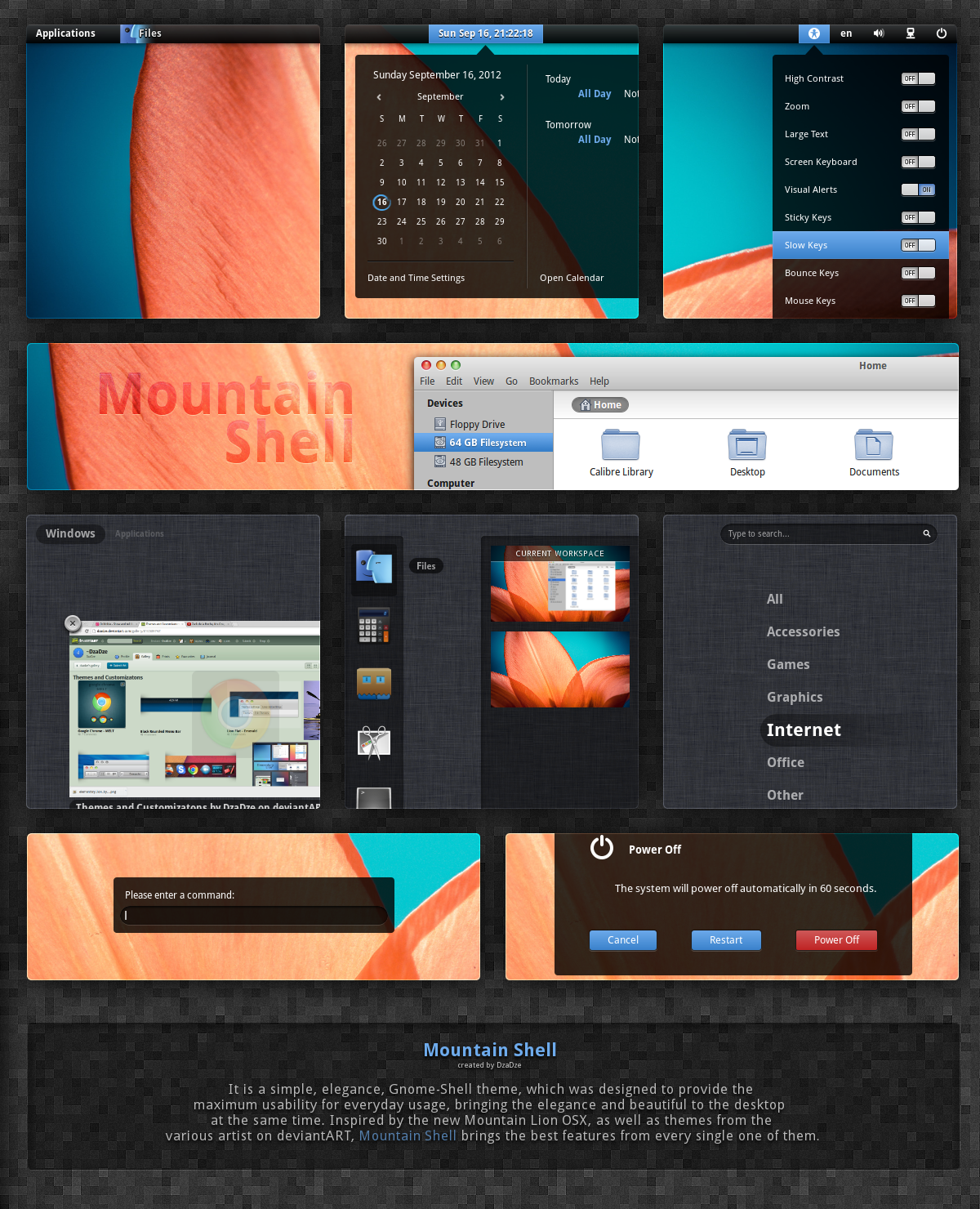
Mountain Shell - Theme for Gnome-ShellIt is a simple, elegance, perfect Gnome-Shell theme,
which was designed to provide the maximum usability for everyday usage,
bringing the elegance and beautiful to the desktop at the same time.
Inspired (most of the elements) by the new Mountain Lion OSX,
as well as themes and other elements from the various artist on deviantART.
Mountain Shell brings the best features from every single one of them.
______________________________________________________________________________
Including:
- Minimalistic, simple, beautiful, elegant look
- New pane
- New switch ON/OF buttons
- OS X Mountain Lion Overview/Workspaces look
- Simple, fast, responsive, beautiful menu selection
- New arrow workspace switch
- New calendar current day selection
& some more new good looking elements.
Extra: GTK Theme [link]
(Adwaita Cupertino L modified by Me... and thx to Delta909 for the traffic lights).
______________________________________________________________________________
Installation:
Extract the downloaded folder into /usr/share/themes/
... or into home/.themes/
If the workspace background does not fit your monitor,
i have included various background sizes.
They are in the theme folder (Mountain Shell/gnome-shell/Workspace Backgrounds/).
All you have to do is pick background that fits your monitor resolution
and replace the current one (Mountain Shell/gnome-shell/worspace-backround.png).
If you have any suggestion, please write them down... just to make the theme more beautiful.
And... sure favs are welcomed

Related content









Comments: 107


hey man can you help me out?
I download two of your themes, this and one more...
Actually I am new to linux I don't really know much, I managed to install gnome in ubuntu 13.10
I can change the upper bar by choosing theme but I can not change the overall texture and close, maximize buttons.
I downloaded the gtk theme mentioned and pasted the extracted folder it in the /usr/share/theme/ folder, tweaker app shows the name and when I choose it, it does not change the default look, ie not red, green, blue buttons for close, maximize and minimize.
and I did the same for the icons, extracted and pasted in the /usr/share/themes folder but both of these things are not working, please help

👍: 0 ⏩: 0

Amazing! This needs to be updated! because i only get the taskbar.. and the windows looks so bad ;(
👍: 0 ⏩: 0

Nice work...Which Gnome version does this work with 3.4 ? will it work with 3,8?
👍: 0 ⏩: 0


i cant see the text in the themem i think...
1) i dont see "Applications" in top right corner
2) dont see application names when i hover over them
3) dont see "windows" and "applications" text after i have hovered over the top right corner
instead i see blobs of background
how do i fix this.. im using debian 7.1 with GNOME Shell 3.4.2
👍: 0 ⏩: 0



Where can I get that pixel-wallpaper you use as backdrop in your preview up there ?
👍: 0 ⏩: 0

Beautiful theme. Unfortunately it doesn't seem to display notifications properly on my system
ArchLinux with Gnome 3.6
👍: 0 ⏩: 0

i have not used linux > i hope soon to do and i need some help for understand some things, but anyway> this work looks very good designed and inspired> congratulations.
============
👍: 0 ⏩: 0


How do you get your nautilus to look like that? This is what mine looks like: [link]
Nautilus: 3.4.2
GTK+ 3.0: 3.4.2
👍: 0 ⏩: 0


Hey man, great work!
however, I'm seeing the nautilus side bar with white background, do you know what can i change to make it look like your screenshot ?
thanks!
👍: 0 ⏩: 1

Thank you.
What gtk are you using ?
👍: 0 ⏩: 1
GTK3 - Gnome Shell - Ubuntu 12.04
👍: 0 ⏩: 0


Looks good
I noticed, though, that you're using a pixmap for the overview background. My screen was too large for it, so it didn't cover the whole screen. I would suggest using a tileable image and setting it the background-image to repeat mode, then it should cover it all.
👍: 0 ⏩: 1
background-repeat doesn't work... so you have to replace the workspace background with the monitor resolution.. if you can't do that.. just tell me the monitor resolution i will make the linen background.
👍: 0 ⏩: 1
It doesn't work? :/
It's ok, I don't need it, I usually use whatever theme I'm working on at the time anyway. I would suggest, though, that you make the background larger, so it will fill bigger screens, if the repeat doesn't work.
👍: 0 ⏩: 1
I have included other sizes..
how big do you think ?
👍: 0 ⏩: 1
Probably 2560x1600. That's the biggest I ever do my wallpapers in.
👍: 0 ⏩: 1
Yes, i had included 2560x1600 in the theme folder, and other screen sizes.
All you need is written in the description.
👍: 0 ⏩: 1
Ah. Okay, then I would suggest only using that background size, since it should fit other sizes, too, and would lessen the download.
👍: 0 ⏩: 0

gnome 3.6 support?
Icons?
GDM 3.6?
Perfect theme! If only I could have a whole unified system theme (gdm, gtk, gnome-shell, icons and gtk...) it could be my default settings for ALWAYS!
Thanks dude
👍: 0 ⏩: 1
Not fully functional on 3.6...
Icons will be released soon...
Gtk - you have it in the description.
And, thank you !
👍: 0 ⏩: 1
But are you planning to port it into 3.6? What about GDM (Ithink it's just the top bar what should change :S)? I can wait until them
👍: 0 ⏩: 1
+1000000000000000000000000000000000000000
👍: 0 ⏩: 0

I'm user of KDE with Bespin, but this looks awesome!!
A favs 

👍: 0 ⏩: 1

This is very nice!
Mind if i ask for links for the two grey backgrounds, the "cloth" type one seen in the pic of the search area, and the general grey "squares" background! I would like to make use of them on my desktop!
👍: 0 ⏩: 1
Thank you.
The squared one [link]
... and the grey background is included in the theme folder.
👍: 0 ⏩: 0

Hey man... really awesome high quality work!
Do you mind to tell me what is the iconset that you're using here?
Thanks!
👍: 0 ⏩: 1
| Next =>