HOME | DD
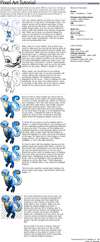
 griffsnuff — surrounded by blocks tutorial

Published: 2013-02-09 14:35:45 +0000 UTC; Views: 38965; Favourites: 2386; Downloads: 216
Redirect to original
Description
A lot of people were asking for this so why not x3.This was made in photoshop
I cant help with other programs.
Atom (character) belongs to me.
Related content




Comments: 218


For those who don't have photoshop, the "pixelate" option usually works if you use large sized pixels.
👍: 0 ⏩: 0

for anybody who is curious, I'm 80% sure this technique works for Sai and FireAlpaca, as well as Photoshop! (I'm not sure how exactly one would do it though XD )
👍: 0 ⏩: 1

FireAlpaca Addition: sta.sh/0c4ow8hfwrw
👍: 0 ⏩: 0


probably. it works on FireAlpaca(I think), so it should work on Sai.
👍: 0 ⏩: 0

Would you mind if I did commissions using this effect? ;O; I've used them on two drawings (fav.me/d6pqeb2 fav.me/d6qpt1o ) already and I was planning on doing commissions for the group %Elementiiae for these as well as point commissions if they are well recieved. Thanks for your input; I just wanted to be sure before I began! 8'D
👍: 0 ⏩: 1


Thanks! This was really helpful
You have really great tutorials
👍: 0 ⏩: 0

This is awsome! I was always curious on how it was done.
👍: 0 ⏩: 0


Uhh Im new to PS
Where can I find this "Filter" tool? ;3;
👍: 0 ⏩: 1
I got PS cs5
I cant find it TT^TT
👍: 0 ⏩: 1

at the top bar were it says file and such it should say filter to, if it doesnt I cant help you xD
👍: 0 ⏩: 1
Oh mai god I gound it ;o;
Thank you soo much ^^
👍: 0 ⏩: 0


had to try it out at least once [link]
thanks agian for the tutorial
👍: 0 ⏩: 0

xD Not sure what you mean by "normal" photoshop, seeing all photoshops are normal?
👍: 0 ⏩: 1


I tried: [link]
Thank for the tutorial. It helps me lots.
👍: 0 ⏩: 0


used it for my beloved snowbell [link] 
thanks for sharing this!!!!!!!!!!!!!
👍: 0 ⏩: 0

Finally found out how to do it [link] Thanks :'D
👍: 0 ⏩: 1
SHoooot I mean [link] xD
👍: 0 ⏩: 0

This works on GIMP, too.
👍: 0 ⏩: 0

I was planning to try this on my own, but the tutorial is very helpful C:
👍: 0 ⏩: 0


I tried it here: [link]
It looks really cool, thanks!
👍: 0 ⏩: 0

I tried my best: [link]
MAny thanks for this tutorial, I'd never had found out by myself

👍: 0 ⏩: 0

Thank you very much, don't have photoshop, but figured out how to do it in gimp, and how to do lots of other things to boot. 
👍: 0 ⏩: 0


Thanks for the tip~ I tried it out here: [link]
👍: 0 ⏩: 0


| Next =>