HOME | DD
 KeybrdCowboy — Taskbar Transparency
Published: 2013-03-11 22:45:31 +0000 UTC; Views: 1481; Favourites: 5; Downloads: 272
Redirect to original
Description
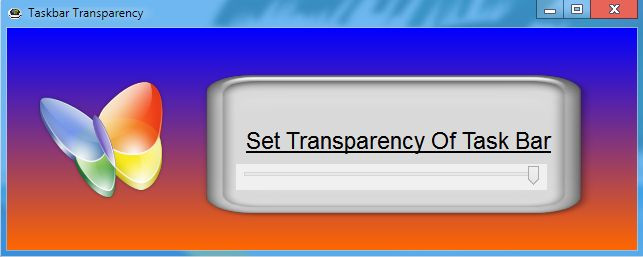
Taskbar TransparencyRelated content






Comments: 17


I updated the Icon
and the made the same Icon
show up on the Desktop
👍: 0 ⏩: 0

Hmm... That butterfly... I have seen it somewhere before... I should know where, but I just cant remember...
👍: 0 ⏩: 1
It comes with Autoplay Media Studio
👍: 0 ⏩: 1
Maybe. I remember it from my childhood I think. Back when Windows MSN was popular. I think that's where I saw it
👍: 0 ⏩: 1
That Arrow next to the buttons is from my TeamViewer
You should not have that showing
👍: 0 ⏩: 0
they are there... In this theme I am using they don't show... they will show on your pc
👍: 0 ⏩: 1
I changed my theme... It should look better now.
👍: 0 ⏩: 0
nice comment... but that's like saying a Dodge Dart is not a car...
looks like a car to me... it's a Windows Utility...For Skins and Themes
... looks like a Windows Utility to me...
👍: 0 ⏩: 1

i just said that, because it had no exit, minimize, or full screen buttons on the side, dude
👍: 0 ⏩: 1
That's because he's using a skin or theme or what's-it-called-again... I use one too on my Windows7 and i've hidden the symbols representing the X the _ and the square to close, minimize and maximize. I only have the buttons which is fine since I know what each button do. When it's downloaded to your computer you'll get the normal and standard Windows7 buttons.
👍: 0 ⏩: 1
Not sure how to understand your question..
If you're wondering why I've changed my theme on the buttons, It's because I like customizing my desktop. If you head over to a group like deskmodder-de you'll see some more of that stuff. Most of the time, the custom desktop is way more good-looking than the standard win7 desktop.
If you're wondering why you'll get the normal standard buttons, that's because it's a program that makes use of the current theme you have. It's like my web browser. Right now I'm using one theme and so, the buttons looks like how I described them earlier. But if I change it to standard theme, my web browsers buttons looks like the standard buttons. It's all a matter of how a person wants their computer desktop to look like.
I'm guessing that you're using the normal win7 theme yes? Then the program will make use of that theme, and have it's buttons appear like the theme have designed the buttons...
👍: 0 ⏩: 1
i mean, why would you remove your exit and minimmize buttons, there really usefull, i just dont see the logic in it
👍: 0 ⏩: 2
The buttons are still there. The X and the _ logo arent but the button itself is there.
👍: 0 ⏩: 0
just because you don't see them... don't mean they weren't there... you just have to mouse over in that area and they would become visible... It's like you have been living under a rock... like that guy that didn't know he could get 15% off on his car ins.
👍: 0 ⏩: 0