HOME | DD
 moondragonwings — On the Rocks 2

#cove #digitaldrawing #fantasy #male #merman #ocean #rainbow #sea #ocsoriginalcharacter #multicolored_body
Published: 2009-02-17 21:55:50 +0000 UTC; Views: 5336; Favourites: 120; Downloads: 0
Redirect to original
Description
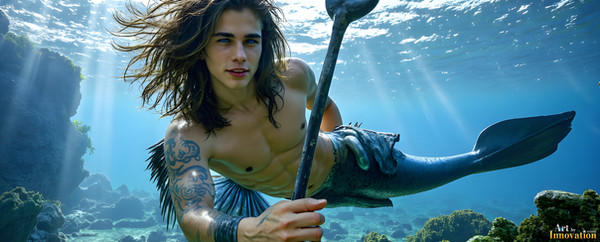
For the ladies out there - a merman - Collin Ladd, He didn't start out as a merman.Another of Collin
Related content




Comments: 59

I really like the exotic coloring on the tail and the fin down the back of the tail! Great job on the webbed fingers, as well!!
👍: 0 ⏩: 1

I'm glad you like this, I'm addicted to bright, saturated colors!
👍: 0 ⏩: 0


I just go crazy with bright colors!
👍: 0 ⏩: 0

Thanks I love bright colors!
👍: 0 ⏩: 0
Actually, my first digital rework of a hand colored lineart!
👍: 0 ⏩: 1

cool i cant do stuff like that
👍: 0 ⏩: 1
Creativity (and depression) runs in my family!
👍: 0 ⏩: 1
yeah i understand i am pretty depressed at times too i need to learn to be more creative though
👍: 0 ⏩: 1
Several of these latest Equine Manips were unplanned... I just cut out the horse, played with the colors, added marking, horns wings on the spur of the moment,and dropped them into a background that felt right... without a plan...the flow can be rewarding and the results better than you thought they'ed be!
👍: 0 ⏩: 1
most of my stuff is like that but during my stay on here i pick up ideas and save stock images and then decide what i want to use. i really like my wandering sprite photo and lust and a waterfall
👍: 0 ⏩: 1
I collect stock too! Two of my favorite stock providers left to sell their stock... 
👍: 0 ⏩: 1
thats pretty cool and yeah da makes all the money if you sell your print on here. i have alot of my photos for sale not that they are good enough or that i expect to sell them but i pride my work and dont want role players or other fans stealing it so i have to make a print so i can put a watermark on my photos i only do that for my best pieces of work im about to take one off of prints but i dont know how to get the watermark without submitting a print
👍: 0 ⏩: 1
Go to the piece you want to watermark, the page with all the comments and stats, select Edit Print, there will be an option to add a watermark, it's just a single line of type with a check box in front of it, just under the box for allowing downloads. These boxes also show up below your art when submitting, it's not there at first, but shows up later...
👍: 0 ⏩: 1
ive seen that so i dont need to submit it as a print? can you tell me how to delete prints but still keep the artwork?
👍: 0 ⏩: 1
Select the Prints Icon next to your gallery button,select the artwork you want to delete from the print list, after the page loads there are 4 Icons to the left, select the bottom one, you will get a page of text, select the heading "your products", there will be a list of all your available prints, select any and all artworks you wish to delete, then at the bottom of the list is a box "deactivate selected prints" select that and you are done! I had to rediscover how to do this, it's not something that they made easy!
👍: 0 ⏩: 1
wow lol and i did figure it out thank you!
👍: 0 ⏩: 1
Both the watermark and the print deactivation?
👍: 0 ⏩: 1
Just go to the artworkin your gallery, select it, select edit deviation, you'll see a place to change the title, another to change the category, a list of all the groups that you have entered the deviation (if any) A place to change which Art file, "full view size", and a box with a dropdown list of options, then below that check "add watermark", below that, "allow download" unselect if checked(do not select unless the art is stock) go to the bottom and save changes.
👍: 0 ⏩: 1
there is one more thing i want to know how to do i see lots of people making custom slide shows i want a slide show for my gifts but i only know how to do featured favorites in the slideshow i want a custom one i dont know how to change the name and i even tried to take the emedded link from the viewing page but when i pasted it in my custom box i got bldfsldfkslkdf.. do you know how i can make this custom slide show instead of showing off my favorites?
👍: 0 ⏩: 1
Never done a Slide show, but I think you use a "Collection" Widget. First create a special collection in your gallery (If you don't already have one) for Gifts, it should show up in the list of collections in the edit Widgit screen. select it and slideshow, that should be it...I think...
👍: 0 ⏩: 1
it didnt work when i went to collections it didnt show all my albums it only shows my favorites there for only lets me put my favorits in a slide show
👍: 0 ⏩: 2
Uh, after you fave them make the collection in your faves page, if that wasn't clear...
👍: 0 ⏩: 1
Try the help/FAQ link at the bottom of your profile page...waaay down at the very bottom......
👍: 0 ⏩: 1
hmm ok 
👍: 0 ⏩: 1
Getting by, Did The Help folks help?
👍: 0 ⏩: 1
no im having a terrible day

👍: 0 ⏩: 1
Need to talk about it?
👍: 0 ⏩: 0
Fave all the gift arts, then put them in a collection of gift arts, then Edit and add the widget.
👍: 0 ⏩: 1
oooh let me try that thanks!
👍: 0 ⏩: 0


Nice I see what you mean about long tails very nice.
👍: 0 ⏩: 1

Stunning! The colors are amazing! The entire feel of the piece is breathtaking!
👍: 0 ⏩: 1
Wow Thank you! The same Merman is seen in 'Traveling Companions'
👍: 0 ⏩: 0

Wow, what COLORS! He's really impressive.
Favorited,
Jayim-Duinara
👍: 0 ⏩: 1

Thanks!It took lots of time, i was only just astarting to learn PSP7 and knew nothing of layers, but made up my own way to get what I wanted, I'm still jealous of you talent!
👍: 0 ⏩: 1

thanks a lot too, im flattered

👍: 0 ⏩: 1
Your guys are really cute...
👍: 0 ⏩: 0

Ooh, he's very cute! I really like how you did his hair. It looks just like colorful flowing water, IMO.
👍: 0 ⏩: 1
| Next =>