HOME | DD
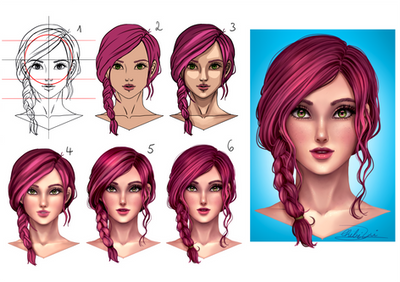
 ryky — face coloring tutorial

#coloring #face #ryky #tutorial #tutorials #painttoolsai #adobephotoshop #howtodraw #stepbystep
Published: 2015-04-02 19:04:00 +0000 UTC; Views: 161822; Favourites: 6135; Downloads: 2686
Redirect to original
Description
face coloring tutorialWATCH me for MORE TUTORIALS , BRUSHES ,UNFINISHED WORK and REFERENCES
add me to your friendlist on facebook or just follow me
 www.facebook.com/benjamin.cehe…
Related content



Comments: 80

👍: 0 ⏩: 0

👍: 0 ⏩: 0

👍: 0 ⏩: 0


If you could do more face tutorials that are closer would be cool.
👍: 0 ⏩: 1

click on the picture to zoom in
👍: 0 ⏩: 0

I just want to say that I really love your work ! I usually draw traditionally and I just got a tablet and Im kind of struggling but I looked at your tutorials and it really helped me a whole lot with the coloring stage ! :3
👍: 0 ⏩: 0


do you paint with a layer over the lineart ? how did the lineart go from black to brown
👍: 0 ⏩: 0


Idk how I missed this but its very helpful. thankyou for posting
👍: 0 ⏩: 0

i like it so much.
i have one too!it not so much but
take a look. i hope that help someone^^
👍: 0 ⏩: 0

That is a very nice step-by-step tutorial. Thank you very much for providing such great help!
👍: 0 ⏩: 0

OMG its so beautiful and helpful! THANKS FOR THIS TUTORIAL!!
👍: 0 ⏩: 0

Give this person a BELL'S, Thank you for the help. really helps alot
👍: 0 ⏩: 0

what application did you use on this tutorial?
👍: 0 ⏩: 2

There are a lot of applications that can do what this tutorial is teaching ^^ you just have to take the basic concepts of how to shade which colors and then how to soflty blend them. I do the same thing in this tutorial using adobe photoshop. but a popular program here on dA is paint tool SAI. hope that was helpful

👍: 0 ⏩: 0


Well, I don't know if it's a bad thing, really, but I certainly dislike when the end result look absolutely nothing like the original line art. The feeling I get from the two are just completely different, especially if I look at the lips. It's not bad technique with the colouring or anything like that, though. That was the only thing that bothered me, and I bet this helped a lot of people.
👍: 0 ⏩: 1

That tends to happen. Lineart is only really points out the prominent features, whereas when colouring realistically you have to include the whole deal, so those prominent features don't stick out nearly as much anymore
👍: 0 ⏩: 0

This looks awesome!
question, are all colors in the same layer? Do you use blending layers? And do you have video tutorials?
👍: 0 ⏩: 0


How do you know which colors to choose for the face..?
👍: 0 ⏩: 1
| Next =>