HOME | DD
 SaldaeanFarmgirl — Eye Manipulation Tutorial

Published: 2007-05-27 21:56:26 +0000 UTC; Views: 21013; Favourites: 371; Downloads: 940
Redirect to original
Description
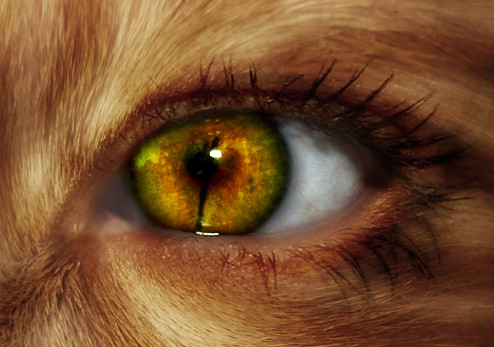
I am self taught, so if there are better ways to do it I really don't care. Also, know that it takes practice to do this. I've been doing eye manipulation for about a year, so for me its a piece of cake (if not the best you've seen). The first time I did it though, it came out looking like someone put on a purple colored contact.Stock used:
Related content




Comments: 86

please see my new artwork. maybe you will like it
Its about six pack btw ^_^ 
👍: 0 ⏩: 0

OMG thank you!!! I always wondered how people got the eyes to look just right when messing with PS
Now i can do it :'D
👍: 0 ⏩: 0

Thank you for this! I'm a new manipulator and looking through tutorials this one is so simple. I like them simple it's easier for us noobs to use! <3 If I use this I will surely post it to let you see my results!
👍: 0 ⏩: 1

Thanks glad it was useful.
👍: 0 ⏩: 0

I used photoshop v.7 at the time I think. With most photoshop versions you can follow this tutorial exactly. Other programs such as gimp and corel I've seen used but you'd need to adapt the tutorial. I'm not familiar with anything other that photoshop.
👍: 0 ⏩: 1

do u have to buy photoshop? or is it a downloadable thing? i'm not familiar with most of it.
👍: 0 ⏩: 1
You have to buy it. You can get some of the older versions second hand cheap if you know where to look. Photoshop CS4 is the new version (and if I don't say its mighty expensive). Its a program by Adobe (the same people who make Adobe Reader).
👍: 0 ⏩: 1
ooh, okay
👍: 0 ⏩: 1


Welcome! Great job.
👍: 0 ⏩: 0
Your welcome. Great job.
👍: 0 ⏩: 0

Thanks for the tut. I didn't even know variations existed. A great help with loads of things. Thanks again.
👍: 0 ⏩: 1
Your welcome. Hope it helps you make some awesome manips.
👍: 0 ⏩: 0

im browsing around for different manip tuts to get better at manips and i came across yours thanks for posting i hope to practice this and get good at manips
👍: 0 ⏩: 1
Thank you, good luck.
👍: 0 ⏩: 0

Thank you!
you helped me. Do you whant to see da outcome?
👍: 0 ⏩: 1
Certainly! I'm glad this helped you out.
👍: 0 ⏩: 1
👍: 0 ⏩: 1
Great job! Remember also that it is good to use different eyes for every few manipulations just for diversity.
👍: 0 ⏩: 0
Thank you!
you helped me. Do you whant to see da outcome?
👍: 0 ⏩: 0

Cool! When Im outta school, over the summer Im gonna learn to do Eye manipulations <33333
👍: 0 ⏩: 1
Sounds like fun. Enjoy. 
👍: 0 ⏩: 0


This is a great tutorial. Really easy to use/follow. I just did a trial one where it looks like the sun blew up in her eye. XD
Many thanks for making this!
👍: 0 ⏩: 1
You're welcome! Thanks for the comment & fave and for using it. I'm glad it helps.
👍: 0 ⏩: 0

I use gimp and this worked pretty well.
mine don't quite turn out like yours yet but I'm sure if I practice
[link]
[link]
any tips?


👍: 0 ⏩: 1
They don't blend enough. More erasing around the edges I'd suggest, or else, make the part you color bigger and feather the selection. Typically if you erase a little at the center of the eye (maybe 40% opacity) it will look more natural. You could also make the color more multidimensional. Do what you did, then duplicate the layer, make it a bit different in color, and erase that to match either the outer or inner grooves of the eye. Don't do too much yellow or green, it just looks very unrealistic as you know eyes couldn't get that green or that yellow, etc. Understand? In Splash (the one I did for the tut) my eye is mostly purple with some burgundy in it. The multidimensional tone, plus some texture using highlighting brushes, makes it look more realistic. Try using the dodge and burn tool (very small brushes). Remember to mess with the curves/brightness, this will also help. Try, instead of using variations, go to Adjustments-Photofilter. Make sure the luminosity box is checked. That will help a bunch, though it doesn't make too differentiated colors.
These are all guidelines. The main point is to mess around till you get something you like!
Btw, practice makes perfect. Look at my first eye manip compared to my most faved:
first:[link] pretty one toned and boring
most faved:[link] red and purple make for an interesting combination. Plus, loads of detail, mostly photomanipulated in.
👍: 0 ⏩: 1
ah wow thanks a bunch!

👍: 0 ⏩: 1
Welcome, I hope I could help.
👍: 0 ⏩: 1

I loved this tutorial!
The last step I don't quite get but I use hue/saturation and for some reason they don't come out looking like contacts!
I'm using photoshop elements 4 and it seems there isn't a pen, any suggestion on something else i could use? (at the moment it's taking me ages!)
👍: 0 ⏩: 1
Ellipse tool might work if you can see most of the eye. If not layer masks would be your best bet.
If you don't need the last step then hell, don't use it. XD It just turns up that way how I do it.
Thank you!
👍: 0 ⏩: 1
Thanks for the advice! I don't really know what layer masks are so I guess searching tutorials on that would be my best bet! Lol

👍: 0 ⏩: 1
Probably. I'm not too familiar with them, I only know the basics, so I probably wouldn't be the one to teach you.
👍: 0 ⏩: 1
I wouldn't worry, i'll work it out
👍: 0 ⏩: 0

OHH I found I mean I just want to know how to circle the Iris
👍: 0 ⏩: 1
Using either the ellipse selection tool, and/or the pen tool. After right click make selection (for pen tool). After that, and after the ellipse selection tool, right click and layer via copy.
👍: 0 ⏩: 1
Well, I don't know what is a " ellipse selection tool "
And I don't catch this : " After that, and after the ellipse selection tool, right click and layer via copy. " :/ The pen tool is weird D:
👍: 0 ⏩: 1
After whichever one you choose to do, right click, then click layer via copy.
I'd look up some pen tool tutorials.
An ellipse selection tool is right under the square selection tool. Just hold down the button, and then click the circle with the dashed line.
👍: 0 ⏩: 0
| Next =>