HOME | DD
 Sevrn — Simple flame tutorial

Published: 2011-06-14 19:59:07 +0000 UTC; Views: 4739; Favourites: 164; Downloads: 63
Redirect to original
Description
This is VERY easy to do folks!---
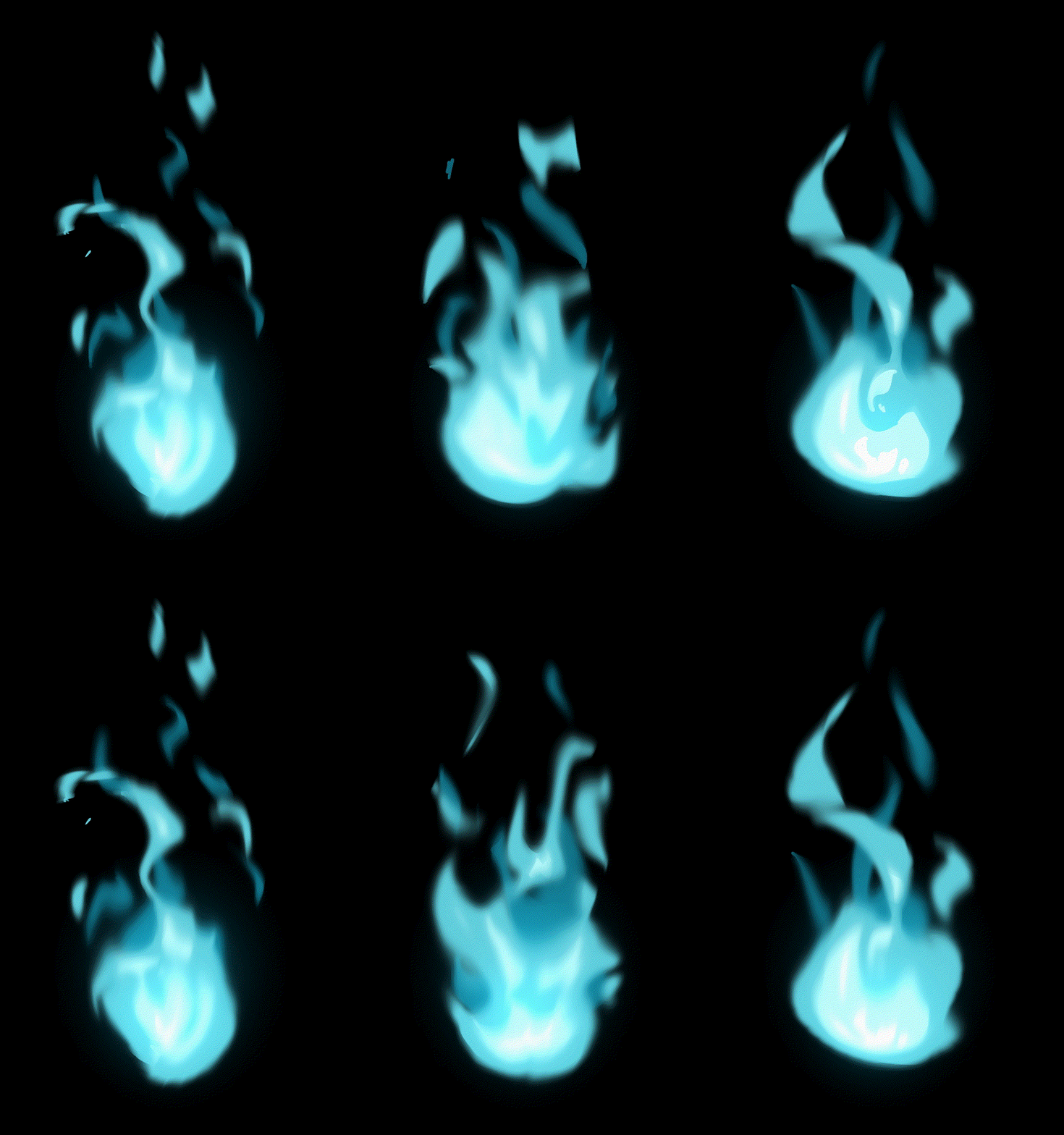
step 1: decide on the base colour you want for your flame.
step 2: add in lighter colours. The nearer to the 'core' of your flame, the lighter the colour will be.
step 3: pick your 'smudge' tool. I used these settings: hardness 20%, mode: normal, strength: 50%. So that's pretty standard.
Now what you do is; you begin at the core of your flame and make round motions, dragging the smudge tool towards the top of your flame. You should be able to get what III shows by one go, but you can perfect it a bit with making a few more circular motions here and there!
---
So that was pretty easy, right? This tut was made for Photoshop, but I'm sure that if you program has a similar tool to the smudge tool, this tutorial should be able to work just fine!
This tutorial was suggested by *SunRei feel free to suggest for more tutorials from me if you're interestd :3 Just drop me a note, I don't bite

I realize it looks crap from up close, but take a look at the thumbnail and then look at step III in the picture, looks pretty close to the real thing right? So I'm sure if you do this right you'll get a cool effect
 pictures where I've used this method:
Related content






Comments: 36

Not trying to sound rude but I can't really see how this could be a flame
👍: 0 ⏩: 0

Thank you for the awesome tutorial! I will defenitly keep it in mind!

👍: 0 ⏩: 1


Um..what about Paint Tool Sai 
👍: 0 ⏩: 1

sorry but I have 0% experience with SAI :< so can't help u... basically what you need is a low opacity, watercolor like tool; hardness 0-10%
👍: 0 ⏩: 1

This works like a charm and looks great! Thank you!
👍: 0 ⏩: 1


I haven't yet tried this since I don't do digital colouring but I think this is a great idea and I want it in my favs so I can always point this out to people with 'fire' issues

👍: 0 ⏩: 1

Fweeeee, why didn't I see this before!? *flails* Thank you, I shall try to improve my poor Treydan's tail now!

👍: 0 ⏩: 1

This has really made my day 

👍: 0 ⏩: 1

What is a smudge tool my photoshop is is CS 4 Extended
👍: 0 ⏩: 1
It's the icon with the finger; it might be hidden under your blur or sharpen tool. Simply press on the icon and hold it and the other 2 tools will appear
👍: 0 ⏩: 1
Thank you I have found it and tried to make flames. Its sooo fun to do I just whis you could use it to make a pretty curly hair on my manga
👍: 0 ⏩: 1
Hehe glad you found it ^-^ And I'm sure you'll find a good way to do that :3 just keep trying, practising and messing around with photoshop!
👍: 0 ⏩: 1
That's not really easy when they only have photoshop and a tablet at my school. But I hope to find a tutorial her on DA
👍: 0 ⏩: 0
read the description
👍: 0 ⏩: 1

What program did you use? Photoshop or somethin' else?
👍: 0 ⏩: 1
I told you; read the description -_-
👍: 0 ⏩: 1
thanks:3 hope its helpful!
👍: 0 ⏩: 1

When i get better at photoshop it might be when i have a character who requires fire.
👍: 0 ⏩: 1
you will have a char with a firetail soon
👍: 0 ⏩: 1


Lol you called us Folks <3 ... I don't do mine like this fft D>
👍: 0 ⏩: 1
hahaha x3 you dont have to because your awesomer >u>
👍: 0 ⏩: 0