HOME | DD
 Trish2 — Flickr Photo Capture
Published: 2009-04-18 06:20:48 +0000 UTC; Views: 250; Favourites: 1; Downloads: 8
Redirect to original
Description
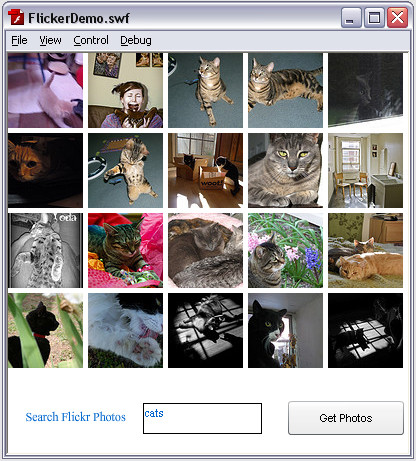
type in a search word or no word at all... click get photos and at max 20 photos will appear.Did this in the flash class... homework assignment was to include a search function. Type in any keyword. If there is a picture associated with that word then it will clear out the old pictures and put in the new ones. Otherwise it will just sit there.
Related content




Comments: 5


I love how one of my final projects is now just a homework assignment for multi-user... wow Cara is lame! Anyway, nice job on it- better than my final haha

👍: 0 ⏩: 1

awww... I had no idea. Andrew went over most of how to do this in class and the search functionality was what we had to figure out for homework. And no... you are so not lame if you had to figure out all the stuff to go along with it.
👍: 0 ⏩: 0

Nice job!
I hope I'm allowed to make a suggestion for improvement?
- Make the input field work on pressing the return button as well
- Adjusting the text size in the input field
- Add that white border (on the right) left and top as well.

👍: 0 ⏩: 1
Sure you can make a suggestion! I didn't say I didn't want comments.
I would love to do all that. Right now I'm happy I got my homework done. I'd have to figure out how to get that set of columns and rows to center themselves with math. Not sure how I'd add that 5 pixel border on the leading edge and top.
I'd have to add an event listener for the return at least. That I could probably do pretty easy. Text size in the field is also an easy adjustment.
👍: 0 ⏩: 0