HOME | DD
 Cayotica — Fractal Rendering and Post Process

Published: 2012-03-24 22:57:32 +0000 UTC; Views: 1366; Favourites: 7; Downloads: 51
Redirect to original
Description
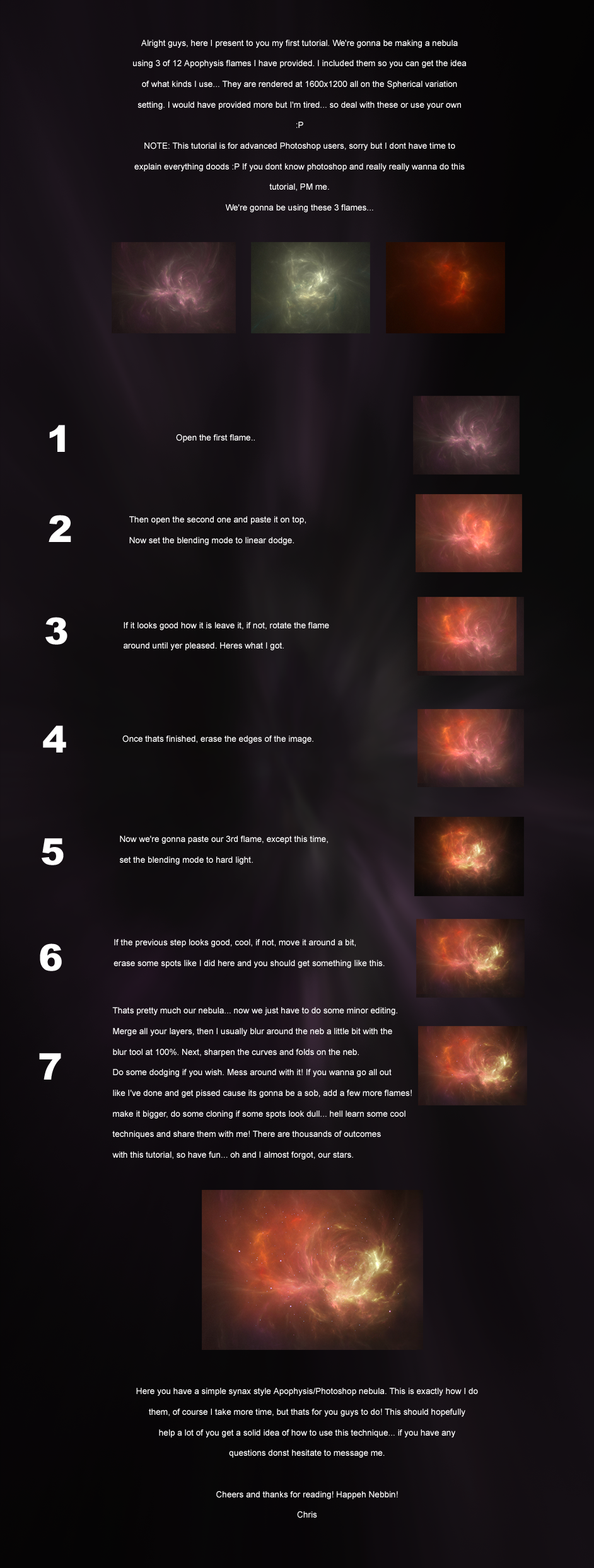
Yeah, I made this AGES ago. I had no idea that I didn't have it in my gallery D:Anyone, for those that work with fractals, and want a little extra info.
Careful, its HUGE
Picture rendered :
Related content




Comments: 10

I have a problem. I've been trying to render some really nice designs I've come up with. Saved all their parameters, but every time I render it comes out blurry. I'm using Apophysis 7x, I use quality at 4000, Filter Radius at 1.5, and oversampling at between 5 and 7 depending on the size. In this case; 4000 x 2500. I set the sampling at 5 since I only have 8 gigs of RAM and it still come out blurry. Any tips?
👍: 0 ⏩: 1

hmm, I'm not sure, but it sounds like it could be the Filter Radius, which you can change in the post process window, if you have it checked. Basically all Filter Radius does is blur the image to hide artifacts and pixilation, which is why mine is set to the default (I can do what it does but better in Photoshop haha). If you are doing very high quality renders, the lower setting might be best, and then just go into photoshop and enhance it. Try doing a small render (500x900 or something) to play around with it. Let me know if that helps any 
👍: 0 ⏩: 1
Well, I knew that filter radius helped filter the image to hide artifact... but I didn't know it BLURRED it. Thanks for the info, I'll tell you my results.
👍: 0 ⏩: 1
haha, yeah, I didn't either for a while. I did a bit of experimenting, and finally just scoured Google for about 2 hours lol. It adds a Gaussian blur that gets rid of the small stuff, but the big stuff as well lol. 1 makes the image VERY blurry. usually go for something like .5 or .6 if you have too much pixelation. that way you can shrink the image, and it will still be clear along with the blurring.
👍: 0 ⏩: 1
Thanks! Worked like a charm. Set it on .5, though looking at it I probably should've gone to .7. Oh well. You either get too much, or not enough. Haha, where's the middle nowadays? Anywho, if you'd like to see what I made, since you gave me the tip, here it is. 
Thanks again.
👍: 0 ⏩: 1
Wow, thats gorgeous!!!
👍: 0 ⏩: 1
Lol, thanks! You were a great help. And thanks for the fav, too!
👍: 0 ⏩: 1
👍: 0 ⏩: 0

Really nice - never would have realized that you could do this before I read this ^^ Thank you for posting! <3
👍: 0 ⏩: 1
Well I'm definitely glad that you got something out of it. That makes posting it all the more worth the time it took to make
👍: 0 ⏩: 0