HOME | DD
 Duces-Wild — Photoshop Brushes Tutorial

Published: 2011-08-06 02:52:57 +0000 UTC; Views: 23653; Favourites: 755; Downloads: 794
Redirect to original
Description
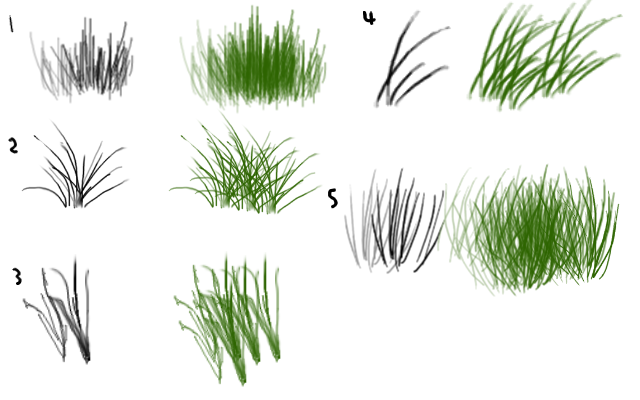
CAUTION HUGE FILE.Made for reference in Adobe Photoshop CS5. Recommended for those with pressure sensitive tablets. Standard mice will yield different results.
YAY MY FIRST TUTORIAL~~please note that this is just a quick guide to ease people into tinkering with brushes. With so many options to toggle there's endless possibilities for a single brush! :3 Go ahead, play around with them and make some digital brilliance!
Features a brush from Charfade's amazing grass brush set <3 [link] Which for the record I'm pretty sure was made back in CS3 so I don't think these toggles were available :3
If you find this helpful, please let me know it comment--it really does make my day~~and lets me know whether or not I should make more tutorials like this in the future ^//^
Related content



Comments: 75

Thank you for this tutorial! It helped me so much and no I can make a beautiful field of grass! I really appreciate you uploading this for all of us to view. :]
👍: 0 ⏩: 0

I found this informative. But I do have a question that I get asked a lot and hoping you can help me out. I use Paint Shop Pro for my graphics and make my own brushes but I also save them in png format so they can be converted for gimp and for those who know how to do photoshop brushes. I have found instructions for converting png to gimp brushes for my website members but not how to convert png to photoshop brushes. Is there an easy text instruction that can be used or would it take a tutorial like this to be able to convert png images as photoshop brushes. I have a very old version of photoshop I got with a wacom tablet I bought about 15 years ago now Photoshop 5 LE but not that great with it to be able to figure something out for them and it most likely wouldn't work for versions available today.
👍: 0 ⏩: 0

Thank you for this. I've used the basic CS2 grass brush before but found it horribly stampy. This solves my problem altough CS2 doesn't seem to have the transfer setting for brushes.
👍: 0 ⏩: 0

This is a GREAT reference! Thanks for taking the time to make and post this. /)
👍: 0 ⏩: 0


This is for Photoshop.
👍: 0 ⏩: 0

brilliant I never even did try some of those gosh, newing some of this I could have saved hours

👍: 0 ⏩: 0

Thanks for this!....I thought I knew all about brushes. I was wrong. lol This is concise but simple and to the point. Excellent teaching!
👍: 0 ⏩: 0


Really useful, love the clear explanation of the presets. Thanks!
👍: 0 ⏩: 0


Thanks for the tutorial. I havent actually used it yet, but I'll be working on my project soon.
Added this to my favs
👍: 0 ⏩: 0

I'm on a Mac, just learning, and using PS Elements 9. Not sure if I am able to use this, but I'm hoping. *Keeping fingers crossed*
Thanks for posting this!
And may I suggest a tutorial? How about one on how you made this tutorial? How you got the screen shots and how you got the background color and the actual instructions typed. For those of us that are just learning, it would be great.
👍: 0 ⏩: 0

okay so i have photoshop cs5 also but the eraser and brush tools have gone wakey on me. When i erase it only erases some of it leaves like another layer of it but like more see through.With the brush tooll it either does it in shades of gray black or white and it's like a highlighter.To get the full bold color you have to go over the same spot multipul times. Can you help me at all??
👍: 0 ⏩: 1

Erm it kind of sounds like you lowered the opacity of both your brush and eraser tools---or you have the "transfer" toggle enabled.
Try increasing the opacity first, and if then doesn't work disable the transfer toggle or simply use a brush preset that doesn't have it enabled.
👍: 0 ⏩: 1
thank you for the assisnant. By chance can you please explain where the 'tranfer' toggle is?? The opacity worked for the eraser but not the paint tool
👍: 0 ⏩: 1
*points to guide* It's one of the various toggles I've explained--as well as how to access them @.@;;
Glad to hear I've helped solve half your problem, though
👍: 0 ⏩: 0

i pressed F5 and nothing happened D: whats the manual way to get there?
👍: 0 ⏩: 1
That's weird...
Window> Brush
👍: 0 ⏩: 1
there isnt a "brush" in the windows tab... might be cause i have photoshop 6....

👍: 0 ⏩: 1
Ah I've never worked with any older versions of PS but that's likely the issue >:
👍: 0 ⏩: 1

You're very welcome! Glad to help out a fellow deviant
👍: 0 ⏩: 1

Mam ;]
And I'm glad I could help~
👍: 0 ⏩: 0

what is that 212 brush ? Is it possible if I can get that one by chance? I am just asking
👍: 0 ⏩: 1
I have no clue which one it is lol Sorry @.@
And I'm not going to be uploading this brush simply because the whole point of the tutorial is to get people to better understand how to tinker with brush presets and figure out what works best for their needs X.x
👍: 0 ⏩: 0


Thank you! Finally someone explained the purpose of the PS brush!
👍: 0 ⏩: 0

oOO i hope this works (kinda) in GIMP, too. I love it!
👍: 0 ⏩: 1
I can't say for sure as I haven't used GIMP in years...but I hope you find similar methods to use :3
👍: 0 ⏩: 0


Awesome! I really need to get better with Photoshop so I can properly texture my 3d modeling projects... this seriously helps. Thanks for posting this.
👍: 0 ⏩: 0

Thanks so much for this very good tutorial 
👍: 0 ⏩: 0


grrreat! thanks for taking the time to explain that

👍: 0 ⏩: 1
You're very welcome! 
👍: 0 ⏩: 0

This was exceptionally helpful
I've recently started using CS5 myself and have barely even begun to imagine the possibilities of all those speacial features and brushes x.x (I used to use CS2 >.>)
I've only managed to create one of my own brushes so far (bubbles xD for lazy backgrounds) but this will help me think outside the box (or inside the drop menu 8D) ... I hope :3
👍: 0 ⏩: 0

DDDDDD: Oh noes!! That's like one of my fav toggles 

👍: 0 ⏩: 0

Awesomeawesomeawesome!! Thanks so much for this!
👍: 0 ⏩: 1
Yayyayay! You're so welcome---thank you for commenting, it makes me so happy to know this is actually helping people -^//^-
👍: 0 ⏩: 1
Oh no prob at all! I love it when people share their artistic knowledge on things, it makes life so much simpler ya know? If you have more, I'm always willing to learn C:.
👍: 0 ⏩: 1
| Next =>