HOME | DD
 etNoir — The Avatar Border Tutorial

Published: 2010-01-31 12:13:41 +0000 UTC; Views: 7705; Favourites: 144; Downloads: 206
Redirect to original
Description
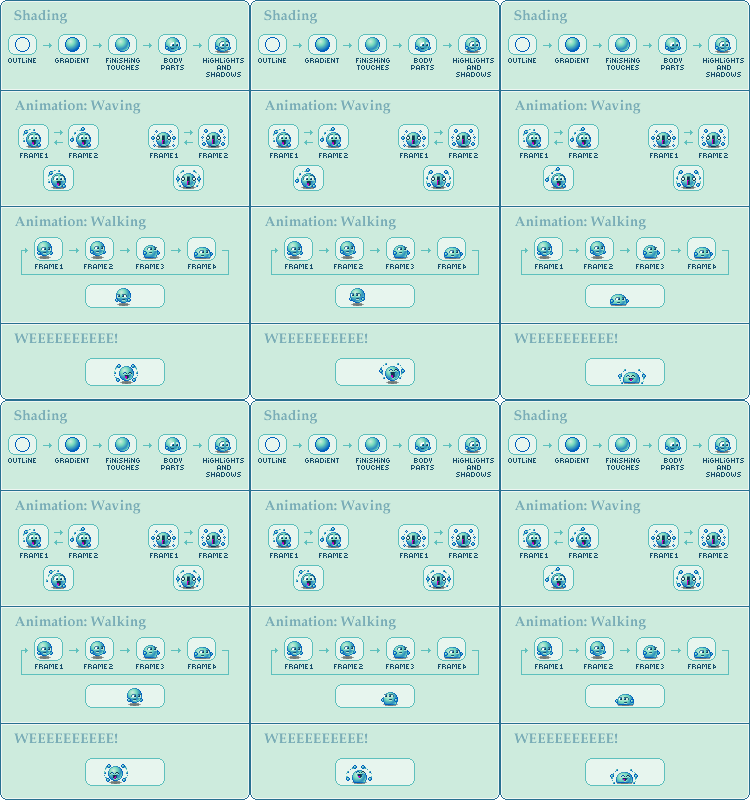
The animations are a bit different from the original. If you have trouble understanding the part about the apple, take a look at the original Vampire Apple Icon .All other icons can be found in my Free Icons Folder.
Click to full view.
I'll put this in the right gallery as soon as it starts accepting .gif images -_-
Related content












Comments: 20

How to make the border? With brush or shape?
Or manually ?
But this is very very helpful 

👍: 0 ⏩: 1

I only do pixel art, so everything is made using the pencil 
👍: 0 ⏩: 0

You're welcome 
👍: 0 ⏩: 0


hey, i wonder how on earth u make those Open Borders? I can't figure it out 
👍: 0 ⏩: 1
In this case I drew them in Paint and used another program to make the background transparant. If you want the pieces in all corners to be the same, you can always draw one corner and then copy, paste en rotate it to make it fit the other corners as well
👍: 0 ⏩: 0


Thanks for taking the time to help us with our tutorials challenge! It's very much appreciated.
👍: 0 ⏩: 0
I draw everything in Paint and use either iaza.com or Imageready (for animations) for the transparacy
👍: 0 ⏩: 1

omg thanks SOOOOO MUCH!!!!
iaza.com works soooo well!!!! thanks!!
👍: 0 ⏩: 1

I like this tutorial. It's one of the most helpful I've found on the subject!! Thanks.
👍: 0 ⏩: 1
Yay, I'm glad someone finds it usefull ^^
👍: 0 ⏩: 1

Aww, yes, I was wondering why there weren't any comments before
It's great and you put a lot of effort in it I suppose


👍: 0 ⏩: 1
Well, I tend not to comment on tutorials much either. I just put them somewhere where I can find them in case I want to use them someday xD But thanks!
👍: 0 ⏩: 1