HOME | DD
 FredAckerman — Friendly Neighborhood

Published: 2012-07-08 00:14:31 +0000 UTC; Views: 1859; Favourites: 39; Downloads: 63
Redirect to original
Description
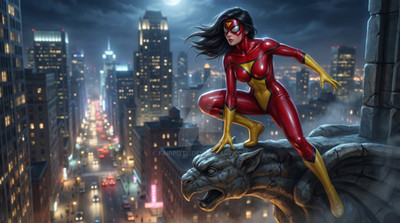
Webs took foreverRelated content




Comments: 14

Because I wasn't entirely sure how to do them justice in Photoshop, and I don't have any props within Poser itself that would quite work, so I had to go in search of tutorials. Eventually found one that involves messing with the saturation and shape of pictures of paint being splashed and thrown around. Also, it just occurred to me that you possibly are talking about the webs on his costume. I meant the webs he's swinging from. Hell, no, dude. I suck at making textures. If not for you this image wouldn't even exist.
👍: 0 ⏩: 0

I'm assuming you're referring to the swing lines? (nice work on those)
👍: 0 ⏩: 2
I will say, though, that I have tweaked the texture a bit, but nothing major. I separated the costume webs onto a different layer and gave the layer a bevel and emboss effect to get more of a raised feeling. Other than that, 99.9 percent of the texture is yours. Good work, too, btw.
👍: 0 ⏩: 1
I had noticed (the light doesn't hit it correctly since it's done in a photo editor and not in poser. My suggestion - goose the displacement map and value instead and get a higher raised web that shows the correct highlights and shadows. Next time also, just ask, I have the original as layered psd files.
👍: 0 ⏩: 2
Actually, come to think of it I would like to get a look at the originals. That may help me on my path just as effectively. If you're still willing to share just let me know and I'll shoot you my email address. Thanks in advance.

👍: 0 ⏩: 1
when I do textures that require those sorts of details across multiple body parts I use Adobe Illustrator for the main lines, and then Photoshop for the texture, color, and various map types. I don't mind sharing the psd - but I do have some RULES. shoot me a note.
👍: 0 ⏩: 0
I may give that a shot.
Also, I really enjoy ripping textures down to their most basic components. I'm hoping in doing so it will, over time, give me a better sense of how to do my own.
👍: 0 ⏩: 0
LOL, yeah, the actual webbing, not the costume webs. No, those belong to you, and I can't even imagine the blood, sweat, and tears that went into making them.
👍: 0 ⏩: 0


THIS IS Kickass job man!! epic look and so much better then the new film my friend.
👍: 0 ⏩: 1
Just proof that you can distance yourself from the look of the Raimi films and STILL stay true to the classic costume. Thank you.
👍: 0 ⏩: 1
YES!! That is so true. 
👍: 0 ⏩: 0