HOME | DD
 GirGrunny — Paint tutorial

Published: 2008-12-14 02:25:03 +0000 UTC; Views: 589; Favourites: 5; Downloads: 20
Redirect to original
Description
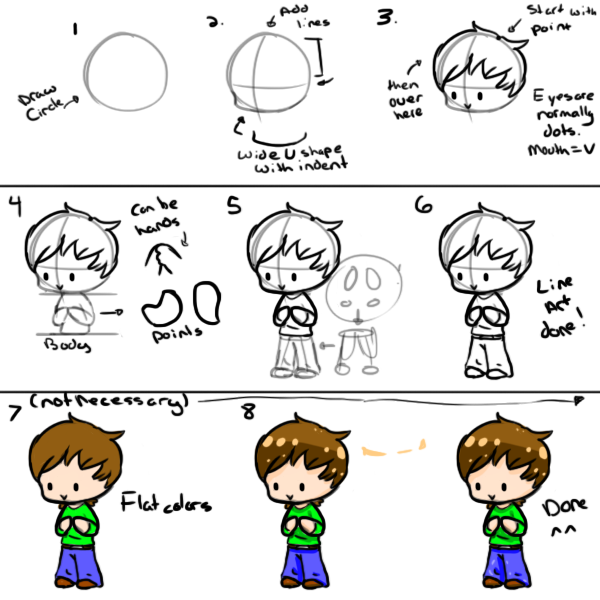
How to make a decent picture in MS Paint!My first tutorial. It shows people how to make a pic in MS Paint. It doesn't explain much.. Oh well. You'll figure it out!
Related content






Comments: 8

Tip for MSPaint, erasing sketch lines can be easier if you put the color you want to erase in the primary color and the color you want it to be (background color) in the secondary color. Then right click (and hold) and drag the mouse all around everywhere that color is. Just make sure you're not using a special paint brush.
👍: 0 ⏩: 0

I need to tell you, thank you, because i am doing some draw on paint, but i am not at all good drawing with the computer
👍: 0 ⏩: 0

That's almost exactly how I do it! LOL, but I clean up as I go. Less mess in the end.
👍: 0 ⏩: 1

Well when I actually do it, I only use one color for the sketching/details. I used multiple colors here to show people different parts. Sometimes I clean up as I go.

👍: 0 ⏩: 1

Thanks! And yes. I just recently started using it. Only twelve of my pictures are done with a tablet. All the rest are with a mouse.
👍: 0 ⏩: 0