HOME | DD
 killhellokitty — Dorian-theme-3.14 version 12
#cinnamon #dorian #gnome #gtk2 #mate #metacity #themes #xfwm4 #gtk3 #openbox3
Published: 2014-11-14 14:48:02 +0000 UTC; Views: 21894; Favourites: 34; Downloads: 5879
Redirect to original
Description
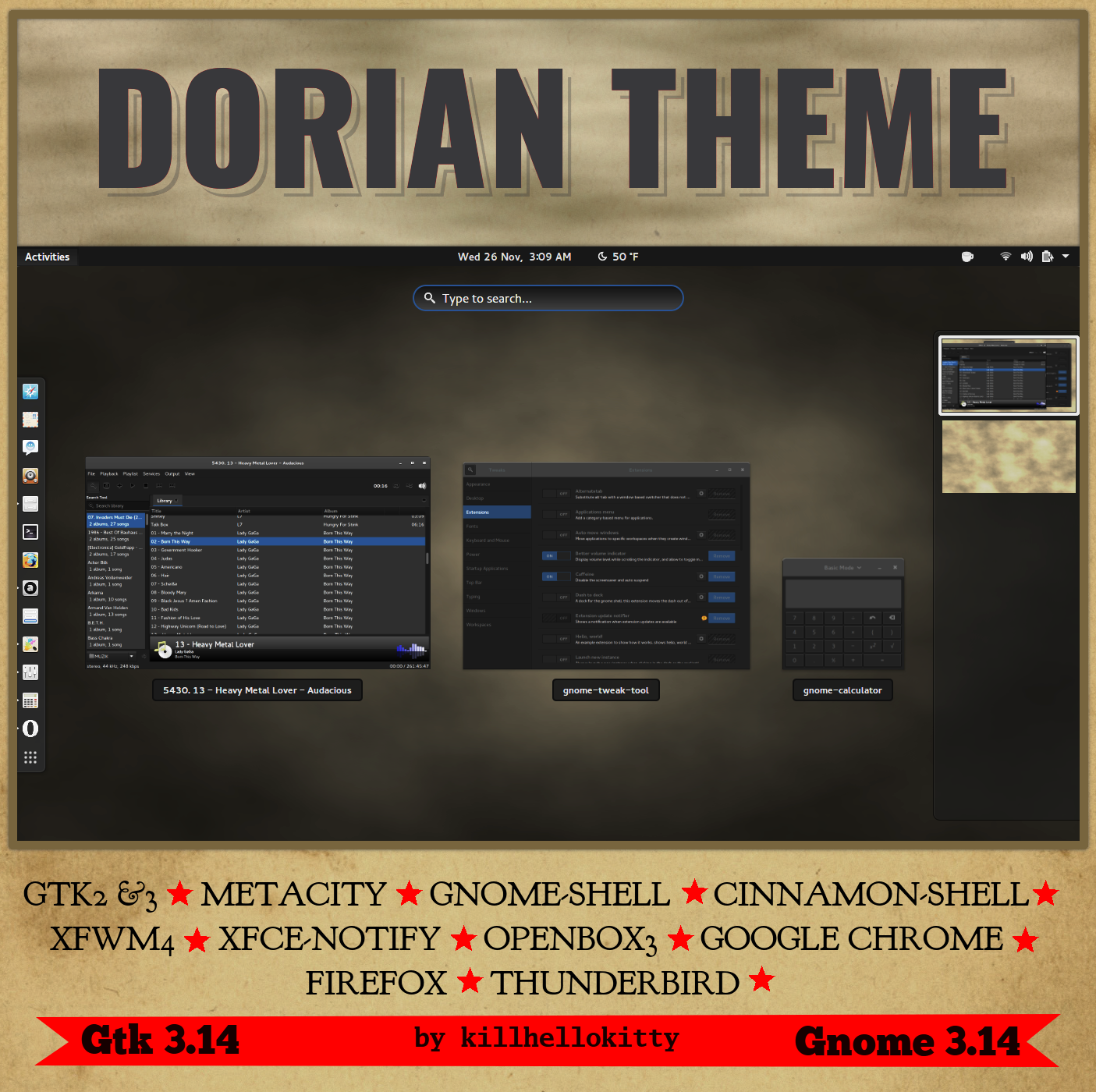
For Gnome 3.14Dorian is a very dark theme intended to be easy on the eyes and clean to work with.
Donations are appreciated, Thank You for your support!
*UBUNTU users: Ubuntu uses Gtk3.12/3.10 currently. This theme is built for Gtk3.14, it will not work on UBUNTU! You will have to be patient for Ubuntu to move up to 3.14 within the next 6+ months. If you cant wait, try Fedora, Arch or Manjaro. Thank You
INCLUDES
- Gtk3 & Gtk2 themes
- Metacity Theme
- Gnome-Shell Theme
- Cinnamon Shell-with Nemo(for 3.14)
- Xfwm4 Theme
- Xfce-Notify Theme
- Openbox-3 Theme
- Google Chrome Theme
- Firefox patch/theme
- Thunderbird patch/theme
- Unity Theme
- Ubuntu Softare-Center
- MATE compatibility (does not require gtk-3.14)
REQUIREMENTS
- Gtk 3.14
- Gtk 2.24 or newer
- gnome-themes-standard-3.14
- pixbuf-engine or the gtk(2)-engines package
- gtk-engine-murrine
- Download the Dorian Theme package from the top of this page.
Unzip the archive, and copy the Dorian folder to '/usr/share/themes/' for system-wide installation, or to '~/.themes' for individual use installation. - Arch Linux & Manjaro
Install from Arch Linux AUR
If using yaourt, type in terminal: yaourt -S dorian-theme - Unpack the DeLorean-theme package and locate the Firefox chrome folder. Next go to '~/.mozilla/firefox/xSomeNumbers.default'.
- If there is no 'chrome' folder, just copy and paste the one from inside the DeLorean theme folder
- If there is a 'chrome' folder, merge its contents with the DeLorean 'chrome' folder.
- Restart Firefox to apply the theme. This theme depends on DeLorean being in use to work properly!
- Thunderbird is also installed the same way except the folder '~/.thunderbird/xSomeNumbers.default'.
- User Profile You may also desire to create a new user-porfile for the DeLorean theme since it hard codes its appearance. To do this simply open firefox with a trailing '-p', for example: firefox -p. A small gui will appear. Choose create profile and follow the instructions. If you would like this gui to appear at every start-up(recommended) so you can choose you profile. Un-tick 'Don't ask at startup', or you can always start the app with the '-p' to change profiles again.
- The Chrome themes are located within the theme files.
- Simply drag and drop them onto Google Chrome and choose to apply theme
- To use with Ubuntu you must open 'Sable-(SomeColor)-3.14/gtk3.0/gtk-contained.css'
- Scroll down to the bottom of the document and uncomment 'ubunntu_styles and unity.css'
- Use Unity Tweak Tool to choose a sable theme built from the daily build Feb 18 2015
- Backup the original folder and name it 'software-center-backup':
- sudo cp -a /usr/share/software-center /usr/share/software-center.backup
- Install This assumes the Sable(SomeColor)-3.14 theme is installed to '/usr/share/themes':
- sudo cp /usr/share/themes/Sable(SomeColor)-3.14/ubuntu-software-center/softwarecenter.css /usr/share/software-center/ui/gtk3/css/softwarecenter.css && sudo cp /usr/sahre/themes/Sable(SomeColor)-3.14/ubuntu-software-center/stipple.png /usr/share/software-center/ui/gtk3/art/stipple.png
- Start/Restart software-center.
- To revert changes sudo rm -r /usr/share/software-center && mv /usr/share/software-center.backup /usr/share/software-center
INSTALATION
Firefox This is a set of patches to make firefox work better with dark themes. It is not a Firefox theme.
Google Chrome
Ubuntu Vivid 15.04
Ubuntu Software Center
CHANGELOG
11-14-2014 first upload.
11-15-2014 Added Openbox, Xfwm4,and Google Chrome themes. Minor fixes to gtk ie. selected button color, and column headers.
11-16-2014 Added Xfce-notify theme, and Firefox patch/theme.
11-20-2014 Added Gnome-Shell Theme, made minor adjustments to Gtk3 and Metacity.
11-21-2014 Added Cinnamon Shell and Nemo for Gtk 3.14
11-27-2014 Added Thunderbird theme.
02-21-2015 Added Ubuntu theme including Unity.
02-23-2015 Many small fixes to the theme.
02-24-2015 Added unity buttons for dash.
03-01-2015 Added MATE compatibility (only the use of gtk3 apps will require gtk-3.14).
Related content










Comments: 38

Can someone tell me will this theme work in Linux Mint 17.2 Mate?
👍: 0 ⏩: 0

Thanks a bunch for your work and for releasing it as Free Software!
After trying many dark themes this came out as the best for my LXDE box (Lubuntu 15.04). I needed something just like this, real dark and with support for GTK 3.14, GTK 2 and Openbox 3. The Firefox and Thunderbird themes are a great plus! Please keep maintaining them.
Now I am eagerly waiting for Lubuntu 15.10 (bringing GTK 3.16) so I can try out your new 3.16 themes.
Things I would like to change but can't:
- The background colour of a selected filter (Sender, Recipients, Subject, Body) on Thunderbird's Quick Filter. The current colour is almost the same as the surrounding bar making it really difficult to see which filters are selected. I created several different rules for it, such as "#quick -filter-bar toolbarbutton[checked]" but node had no effect. It seems like these buttons get their properties form the GTK theme and not from userChrome.css
Some successful tweaks I did:
- Changed the left sidebar background colour on the file manager and Thunderbird, from #616161 to #2A2A2A . With #616161 it contrasted too much with the background of the file/mail lists.
- Uncomment the Enigmail CSS on Thunderbird's userChrome.css (Why was it commented? It certainly looks better than the default theme.)
- Added the following to Thunderbird's userContent.css
*[_moz_quote="true"] {
color: #ffcb00 ;
}
It changes the colour of the quoted text when you reply to a message in plain-text. The default was pure blue, which is really hard to read on Dorian's dark grey background.
- Removed !important from input and textarea on Firefox userContent.css in order to allow Stylish or the website to style these areas.
- Added the following to Firefox's userChrome.css in order to change the autocomplete link's colour in the address bar:
#PopupAutoCompleteRichResult .ac-url-text {
color: #0095DD !important;
}
👍: 0 ⏩: 1

wow those are some great tweaks! I will add them in upcoming themes. I commented the enigmail so it didn't overide anything, but I left it for those who use enigmail. The quick filter bar is tricky...the css you need to fix it is in the theme. Take a deeper look at the quick filter section, you can change the button colors there. I'm really happy to hear that you enjoy the theme. It makes all the work worth while hearing from you and others like you. Thank you.
The 3.16 version is a flat theme, hope you are into that. 
Cheers!
👍: 0 ⏩: 1
I was finally able to fix the quick filter bar. The trick was to replace all "#quick -filter-bar-main-bar" for just "#quick -filter-bar". This way the same style is applied to the "Sender, Recipients, Subject, Body" buttons. And now I can see which are selected!
Some more tweaks I did:
- Added elpresidento's gtk-2.0 fix for Firefox: How to fix firefox's look with a dark theme?
- Give a lighter colour to the Firefox tab labels (.tabbrowser-tab). They were too dark and thus hard to read.
- Give a lighter colour to subject and attachments' name and size in Thunderbird's message composition. Again too dark to read.
It's a pity Ubuntu is still on GTK 3.14, if it had 3.16 I could be working on your current theme and submit these modifications as pull requests to the GitHub repo. Anyway... when Ubuntu 15.10 comes out I'll try to port these changes to Dorian-3.16. (I could find no repo for Dorian 3.14.)
Meanwhile, here is a bundle with my mods: dorian-theme-3.14-v13-by-killhellokitty-mod-dllud.tar.gz
If you have the time you can run a simple diff to your version, check the changes and port them to Dorian-3.16.
I am totally ok with a flat theme. Actually, I don't care much about flat vs realism, square vs round, etc. What really matters to me is having a theme as dark as possible with a good colourscheme, providing good contrast to make things easy to read. I care mostly about usability, not appearance. So far, in this realm, Dorian was the best and most complete theme I could find. It just needs some more tweaks to be perfect.
👍: 0 ⏩: 1
Hi killhellokitty,
Thanks for keeping all the dark theme lovers happy with your news releases! It has been a while since I last came here and it is very nice to see you keep sharing new themes.
I've now tried "Dorian Flat 3.16" and "DeLorean Dark 3.18". They are a bit more light coloured, which makes them less suitable for long hours at the screen. On the other hand, both "Cloak 3.20" or the darker-and-darkest variant of "Candra 3.20" seem perfect for me. Unfortunately Ubuntu is still on GTK+ 3.18.
I'll have to stick with "Dorian 3.14" until Ubuntu updates to GTK+ 3.20. Thus, on the hope it may be useful to someone, I've decided to create a repo to host the small tweaks I made to Dorian (detailed above). You can find it at: github.com/dllud/Dorian-3.14
I've now added some instructions on how to achieve Qt 5 integration.
👍: 0 ⏩: 0

Love your themes! Please bring back the 3.12 style for 3.14, the darker the better

👍: 0 ⏩: 1
I probably will bring back the darker color for 3.16. Thanks.
Cheers!
👍: 0 ⏩: 1

Oh, please do it quick!!!! When I found this theme, I was like 'OMG, dis definitely THE ONE', but too bad I'm using 3.16.
Also could you mk the bg color a bit darker?
And hey, the xfwm theme's rc , in line 7, the maximized_offset value need to be 8 so that the buttons won't move when maximized.
👍: 0 ⏩: 0

Amazing, beautiful theme. I liked Dark Adwaita, but your theme keeps the good stuff and improves it a lot!
Such a great work I registered to DeviantArt just to thank you.
👍: 0 ⏩: 1
Thanks so much! Its great to hear such positive feedback.
Cheers!
👍: 0 ⏩: 0

awesome theme, fell in love with this theme. i pretty much only use your themes
👍: 0 ⏩: 1


Hello !
It's definitely a good theme. thank you very much for your work.
I only have one problem with it. When using it with Kdevelop 4.7, the menu background stays white. It's black if I use the previous dorian theme. Sadly the previous theme doesn't work with a lot of other application in Gnome 3.12. I was wondering if you knew what was happening and how to change it. Thanks a lot !
👍: 0 ⏩: 1
Kdevelp is a Qt application, not Gtk. Check this out: wiki.archlinux.org/index.php/U…
👍: 0 ⏩: 0

I used to like Dorian because of the high contrast, dark background, and blue accents, but this update ruins it. The title bar looks out of place, especially on older apps that don't integrate the titlebar and toolbar. The new lighter background in the text areas is way too light. That should be the darkest part of the window. It looks especially bad in Nemo, and the light gray on dark gray combination makes reading hard in daylight.
On the other hand, I'm happy to see a Cinnamon shell theme. Other than the light taskbar it looks nice.
Also, whats with the hideous picture frame border?
👍: 0 ⏩: 2

I've made my own version with just a few tweaks to the original 3.10 version. Feel free to check it out 
github.com/kurotetsuka/kuroria…
There's still a few problems i need to iron out for gnome 3.14, but i'll get to them eventually, aha. Feel free to help out too
👍: 0 ⏩: 0
The previous versions had low contrast. This version I chose to try high contrast. Thats Metacity for you. I personally hater writing XML code for Metacity. You are more than welcome to step up and show up what you got. I may agree with you here. I do prefer the very dark text areas. But, as far as Nemo, goes its a bad representation as in 3.14 it doesn't follow its theming when using Cinnamont-Shell, but it does follow its theming in Gnome-Shell.. As far as Cinnamon-Shell, go ahead and change the taskbar color. Its not difficult.
If you have very specific items(not hundreds, actually a lot less than hundreds, maybe a bakers-dozen)of them I will be glad to help you locate and change the color to suit your needs.
As far as the picture frame: Dorian Gray Theme (The picture of Dorian Gray by Oscar Wild)
I felt like handing a painting...
And you are very welcome for the hours and months spent to bring you this free package for you entertainment.
👍: 0 ⏩: 0

still loving this theme, all others fail to compare.
Thanks for continued updates & work
👍: 0 ⏩: 1
Thanks alot! Its always good to hear from you!
Cheers!
👍: 0 ⏩: 0
I'm afraid I'm not very happy with this 
👍: 0 ⏩: 1
Sorry to hear you aren't as happy with this version. Every version is different, its just how my mind works. If you could be more specific I'd appreciate it.
Cheers!
Please, make your own version, that would be cool!!!
👍: 0 ⏩: 1
Well I think I just absolutely loved the 3.12 version. This version feels a lot like a dark adwaita than a successor to the previous version. I wasn't too keen on the new adwaita to start with, so yeah. Also there's a bunch of small issues like invisible close buttons on tabs ( tabs are pretty ugly looking... ), weird flashing in some apps menus, stuff like that. Also the shell theme that I liked so much disappeared
I've been wanting to make my own themes for a long time, but the lack of up-to-date documentation ( and my own lack of time ) has been keeping from it
👍: 0 ⏩: 0

killhellokitty You are the best designer themes for linux world, its themes are smooth , fast, and black
👍: 0 ⏩: 1
You are to kind! Thanks
Cheers!!
👍: 0 ⏩: 0

Ubuntu, why you no support GTK 3.14?! On the plus side, your previous version still works fine on Mint 17. Keep rock'n!
👍: 0 ⏩: 2
just to add to what kitty said, there's also the choice of manjaro
👍: 0 ⏩: 1
>>just to add to what kitty said, there's also the choice of manjaro <<
Thanks for the suggestion, Kurotetuka. I have been kinda looking at Manjaro lately. I gotta give it a good trial some time soon, because I keep hearing good things about it. Might be a good distro for one of my laptops.
👍: 0 ⏩: 1
You're welcome
Manjaro has pretty nice hardware support, and i love having access to the aur and the arch wiki. If only fedora had as nice a user repository as arch
👍: 0 ⏩: 1
>>You're welcome .
Manjaro has pretty nice hardware support, and i love having access to the aur and the arch wiki. If only fedora had as nice a user repository as arch . <<
Arch's wiki is amazing. It has detailed instructions for anything you might need/want. I bookmarked their wiki when I first started using Linux two years ago, just in case I might need some good instructions. I haven't had to use it yet, but I have browsed it just for kicks. So many people have put in a lot of time and effort into it, and I give them mad props for that. 
Fedora is another distro I have to check out sometime. I have a list of em, lol. One by one I put them into VirtualBox and play with them. I'm slowly working my way through the list.
👍: 0 ⏩: 1
True true, the arch wiki is more awesome than a hotdog
All you've really got to try is one of each of the following: a debian-based distro, a redhat-based distro, and an arch-based distro The most important thing about a distro is the package manager, after that you can just pick the best community that exists around the package manager you like.
👍: 0 ⏩: 1
LOL @ "more awesome than a hotdog"!! Best opinion of something, ever.
I agree about trying one each of the main distro family trees. They each offer a different experience, which is way cool. I first tried Linux out with Red Hat (v1 or v2, it was super new back then) many many years ago when my uncle gave us a disc; it was my first exposure to Linux. Never heard of Linux until then, only knew of Windows and Mac (I was a little kid, parents used Win & school used Mac). Parents couldn't grasp Red Hat, so we switched back to Windows after a week. Then two years ago (time flies!!) I tried Linux again with Mandriva (Red Hat based) and liked it. It came on a multi distro CD and was the only distro on it that correctly recognised my sacrificial laptop's graphics chip. Then I built a new desktop and went exploring..... Currently using Mint as my daily driver, but have VirtualBox for trying out others. Tried Slako Puppy and put it on another old laptop. Need to try an Arch distro now, and I keep hearing good things about Manjaro, so that will be next.
👍: 0 ⏩: 1
Something else to maybe check out is the upcoming fedora 21 release, which is shaping up to be pretty fucking solid
👍: 0 ⏩: 1
Sweet, I will check into Fedora 21 as well. Thanks for that heads-up.
Linux: nerd playground (toy store?). So many distros, so little time to run them ALL! LOL. Playing with all the distros is so addicting.... I love it.
👍: 0 ⏩: 0
Because Ubuntu doesn't support Gtk 3.14 yet. Its still using a mix of Gtk 3.12 and Gtk 3.10. Untill it makes the jump to Gtk 3.14 there is nothing I can do about it. This theme simply wont work on Gtk 3.12/
If you want something that uses Gtk 3.14 try Fedora or Arch.
👍: 0 ⏩: 1
>>Because Ubuntu doesn't support Gtk 3.14 yet. Its still using a mix of Gtk 3.12 and Gtk 3.10. Untill it makes the jump to Gtk 3.14 there is nothing I can do about it. This theme simply wont work on Gtk 3.12/
If you want something that uses Gtk 3.14 try Fedora or Arch.<<
No worries, I was just giving Ubuntu crap for not supporting GTK3.14 yet. Since your old version still works on Mint 17, I'm not too worried about it. So it's all good.
👍: 0 ⏩: 0