HOME | DD
 lizstaley — Fire In Photoshop
Published: 2006-03-27 00:12:18 +0000 UTC; Views: 2495; Favourites: 31; Downloads: 535
Redirect to original
Description
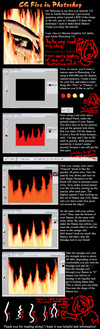
Got some questions about how I did the fire on the Chapter 14 illustration. So, yeah, here's my FIRST tutorial! Sorry, it's HUGE. @_@;;; Dial-up users may die before it loads all the way....Wacom Tablet, Adobe Photoshop 7.0
Related content




Comments: 24

This is one hell of a good tutorial! All my friends like it, and I do too! It's amazing. Thank you for putting it up

👍: 0 ⏩: 1

Thanks so much! I'm really glad you like it!

👍: 0 ⏩: 0

Wow cool tutorial!
HEY! I need you help!!! How do you put a CLICK ME button?!! With this new submitting layout, I dont know how to any more..
TT.TT
👍: 0 ⏩: 1
Y'know.... I actually have no idea how to do it on the new layout. O.o;; I just realized when I went to go look at the submission page after you asked that its not there anymore... Weird...
👍: 0 ⏩: 1

this tutorial is pretty well written, and looks easy to follow
nice work
👍: 0 ⏩: 1

I was looking for something like this! Very informative


👍: 0 ⏩: 1
Thank you very much for the ocmment and :+fave:!
👍: 0 ⏩: 0

Nice tutorial; I've recently tried drawing fire on Photoshop and it looks rather surreal. O_o This really helps.
👍: 0 ⏩: 0


this one rock i like it veryveryveryveryveryveryveryveryveryvery veryveryveryveryveryveryveryveryveryvery veryveryveryveryveryveryveryveryveryvery veryveryveryveryveryveryveryveryveryvery veryveryveryveryveryveryveryvery much
👍: 0 ⏩: 1
Thank you! I'm glad it could be of help ^_^
👍: 0 ⏩: 1
Well i made it and especially the smudge makes it really look like flames.
👍: 0 ⏩: 1
I'd love to see the results if you have them saved!
👍: 0 ⏩: 1
they're not very good.
and how do i send an img srry i'm new in deviantart
👍: 0 ⏩: 1
You can click on "Submit" at the top and upload it to you gallery. ^_~
👍: 0 ⏩: 1
ok i added it but its not so good.
👍: 0 ⏩: 0

Hi There!
You have just earned yourself an O.D.D. 
ODDS (oibyrd's daily deviations) are to honor the sometimes overlooked artists of dA that I personally think deserve some exposure (and ALSO, to show off people who I think are undeniably talented in their own genre of art, regardless of their #'s of fav's or pageviews. I like what I like ). Please click the link below to see your work featured and to view other featured artists. If you prefer not to be a featured artist, just send me a note and I will remove you from the list. Cheers! xoxo Sandi
[link]


👍: 0 ⏩: 0

If I had photoshop that would totally help me!

👍: 0 ⏩: 1
Thank you for the comment! This would probably work fairly well in any CG program, though I only have real experience with Photoshop and ArtRage. ^_^;; The real secret is to build up the color and then be able to smudge it around, so a little modification should work to fit it to nearly any program.
(Again, thanks for the comment!)
👍: 0 ⏩: 0
