HOME | DD
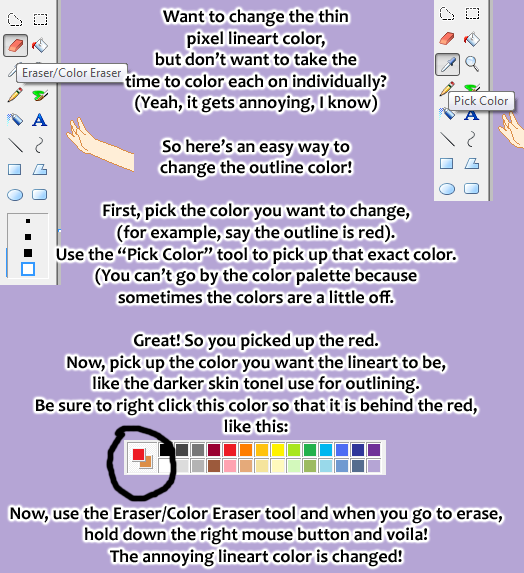
 moonshine-pixels — Lineart Color Change Tutorial
Published: 2008-09-09 02:41:23 +0000 UTC; Views: 11797; Favourites: 192; Downloads: 269
Redirect to original
Description
This will be kept here and at *moonshin3 .I hope this helps.
And sorry for the random pixel arm! XD I left it there cause it makes me laugh. Random!
Related content





Comments: 15


It's not working for me.
Maybe I have an older version of Paint....?.
👍: 0 ⏩: 0


At first when I read this I was like, "WHAA?? How is that going to change it?" Then I tried it and now I love you! xD This makes me life much easier.
👍: 0 ⏩: 0

WOW XD I was surprised that no one knew about this trick!
It's so usefull, and I found it out by accident about 6 months ago, and I was planning on making a tutorial to show people it, but now I can just link them to yours 8D
👍: 0 ⏩: 1


thanks will keep it in mind next time i cange the color of something.
👍: 0 ⏩: 0


i must be doing something wrong. i just tried 3 times and it didnt work for me?
👍: 0 ⏩: 1

This is for MS Paint. If you follow everything it says, it should work. Make sure you're holding the right mouse keys!
👍: 0 ⏩: 1

awesome icons they match!
kirara and kiroro (sp?)
i learned this but forgot it and thanks to u i know it now YAAAAAY
U ROCK!
keep up the awesome bases!
👍: 0 ⏩: 0