HOME | DD
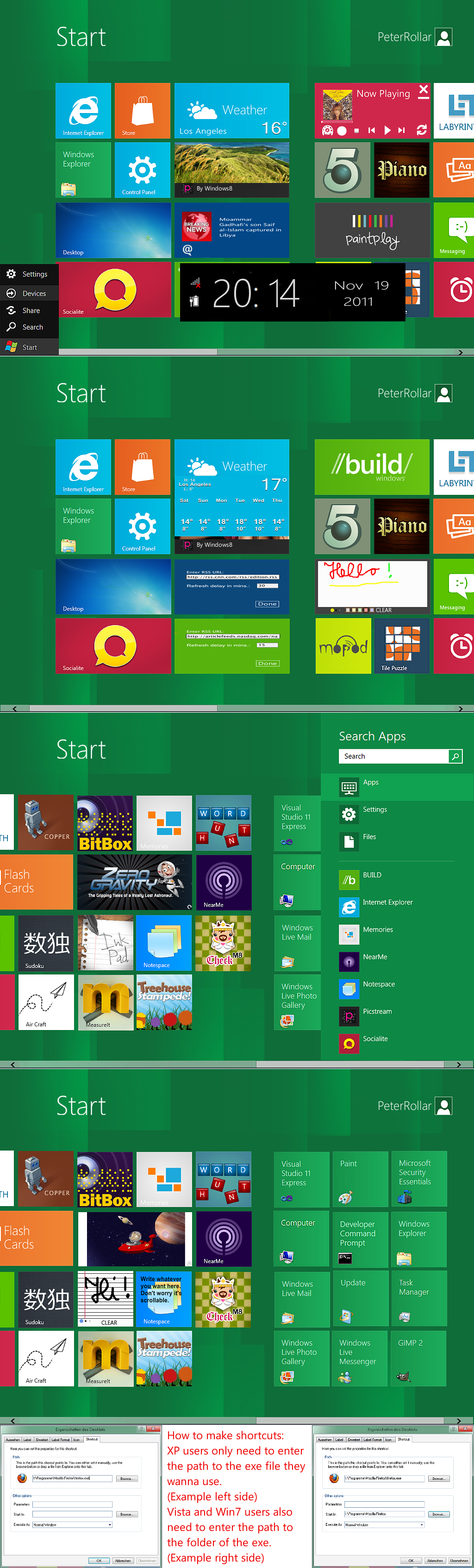
 PeterRollar — Another Windows8 startscreen
Published: 2011-10-15 18:43:24 +0000 UTC; Views: 74547; Favourites: 73; Downloads: 97237
Redirect to original
Description
Another Windows8 startscreen forXP tested by me
Vista tested by
Windows7 tested by me.
Why?
1. Why not
2.No need for actual NET frameworks.
3.Never uses more than 10mb RAM
4. Each desklet can be fully customised and scaled individually
5.Free choice of the systray icon you wanna use.
6.If you are a little bit familiar with Javascript you can do nearly everything with this.
How to use:
First of all download Avedesk 1.3 here[link]
Install it and run the proggy one times to get rid of the intro.
Than copy and paste the Avedesk exe to the main folder of this deviation.
Click on the exe and it should run.

If not the controlpanel of Avedesk will appear and you have to load the theme manually.
To start the slideshow click on the picstream icon.
If you like this deviation give it a try. If you face any problems, just ask me.
Wallpaper with and without scrollbar included.
Left bottom startmenu can be found here[link]
!!Warning. This is no "One click job". Some basic knowledge about customisation recommended.!!
 Totally remake
November19 2011
Changelog:
See changelog and get the video how to use here[link]
Musicplayer needs additional software which can be found here for free[link]
Preconfigured tiles for most shortcuts if your Windows is on C:
Preconfigured position of tiles for 1024x768 or similar low resolutions.
If you use high res you can manually add all tiles you want to one screen.Remove the scrollbars by clicking on them and press delete.
Easy change between the two screens by mouseover userpicture or "Start" text.
Nearly all images remade.
How to use RSS feed and Tile puzzle:
Mouseover the tiles on the right bottom corner brings up the backside to configure them.
You have to install the included font Segoe WP to use the News feed.
Visual nearly 100 per cent similar to the original
Mouseover the "Start" text or the userpicture to switch between the screens.
Watch it in action on youtube[link] Preview of Version 3.0 on Youtube[link]
Have fun
No redistribution in Transformationpacks/Skinpacks allowed!
Related content










Comments: 178

Open the controlpanel of Avedesk and check load theme tab. Navigate to the small tiles folder and you will find the theme file to load.
👍: 0 ⏩: 0

Hi ! I'm trying to make it work but when I start it, i've got an error message. Hook.dll is missing. I tried to run it on my 2 win 7 computers 
👍: 0 ⏩: 1
Seems that on some Win7 systems Avedesk has a prob to find this dll. Please try this: Open the folder docklets. In it is a folder sysstats2_5_11 which contains the hook.dll. Copy and paste the dll to the main folder of Avedesk. Don't rermove the original one. This should help.
👍: 0 ⏩: 0

This version overlaps the desktop without wall paper and has invalid addresses
👍: 0 ⏩: 1
There is no visible desktop. You must set the taskbar to automatically fade out.Change the adresses as shown above.A minimum of experience is needed to use this.If you are new in customisation, this deviation is maybe not the right place to start.
👍: 0 ⏩: 1
What is the path for Desktop Tile and CAD?
👍: 0 ⏩: 1
Desktop
C:\documents and settings\Your user account name\Desktop
if your Windows is on C.
CD Art Display
C:\program files\CD Art Display\CAD.exe
To make it easier for you, you can also drag and drop files and folders from the explorer into the adress box.
👍: 0 ⏩: 1
Thanks. I will replace this one with your new screen sdk.
👍: 0 ⏩: 1
You must first delete the older one complete except of the exe. Or it will appear messed up.
👍: 0 ⏩: 0

When i mousehover the start or user pic then it switches to the next screen but the first one does not go so they kind of overlay on each other, Any solution?
👍: 0 ⏩: 1
The trigger event of this old eviation is set to mouseon/mouseout.This means you have to cross the trigger a second time to close the screens.Move the mouse from left to right should open and move back should close it.Hope this helps.
You can also do the following thing: Move the mousepointer over the target area and make a rightclick. You will see a option named desklet properties.Click on it to open the options menu. Look for the effect option. You will see the words G toggle visibility. Click on configure. Don't change the first two options. The third one gives you the ability to change the trigger. You can set it to leftclick, rightclick etc. Whatever is best for you. If you find something that works better for you, don't forget to save it.
👍: 0 ⏩: 2
Okay finally got it!!
Thanx

👍: 0 ⏩: 1
I'm very glad to hear it works for you finally. There will be a much better version soon.
👍: 0 ⏩: 0
(Sorry for the inconvenience)
Okay that helped but this toggles the 2nd screen but the 1st one still remains there, here is a screen shot
👍: 0 ⏩: 0

How you get the Start Button on Start Panel? What will i click?
👍: 0 ⏩: 1
You should see the avedesk icon in your taskbar.Click on it and you see a option open controlpanel(of Avedesk) In controlpanel you will find a tab "Load theme"
👍: 0 ⏩: 1

then, where is the theme file location ?
your work is so awesome!
👍: 0 ⏩: 1
Navigate to the small tiles folder of this deviation. There you will find a ave theme file called Windows8 Mainscreen.
👍: 0 ⏩: 1

Hey there,I've got one question.Which is better in terms of performance,Windows 7 or Windows 8?I heard that some users prefer to stick to Win 7 cuz of the UI and also cuz' of it's compatibility with many apps.
Heard that the Win 8 icon sucks too XD
Should I get myself Win 8 or not?
Could you just tell me in a nutshell about it's features and stuff and the bad side about it's UI?
👍: 0 ⏩: 1
Windows8 is faster in booting and shutdown. Not sure if it is faster for the rest.
The UI is a question of taste. Some people like it, some not. I recommend to use youtube to watch some HD videos of it. Maybe that's enough to see if you like it or not.
Or download it, and install it in a virtual machine to get a closer view.
I think it's good for tablets and notebooks, but i don't like it for desktop machines.
👍: 0 ⏩: 1
Thanks for the feedback
I think I'll stick to Win 7 XD
👍: 0 ⏩: 0

Hello, When comes the rtm startscreen, This one doesn´t work. I get only errors. Do you have a solution? Looks really nice. Can I change the background to rp wallpaper, with those circles. Aouf wiedersehen un viele danken für deinen reply
👍: 0 ⏩: 0
Hello, When comes the rtm startscreen, This one doesn´t work. I get only errors. Do you have a solution? Looks really nice. Can I change the background to rp wallpaper, with those circles. Aouf wiedersehen un viele danken für deinen reply
👍: 0 ⏩: 1
Which OS do you use? And is your Windows on C?
You can change the background to whatever you want, because you can change everything to your likings.
👍: 0 ⏩: 1
Use windows 7 home premium, and Windows is on C. Don´t you have a explain video? I really like it. And it is almost the same like windows rtm. And better then omnimo
👍: 0 ⏩: 1
Can you show me a screenshot how it looks atm? Maybe i can help you than.
👍: 0 ⏩: 1
Srry for waiting so long. My pc is out of order, so it doesn't matter now. Maybe in future
👍: 0 ⏩: 0

Also sieht echt klasse aus aber ich weiß nicht ob das an den Screens liegt oder gott weiß was, aber ist dieser Streifen bei der Scrollbar unten normal?

👍: 0 ⏩: 1
Dieser Streifen ist die Taskbar die auf automatisch ausblenden gestellt ist.Sieht man auf dem Monitor nicht, weil unter dem Plastikgehäuse, aber auf den Screenshots. Man könnte die Scrollbar 2 oder 3 Pixel nach unten schieben für die Screenshots, aber dann sieht es auf dem Monitor blöd aus.Mal sehen, vielleicht mach ich das nächstes mal.
👍: 0 ⏩: 0

That is a nice work, please tell me what language you used to make this? VB or??I'm actually using VB2010 but still a beginner.
👍: 0 ⏩: 1
No VB. This is made with Avedesk[link]
and Javascript.
👍: 0 ⏩: 0

Dear Peterrollar;
I'm desperately trying to become more than just an 'end user' as in this day and age, you can't be if you wish to sell yourself in every possible level of skill/education/experience within the job market or lack thereof. I am so grateful I happened upon this download, it is so easy to read, that I'm actually looking forward to delving into all the information contained therein. Usually it's dread I feel because when I went to college this would have been an Asimov fiction plot! So thanks for sharing your knowledge as it helps people who want to help themselves and not use it for evil! Take care, Audra.
👍: 0 ⏩: 1
Glad to hear it is understandable for you, because my english isn't that good. Thank you for your very nice comment.
👍: 0 ⏩: 1


| Next =>