HOME | DD
 zilla774 — Alpha Transparent PNGs

Published: 2005-11-23 16:57:24 +0000 UTC; Views: 31047; Favourites: 670; Downloads: 10125
Redirect to original
Description
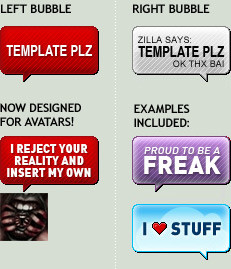
This is based on a request by $pachunka who is currently revamping the DA skin. Basically anything which has a DA based colour as a background to make it look groovy and fit into the DA skin such as:[link] or [link] or [link]
will need to be remade everytime the skin is changed or updated.
Using transparent PNGs will solve this problem, but most people are unaware that it exists! So with my teacher hat on, I've picked up the task of edu-ma-cating the masses!
Related content




Comments: 181

you set the gradient opacity.
There's two options on any given gradient point: the colour and the opacity. So to make it "dissolve" as you say, the first colour has an opacity of 100% the second has an opacity of 0%.
👍: 0 ⏩: 1

Thank you!
I was hoping it would be one of those things that translate easily from PS to Gimp (what I use) but even though Gimp doesn't let users set different opacity levels for each of the two gradient points individually, with what you said, I was able to find a solution that does the trick - so THANK YOU!!!
👍: 0 ⏩: 1


or use the wand tool click on the outside of the image and then click magic eraser. Wala!
👍: 0 ⏩: 0


What I get is a gray background instead 
FF Win7
👍: 0 ⏩: 0

So, I'm just curious. When I do a transparent background, and end up with [link] the black background, what am I doing wrong? It goes transparent in the download, but not on here.
👍: 0 ⏩: 1
i think because we don't support transparent PNGs in our submission process?
👍: 0 ⏩: 1
ergh. Will they ever change it? Or should I just make it DA colour?
👍: 0 ⏩: 0


Thank you god, I have been struggling with freaking transparency. *tries it*
...wtf? Its still not working >.< Guuuh, what am I doing wrong?
👍: 0 ⏩: 0


I love you for this. ♥ I've been bashing my Photoshop in looking for ways to achieve this because I knew it could be done somehow. thank you!
👍: 0 ⏩: 0

I have a question... I used to transparent PNG on a recent deviation and it looks great at full-view, but when at reduced size there's a black border placed around it... is there anyway around this problem? Thanks for any help you can give me...
Here's the deviation incase you need to see it...[link]
...and I'm using Firefox.
Also, is there a way to upload a smaller thumbnail PNG incase it's just a shortcoming of the browser? 


👍: 0 ⏩: 0


wow, of all the years Ive used photoshop, ive never known this, Im embarrassed, yet excited at the same time 

👍: 0 ⏩: 0


omg you have no idea how much this helped me out!
👍: 0 ⏩: 0


old thread I know but... trans PNG in IE4-6 could be done via this method (on my personal site btw so no popups or other crap).
[link]
But then it didn't display right in firefox (or IE7 now that it supports png trans) which was annoying. Saw a php script once that detected the browser and applied the appropriate method 4 each but man talk about a pain just for trans.
Animation of png is sorta possible but only externaly though, via a single elongated image with the frames layed out in row. I am geussing a script then displays positions of it at various times. Objectdock and hotmail live are the only 2 places I have seen it used (that I noticed).
👍: 0 ⏩: 0

I NEVER use tutorials. NEVER. They just aint any good. NONE of them.
Except this,though. This is fabulous
👍: 0 ⏩: 0

i have a question... you see, the transparencies in my PNGs that upload here in DA are filled in with a light blue color...
why is this...?

👍: 0 ⏩: 1
PNG transparency doesn't work in IE unfortunately.
👍: 0 ⏩: 1
OH... tsk.
what about in firefox...?

👍: 0 ⏩: 1


Thanks!! ^_^ I'll be sure to use this as future reference!!
👍: 0 ⏩: 0


faving so i don't lose it. i know this will be important!!

👍: 0 ⏩: 0

you should have done the tutorial as an alpha transparent PNG.. would have been very amusing
👍: 0 ⏩: 0

im 
👍: 0 ⏩: 0


nice tutorial but you'll still have a problem with
png's dropshadows and internet explorer on
mac and pc...
so, i't really not shure if one should use this
or not.
anyway! good tutorial!
👍: 0 ⏩: 0

lol loved the tutorial, the way you wrote it is really fun ;]
👍: 0 ⏩: 0


oK, now, how do you do this in "PhotoImpression 4"?
👍: 0 ⏩: 1

Dang... I was hoping someone would know how, because I don't... and that's what I have on my computer...
👍: 0 ⏩: 1
try googling for it
👍: 0 ⏩: 1
I might try that...
👍: 0 ⏩: 0
| Next =>