HOME | DD
 rocketlaunch — Tutorial: Smooth BW

Published: 2007-11-28 08:05:08 +0000 UTC; Views: 3820; Favourites: 55; Downloads: 0
Redirect to original
Description
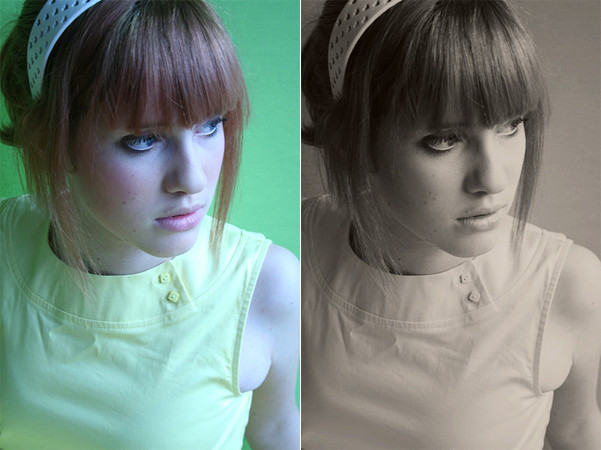
I will be using Photoshop CS2 for this tutorial.1. Go to image > mode > greyscale.
2. Now go to layer > new adjustment layer > levels and fill this in:
Input: 10, 1.06, 250
Output: 0, 255
3. Go to layer > new adjustment layer > curves and fill this in:
Point 1
Input: 24
Output: 30
Point 2
Input: 223
Output: 232
Now set this layer to 19% opacity.
4. Finally, go to layer > new adjustment layer > selective colour, select "relative" and fill this in:
Neutrals: 0, 0, 0, -10
Blacks: 0, 0, 0, +10
Now merge the layers and you're done!
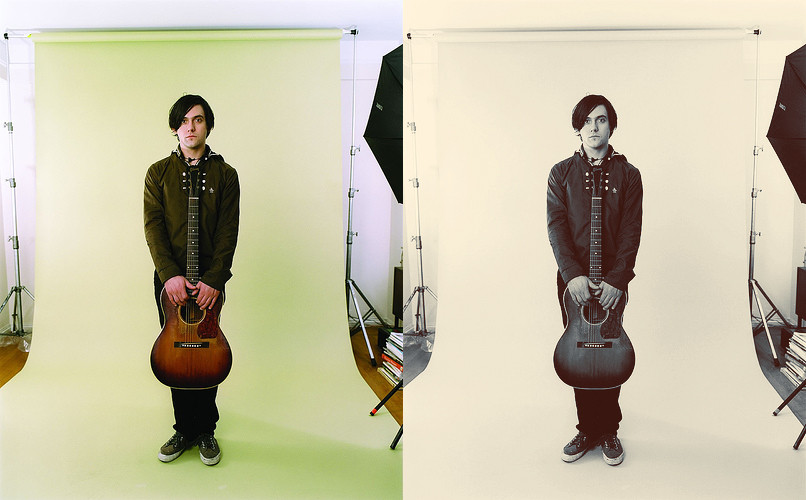
Photo: Patrick Wolf
Found on the internet (last.fm). All credits go to the photographer. I am not claiming this as my own, I am simply using it as an example.
Related content











Comments: 9

you forgot to write the 2nd step, go to image > mode > RGB color.
👍: 0 ⏩: 0

why so complicated? why not just channel mixer or the bw defice?
👍: 0 ⏩: 1

i prefer to mess around with the contrast and curves and stuff, i find it a bit easier and you have more freedom with it.
👍: 0 ⏩: 1
but you could do that with curves adjustment and it's less destructive
👍: 0 ⏩: 1
i did use curves. :/
i'm just used to using selective colour, and i use this on my own b/w photos. i just decided to put it here lol.
👍: 0 ⏩: 0

I really want to do this but my input won't let me go past 100. baaaah. great image, though!
👍: 0 ⏩: 2
For an input over 100, try clicking nearer the top of the grid..
👍: 0 ⏩: 0

yea the same problem with me!
👍: 0 ⏩: 0

this is one of my personal favourites--use it all the time.
thanks!
👍: 0 ⏩: 0