HOME | DD
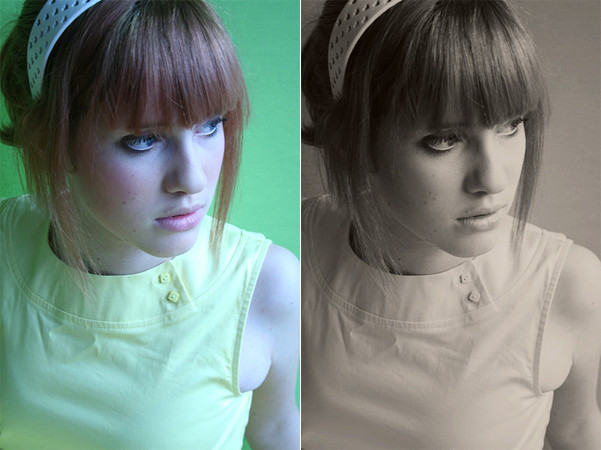
 rocketlaunch — Tutorial: Yellow-Green Tint

Published: 2008-01-12 02:39:00 +0000 UTC; Views: 5622; Favourites: 51; Downloads: 0
Redirect to original
Description
I will be using Photoshop CS2 for this tutorial.1. Duplicate the background layer and go to image > desaturate. Set it to screen at 34%.
2. Duplicate the background layer again and drag it to the top. Desaturate it and set it to soft light at 24%.
3. Go to layer > new adjustment layer > levels, select "rgb" from the drop-down list and fill this in:
Input: 19, 1.15, 242
Output: 0, 255
Select "red" from the drop-down list and fill this in:
Input: 36, 0.67, 255
Output: 89, 169
Select "green" from the drop-down list and fill this in:
Input: 45, 0.74, 218
Output: 43, 179
Now select "blue" form the drop-down list and fill this in:
Input: 64, 0.48, 202
Output: 75, 183
Set this layer to soft light at 36%.
4. Go to layer > new adjustment layer > curves, select "green" from the drop-down list:
Point 1: 28, 30
Point 2: 106, 115
Point 3: 214, 213
Select "blue" from the drop-down list:
Point 1: 44, 37
Point 2: 74, 86
Point 3: 126, 111
Point 4: 217, 227
Set the opacity to 48%.
5. Go to layer > new fill layer > solid colour and type in 85DABE. Click OK and set that layer to soft light at 57%.
6. Go to layers > new adjustment layer > photo filter. Click filter, select warming filter (85) from the drop-down list. Set the density to 25%.
Make sure "preserve luminosity" is checked.
If you do not have the filter option on your version of Photoshop, create a (solid colour) new fill layer of EC8A00 and set it to colour at 10%.
Now merge the layers and you're done!
Stock: ~Impulse-Stock
Image: [link]
Related content








Comments: 7

Anyway to do the curves part without curves?
My version of Photoshop Elements doesn't have it P:
Also great photo xD
👍: 0 ⏩: 1

i honestly don't know, sorry. >< i've never used elements before.
👍: 0 ⏩: 1
Oh it's ok!! xD I'll try to figure out a way lol

👍: 0 ⏩: 0

I just have to say, who evers image that is, yours or stock, it is LEGENDARY! 
👍: 0 ⏩: 1

