HOME | DD
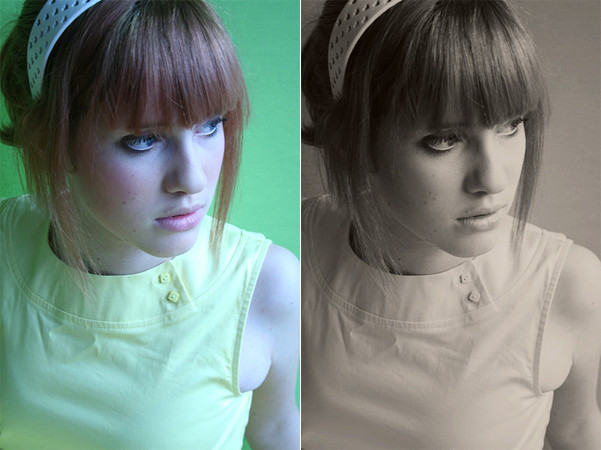
 rocketlaunch — tutorial: sepia contrast.

Published: 2007-08-19 02:36:44 +0000 UTC; Views: 4347; Favourites: 52; Downloads: 0
Redirect to original
Description
i will be using photoshop cs2 for this tutorial.1. go to image > mode > greyscale, then image > mode > rgb colour, because you'll need to add colour later.
2. go to layer > new adjustment layer > levels, select 'rgb' from the drop-down list and fill this in:
input: 21, 1.10, 236
output: 0, 255
3. go to layer > new adjustment layer > selective colour, check 'absolute' and fill this in:
neutrals: -15, -1, +17, -7
blacks: +16, 0, -1, +100
4. duplicate the background layer and drag it to the top. set it to soft light at 47%.
now merge the layers and you're done!
stock: ~shyble-stock
original: [link]
Related content










Comments: 6

i know it's completely unrelated to the goal of this post...but i really love this person's hair color...i wanna get mine colored the exact same way... XD
👍: 0 ⏩: 0

I'm using Adobe 7 and i can't find
2. go to layer > new adjustment layer > levels, select 'rgb' from the drop-down list and fill this in:
input: 21, 1.10, 236
output: 0, 255
that function there! *sad face*
👍: 0 ⏩: 1

well the layer menu should be along the top.. and new adjustment layer is on there. :/
i've never used photoshop 7, so i don't know how it works.
👍: 0 ⏩: 1

sorry for the comment but.. is this you? you're one of the most beautiful people i've ever met!
👍: 0 ⏩: 1
nah, it's ~shyble-stock .

👍: 0 ⏩: 0