HOME | DD
 rocketlaunch — tutorial: suttle red

Published: 2007-09-11 11:14:09 +0000 UTC; Views: 3361; Favourites: 27; Downloads: 0
Redirect to original
Description
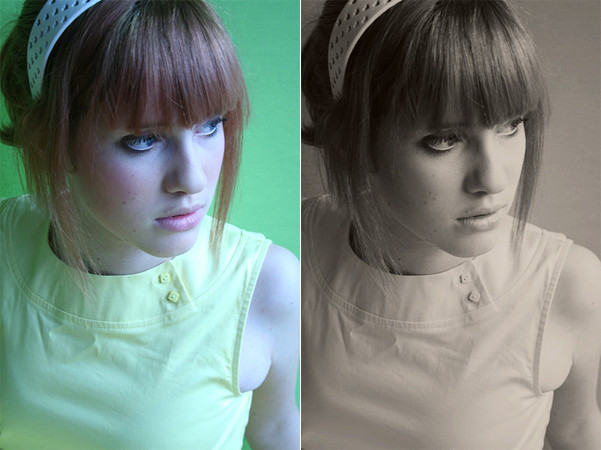
i will be using paint shop pro x for this tutorial.1. duplicate your background layer, and set it to screen at 10%.
2. create a new raster layer, and fill it with #F5E7C0. set it to multiply at 30%.
3. go to layers > new adjustment layer > colour balance, check "preserve luminance" and fill this in:
shadows: -19, -15, -1
midtones: -8, 10, -4
highlights: 0, 0, 0
4. create a new raster layer and fill it with #22223A. set it to exclusion at 57%.
5. create another raster layer and fill it with #964A4C. set it to soft light at 40%.
6. duplicate the background layer again, and drag it to the top. set it to soft light at 55%.
now merge the layers and you're done!
stock: ~shyble-stock
Related content








Comments: 7

awesome. it helped a lot. I'll post where I use it if I put it on dA. thank you

👍: 0 ⏩: 0

Can this be done in paintshop pro 8
some of the options i cant find.
if you could give me some direction to
screen at 10%.
multiply at 30%.
pretty much the ones you have italic
👍: 0 ⏩: 1

if you haven't got the layers window up, go to view > palettes > layers.
a window that looks like this should pop up: [link]
the options like screen and multiply are on a drop-down list where "normal" is. and the % bar is on the left.
hope that helps. (:
👍: 0 ⏩: 1
haha sorry thanks i found it all after i commented >.<
👍: 0 ⏩: 0

great tutorial, I will say that at the least but I'm in love with your hair ^_^ lol why cant more people go like that?!
👍: 0 ⏩: 1
haha, thanks.
but that's not me.. it's :devshyblestock:
i forgot to credit, i'll do that now..
👍: 0 ⏩: 1