HOME | DD
 ZEUSosX — Meta Rithmisis for win 7

Published: 2011-07-07 16:10:35 +0000 UTC; Views: 36055; Favourites: 61; Downloads: 4677
Redirect to original
Description
Meta Rithmisis for win 7 = Re forming for win 7----------------
this work infact is an imageres.dll (in both 32+64 bit) with shorter sound when log in as many users asked for this, and also different style of some basic folders. so:
1. shorter log in sound.(new imageres.dll)
2. different looking of the basic blue folders , different looking of a folder when a folder contain other folders inside. (new imageres.dll)
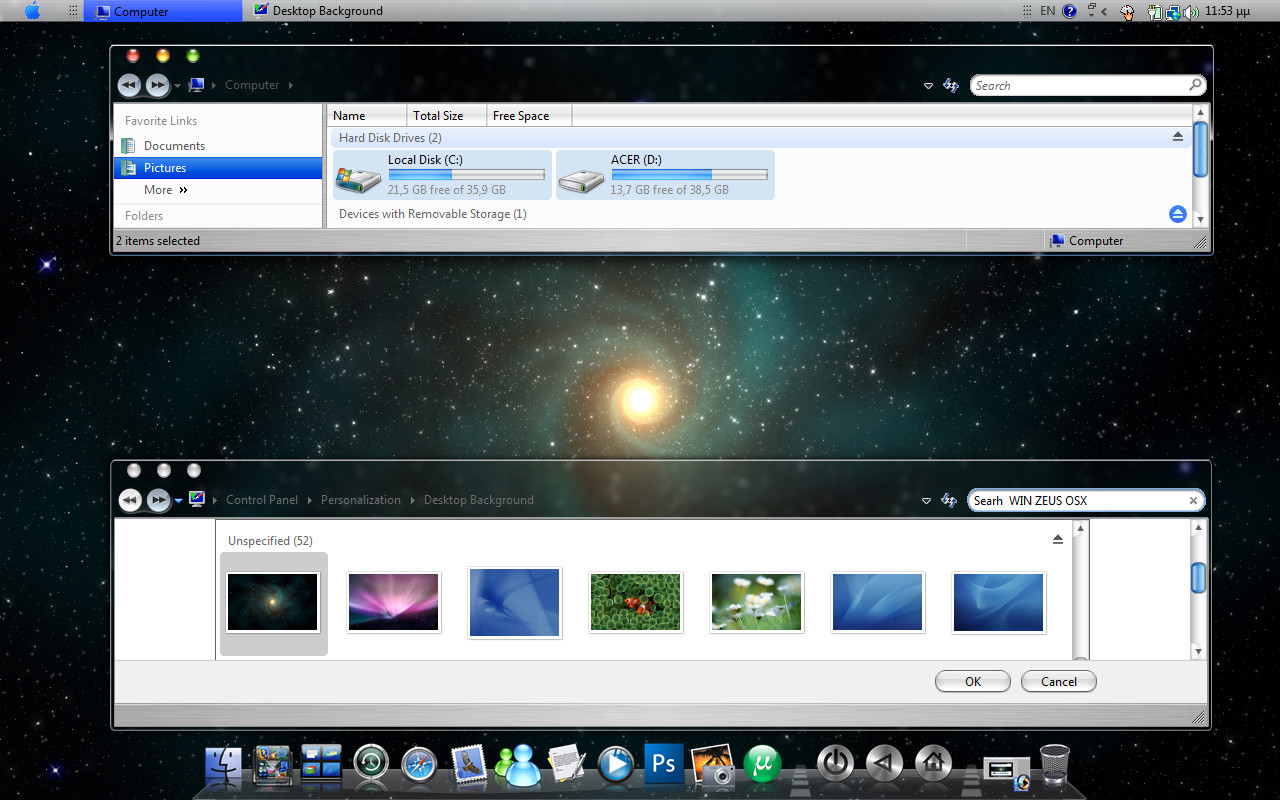
3. a hybrid in looking visual style (in aero mode lion gray style, in basic mode brushed style looking.)
---------
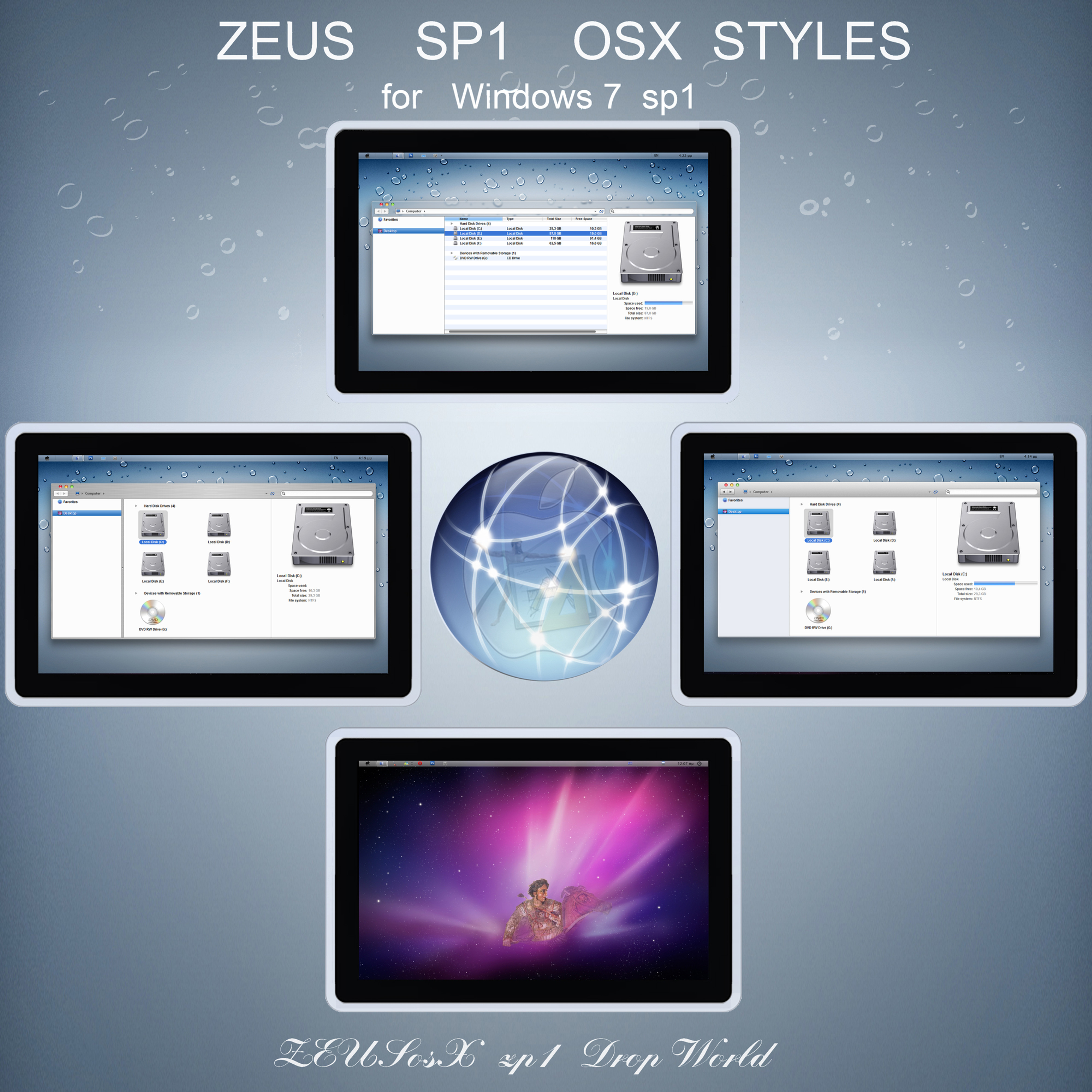
Because some users who use my sp1 ZEUS osX for Win 7 32bit [link] or my 64 bit [link] want to have a shorter sound when log in, (sound edited wave by me, original made by Apple ) as also preffered the microsoft side style when a folder contains 1 or more folders looking (please see in preview image how look the folders , 1 simple folder, 2. folder contains other folders, 3. folder contains text files , looking) , so i have modified a 32 bit imageres.dll to this pack for any user uses 32bit version of Windows 7 and i also have included an already modified a 64 bit imageres.dll to this pack for any user uses 64bit version of Windows 7
the visual style is in lion osx style but with blue scrollbars and also folderband's mouse over buttons also made i blue style. (lion has dark gray ones)
also to this specific visual style i have set the basic version to brushed style.
so if you use an application (such as photoshop) also to aero made, the internal windows are looking in brushed style.
to the down preview image i have used the shell32.dll i made from Dios Afi - Zeus Touch [link] so navigation pane is setted to the right part of the window.
MADE IN GREECE (= Hellas).
---------
This is a registered and copyright property
© copyright - All Rights Reserved
MCN: C81DY-QQJ7U-W91BG
'MyFreeCopyright.com Registered & Protected'
Please USE it only to your COMPUTER SYSTEM as is.
Do not modify, edit , copy it or change the name or the images or the code of it, or use it to any project or copy it anyway in any meaning.
DONATE [link]
******
THEME AND IDEA BACKGROUND
Meta Rithmisis for win 7 = Re forming for win 7
the names of this work is based to the ancient and modern Greek language
IN ancient and in nowdays Hellenic (=Greek) [Active CODE] language, every letter, and every word is a specific number, and it has a specific meaning.
ZEUS ( or DEUS or DIAS) is Master of immortal Gods in Hellenic (=Greek) Active CODE [arithmetic machine logic] language, and APPLE is the given gift from ZEUS .
Afi means Touch.
So the name of the THEME choosen from Hellenic = GREEK language and civilization.
-----------------------------------
Attention : THIS WORK its not a stand alone work.
IT HAS BEEN MADE FOR USING together with my ''sp1 ZEUS osX for Win 7'', just replacing the imageres.dll of your system and use this from this pack ONLY if you want to have a shorter sound when log in , as also you preffered having the microsoft side style when a folder contains 1 or more folders looking (in blue osx style color).
otherwise add only the theme.
so depending if your system is a 32 bit or a 64 bit one, you must first download my sp1 ZEUS osX for Win 7 32bit [link] or 64 bit [link] and follow the instructions of them.
from this theme just copy paste the themes and the imageres.dll
-------------------------------
I N S T R U C T I O N S
so:
UNZIP all files, using freeware 7z [link]
Then go to Control pane [view by category] -->so Go to Control Panel\User Accounts and Family Safety\User Accounts and press the folder 'Change User Account Control Settings' set the slider to the next window Never Notify.
Restart
Copy the folders included in the folder 'Macos X style Theme by ZEUSosx'[after unzip all files, and copy them to C:\Windows\Resources\Themes ,provided C is your Windows drive).
so copy all the folders that are inside in the folder Macos X style Theme by ZEUSosx, and paste them to C:\Windows\Resources\Themes
copy all the folders that are inside in the folder Wallpapers, and paste them to C:\Windows\Web\Wallpaper\Mac os X Wallpapers
--------
a. Obtain Permisions and Ownership of imageres.dll that located in C:\Windows\System32
( example of taking ownership to a random system file
[link] , internet explorer compatible) also text of how to take Obtain Permisions and Ownership included to the pack.
b. Backup you original imageres.dll by renaming them to imageres.old2
Copy the new imageres.dll from this pack to C:\Windows\System32
restart.
(for 64 hit users only : there is another imageres.dll to your system located to c:\windows\syswow64 and this must be replaced from the 32bit version imageres.dll that existed on my pack as the files of c:\windows\syswow64 are 32bit ones!!!)
====================
so:
32 bit users please follow the I N S T R U C T I O N S SP1 (32 BIT Version) TEXT [link]
64 bit users please follow the I N S T R U C T I O N S SP1 (64 BIT Version) TEXT [link]
==========================================
How To Rebuild Icon Cache In Windows 7 To Repair Icons
when we change imageres.dll or shell32.dll which contain new style icons, to this current pack mac osx style icons, its sometimes that we see some folders dont change looking taking the new icons looking but using the old one.
If for any reason, one or more Windows 7 icons are not showing correctly, you can repair by rebuilding the icon cache. Icon cache is a hidden file located at the Local Folder. Here is how to do it:
go to control panel (large icons or small icons) select 'fokder options'.
As the IconCache is a hidden file, you need to enable “Show hidden files” option to see the same. To do this, head over to Tools > Folder Options, switch to View tab, and finally enable Show Hidden files, folders, and drives option.
Now navigate to C:\Users\username\AppData\Local folder and then delete IconCache.db file. Here username is your user profile name.
Reboot your computer to rebuild the icon cache.
All icons should be displayed correct now.
-----------------------
Please USE it only to your COMPUTER SYSTEM as is.
Do not modify, edit , copy it or change the name or the images or the code of it, or use it to any project or copy it anyway in any meaning.
By downloading this Visual Styles/themes,and shell32.dll, you agree to the following conditions:
- This Visual Style/theme, and imageres.dll are free for personal use only.
- It must not be used commercially.
- You can distribute it for free as long as the files are unmodified and this text file is included with the zip file.
- You may not sell them or use them for profit.
- Do not take credit for creating this Visual Style/theme, and simageres.dll,
- I am not liable for any sort of damage to your computer from using this Visual Style/theme, and imageres.dll
so please respect my work.
Thank you All of you, for your support.
Made in H E L L A S (= Greece ).
Inspired by Zeus.
DONATE [link]
******
Related content








Comments: 47

need some time to install this nice them~~~thx~~
👍: 0 ⏩: 0

I really like this, but the start menu ruined it for me, looked kinda bulky Dx..
And the 'space' bars for thhe drives in 'Computer' looks odd, better with just one color ,like light blue with a few shine or something and not stripes.
Thanks anyways

👍: 0 ⏩: 0

Can I use your caption buttons for my own Mountan Lion VS please ?
(I'd like to share it but if you don't want me to use your pictures, I'll send you the theme so that you could upload it...)
👍: 0 ⏩: 0

im interest with the "2. different looking of the basic blue folders , different looking of a folder when a folder contain other folders inside. (new imageres.dll)"
im scared of touching files in system32,had a bad experience before..
could you please tell me what if i had mess up with this? is it just rebuild icon cache will solve everything?
👍: 0 ⏩: 1

if you are satisfied with my previews imageres.dll from sp1 versions then do not change with this.
imageres.dll is not so much problem as the shell32.dll but i can not garanttee for the behaviour of microsoft windows. its microsoft that has made the behaviour of the system such as is, and i supose this because of controlling and security reasons.
so , i replaced my imageres.dll with this version which has different looking of a folder when a folder contain other folders inside and a shorter sound in start up, i also t rebuild icon cache and everything worked ok.
those characteristics have asked from some of the users so i made those.
---------
the secret for not having problems when we like replacing system files is as i many times said:
go to Control pane [view by category] -->so Go to Control Panel\User Accounts and Family Safety\User Accounts and press the folder 'Change User Account Control Settings' set the slider to the next window Never Notify.
Restart
this is the most important.
then we take permissions of the system file we want , we restart, and after restart we rename the system file we have takem permission, and we copy
paste the new one.
but if you afraid to do any changes and you are satisfied with the versionm of system files you use, then no needded to do more experiments.
(it would be good if you have another partition to your hard disc with windows 7, so to experiment first to that and see the changes, but do that only if you are experienced user and you know what and how to do.)
----------
👍: 0 ⏩: 0

nice screenshot.
------------
👍: 0 ⏩: 0
So, you like when no program is needed ? try this: - [link]
👍: 0 ⏩: 1
good work + fav
-------
though i should remake some parts of my visual styles for be looking good: the reason:
1. as i dont see very well those last 2 years and year after year this become worst, i am getting older, so itransported from vista my visual styles, but not everything in the weay must be, and 2. i decided to do on 7 what i ask all those years from microsoft , but also other experts in code, but noone made (only panda x helped me to some sections and i thank him), and i mean the settings of the selecting folders in osx style, the stripes, the settings of pane --> preview to top , and details to the side etc so other people with good eyes and also see my code in content and sizing margins of the visual styles , and making only visual styles, they could make this faster and perchaps better than me.
----------------------
👍: 0 ⏩: 0
Another question :
Is there a vista version of the shell (with coverflow)?
👍: 0 ⏩: 1
no i have leave vista because is too heavy system and my laptop old.
7 are 'lighter'.
👍: 0 ⏩: 0
Where did you get the traffic lights ? I'd like to use them in my lion VS if it is possible.
👍: 0 ⏩: 1
i never shared or giving permissions for my personal works, but you can have a look at the prototype original osx lion (developer version) so see this [link]
i hope it helps you.
------------
👍: 0 ⏩: 1

I think mate, that you should use a Rainmeter or Objectbar config, to have a real Menubar!!
👍: 0 ⏩: 1
Finderbar 1.5 is better even if it doesn't work for me XD
👍: 0 ⏩: 2
i also try to use as possible less utilities or programs.
my philosophy is different than the other users or theme makers.
i want to give to windows system a kind of osx looking , that means colors buttons etc my view ofcourse based to finder ok but i dont care if my explorer be 100% like finder. i like to make explorer work and be flexible as possible like finder but not use many applications for doing so.
i mean this. for example we all like coverflow. there some utilities, small programs that transport this to explorer ok?
i say bravo to people made them
but my vision is different :
personaly if i could , i should try to connect via 'content= res....' of the media center system file in which exist a kind of microsoft cover flow to shell32.dll uifile of the preview pane section.
also doing the same , but also adding new parametrers and modifying flip3d system file for making work like expose
so what i like is to make the system give us, some osx style, not because me and you and many, we like osx , but because those characteristics (of osx) would make our everydy digital life with explorer easier.
so my approach is not coming that i like my system look like osx, but because those things as expose, coverflow, buttons in titlebar for controling the panels etc would make our user life better.
and i use the colors and shapes of osx not as a fashion or mimic but because in my opinion there the more human friendly (except leopard gray sadness which i have in public say that is a dead perfection)
--------------
👍: 0 ⏩: 1
So, you should try to create some toolbars in the windows taskbar.
Finder = My Documents
File = Recent files
Edit = App Data
View = Personalization or tuneup utilities
Go = Links
Windows = Blank folder just on the left of the program list
Help = Windows help
How did you make the tray icons go so far from the clock ?
👍: 0 ⏩: 1
if i remember well, because i add this characteristic mode 2 years before, i changed the content margins and the sizing margins in the clock area of the taskbar, using windows style builder. so i 'pushed' date / time and not the tray icons infact, but this is an old story.
about modifications in taskbar download this [link] there i have made my self some shortcuts which you can direct pin to taskbar ---> there in the the folder TASKBAR'S FOLDERS.
also have a look to my Setting your country's flag to your windows 7 taskbar [link]
----
👍: 0 ⏩: 1
Finderbar is always semi transparent so one style is required!!
👍: 0 ⏩: 1
i respect all the work of Landvermesser (the maker of finderbar)
i also thank you giving your opinion and links here so all users finding those informnations direct.
(personaly i use to my system only the system files and themes, its an old system made for xp, and i used to it vista and now 32bit win 7. so i try not to add many aplications, though ------->
i am thinking of making a page, i diont know if that will be in deviant art or elswhere and to that i could give all the link addresses for such applications)
----------
👍: 0 ⏩: 1
What about Objectbar (for the finderbar)?
👍: 0 ⏩: 1
they made very good work though their target (in general)
is more commercial (that is not wrong or right).
i dont know if their freeware version still exists.
anyway i preffered all this modifications if they could be in future from control pane choices . believe me for microsoft those things are very ease to be made. they dont want.
-------------
👍: 0 ⏩: 0

can you make this same as Dios Afi when the nav panel to be in teh rigth side?
👍: 0 ⏩: 1
just use this imageres.dll from this pack and use the shell32.dll from Dios Afi.
thats it.
--------------
👍: 0 ⏩: 2

see the second picture i made for you to see it, to the down preview image i have used the shell32.dll i made from Dios Afi - Zeus Touch [link] so navigation pane is setted to the right part of the window.
----------
👍: 0 ⏩: 0

I think the folder change is a very good idea, looks more sensible.
👍: 0 ⏩: 1
well, i was thinking more than 2 years how to find the code for changing the position of how they looking the internal folders or files of a folder that contains them.
as i was not lucky, to this, perchaps its hardcoded, or to a dll which i have not found the information (the most possible is that is hardcoded), so i decided just to 'follow' here the microsoft way of setting the folders.
thank you ripsterMY.
-----------------
👍: 0 ⏩: 0

thank you oycyll5355.
-----------
👍: 0 ⏩: 0

Don't get the min/max/close buttons on the right hand side.
It was a pointless change when Apple did it, and it's a pointless change in any VS.
👍: 0 ⏩: 2
this is a preview using leftsider, only because many users want to.
👍: 0 ⏩: 0
for right hand users its logic to be at the right part of window.
so dont use left sider (as if download as is, the visual style put the the min/max/close buttons on the right hand side.
for same reason i made the code of shell32.dll such as putting the Navigation pane, on the right hand side, to my Dios Afi - Zeus Touch [link]
-----------
👍: 0 ⏩: 1
It's brilliant that you cater for both parties. Well done!
👍: 0 ⏩: 0

thank you Sukhpreet7896.
----------------
👍: 0 ⏩: 0

Great work pavlos! as usual. Thanks for sharing.
👍: 0 ⏩: 1
thank you RaymonVisual for your support.
---
👍: 0 ⏩: 1
You're welcome. eventhough I'm the one who have to thank you because of your hardwork and sharing your works for us. your vs is really awesome.
👍: 0 ⏩: 0
thank you ibnumoectar.
------------
👍: 0 ⏩: 1

u r welcome..
there will always an appreciation for awesome thing..
👍: 0 ⏩: 0

thank you Graphik-Em.
-----------
👍: 0 ⏩: 0