HOME | DD
 Sugary-Stardust — Tutorial - How to Create a Floating Animation

#animation #floating #frames #gimp #looping #pixel #tutorial
Published: 2016-01-21 07:37:32 +0000 UTC; Views: 6360; Favourites: 143; Downloads: 0
Redirect to original
Description
☆ Tutorials ☆
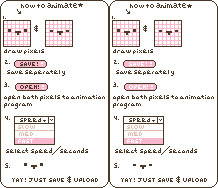
Two-frame result and four-frame result, side by side:
Definitely play around with frame speeds on these! c:
By the way, I used GIMP for this tutorial (and everything else I draw), and it's a completely free program! You can learn more about GIMP and download it for free here .
Font used: RoundRocket by firstfear .
Art is © Sugary-Stardust .
All rights reserved. Do not use in any way without my permission.
Related content










Comments: 3

are you supposed to duplicated the original image? i'm having so much trouble with this.. and where do you find the frame speed?
👍: 0 ⏩: 1

Yes, you have to duplicate the original layer for this animation. For the frame speed, you have to type it in manually and test it out - at least for Gimp, which is what I use. I think I have a tutorial on animating with Gimp in my gallery, but I'm on mobile, so I can't link to it directly.

👍: 0 ⏩: 0
